It looks like the conversation
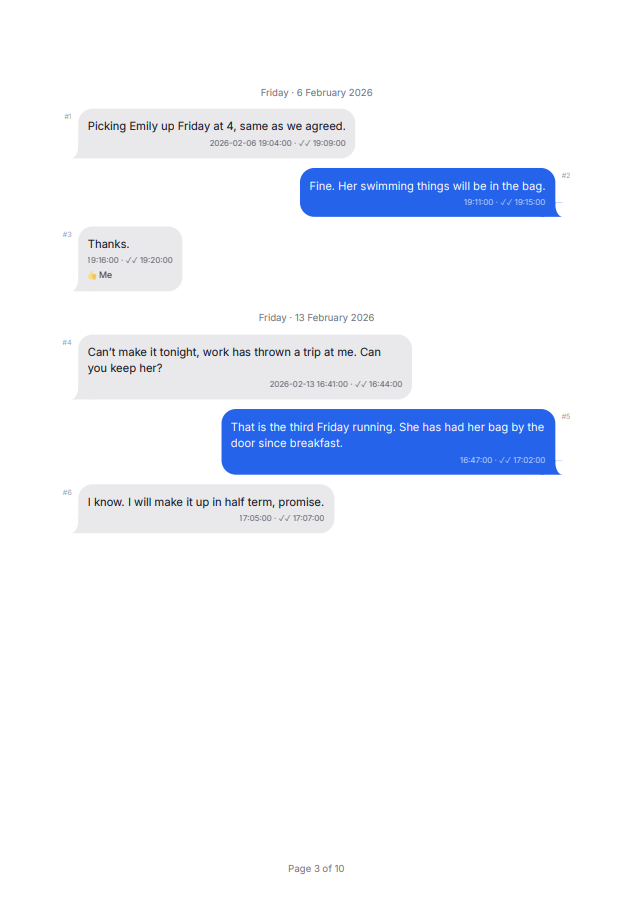
Grey and blue bubbles, grouped messages, date separators. Chat View is close enough to iMessage that nobody has to be told what they are reading.
Every message, photo, timestamp and attachment, exactly as your iPhone stored it, read from Apple’s own backup on your Windows PC. Encrypted backups open too, and from one of those the calls with that person can stand between the messages. Laid out as a document you can print, send or file.
Also reads WhatsApp chats, from the file WhatsApp itself exports. That one works from an Android phone too.
The whole thing, in about two minutes
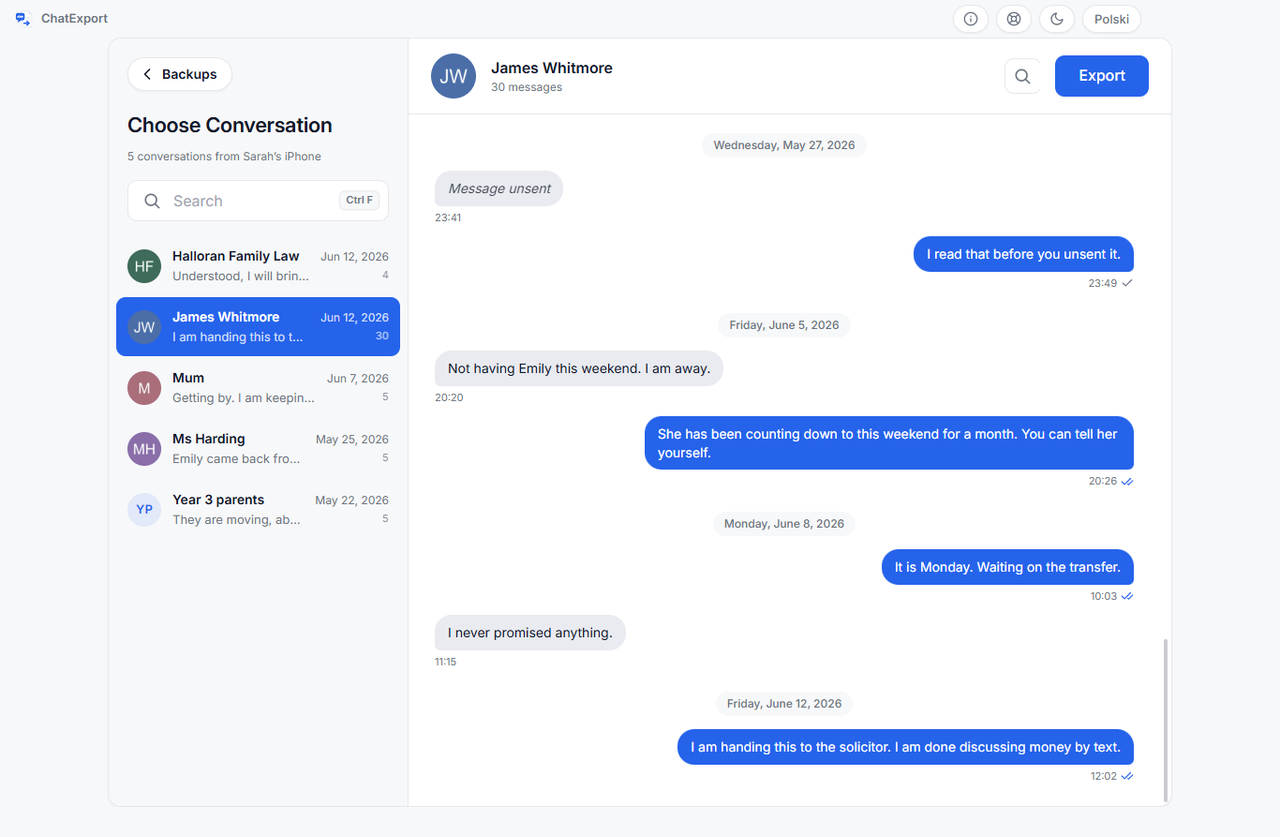
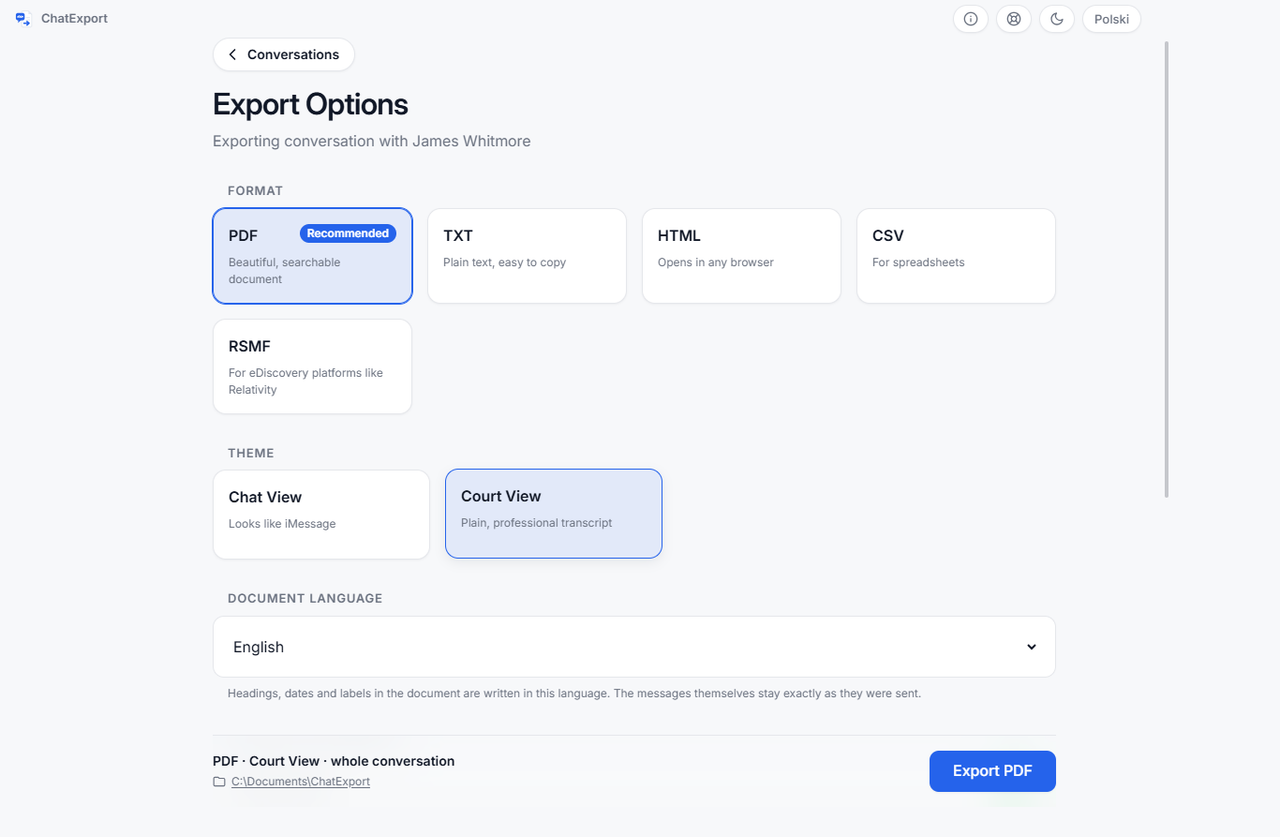
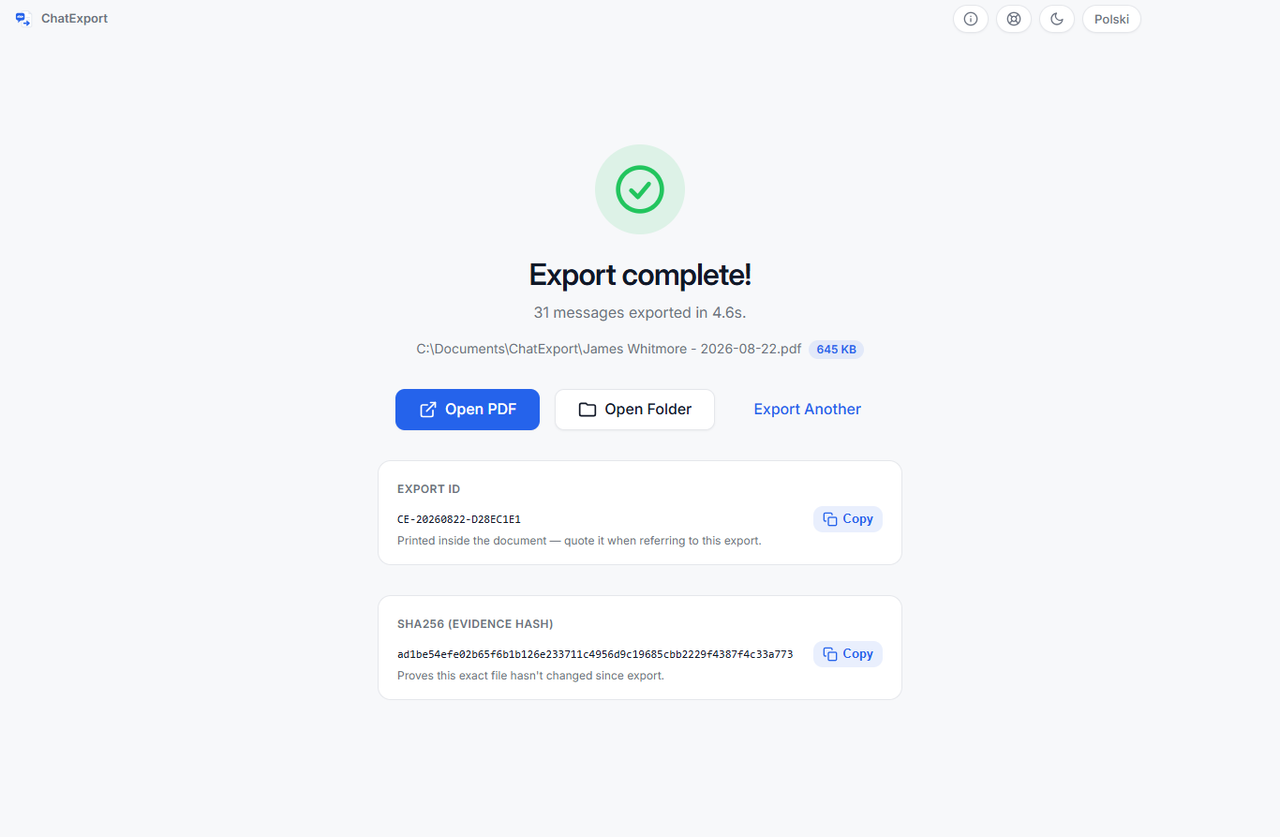
Four screens, in this order, and then you have the file. There is nothing else to learn and nothing hidden in a settings menu.

No upload, no cloud, no account. Unplug the network and every step still works.
Software that can only read an unencrypted backup asks you to switch encryption off, and that switches the call log off with it: Apple writes it into encrypted backups only. ChatExport asks for the password, uses it on this PC and forgets it.
Nothing you do in ChatExport is tracked or collected. Divorce and custody messages are nobody else’s business.
Two iPhone settings decide whether a backup holds your whole history: Messages in iCloud, and Keep Messages set to 30 days or a year. Neither leaves a trace in the transcript. ChatExport reads both from the backup and says so before you export anything. On an ordinary backup you see nothing, because there is nothing to warn about.
Who this is for
They need a conversation in a form somebody else will accept, usually by a date that is already fixed.
Handover arrangements, missed weekends, promises about money. All of it agreed by text and none of it anywhere else.
A complete, dated, paginated transcript with a hash, instead of a client folder full of screenshots.
Harassment, a disputed instruction, a shift that was cancelled by message. Exported whole, so nothing looks selected.
A repeatable procedure: the same backup exports the same conversation every time, from Apple’s own file rather than a photographed screen.
A readable, searchable record of a source exchange, kept on a machine that never uploads it anywhere.
Fifteen years of family messages in one PDF that will still open when the phone, the account and the app are long gone.
The last conversation with a parent or a partner, taken off a phone nobody will renew and kept as a document that still opens in twenty years.
How it works
ChatExport asks your iPhone for a backup over the cable, through Apple’s own driver, and then works from that backup on your disk. If Apple Devices or iTunes already left one there, it reads that one instead. Either way, nothing goes to a server.
Plug the phone in, unlock it and click Back up now. Answer the Trust and passcode prompts on the phone. Prefer Apple’s own software? The button for that sits right beside it. And if you have a backup from last week, skip this step.
ChatExport finds the backup on your PC and lists your conversations with names from your contacts. Search by name, number or something you remember someone saying.
Choose PDF, TXT, HTML or CSV, set a date range, decide whether to include photos, then hit Export. The folder opens when it is done.
Examples
These are real exports, made by the program, from a conversation we invented for the purpose: a separated parent collecting what was said about money and weekends. Open them, search them, print one.
PDF 475 KB
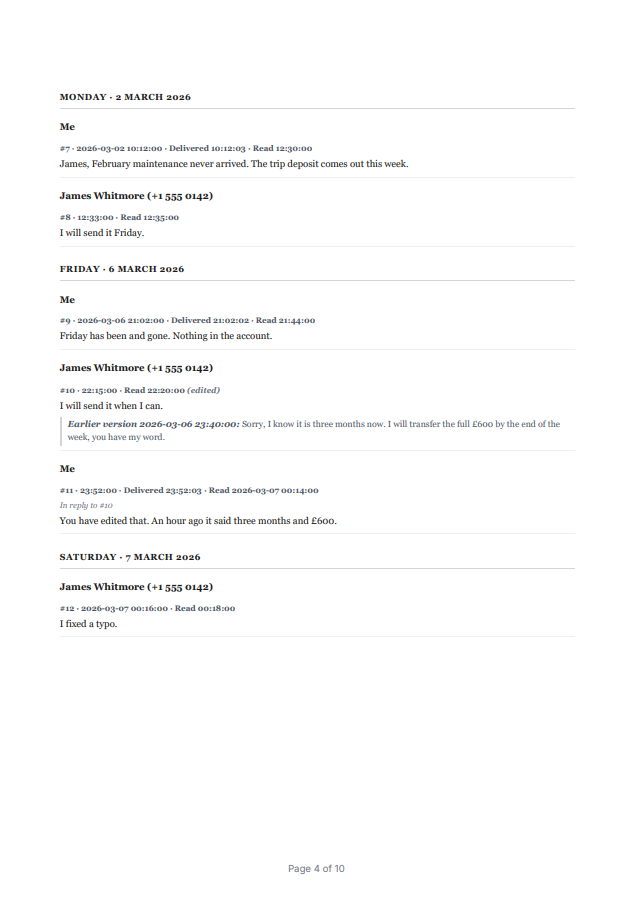
The one most people file. Monochrome, formal header, full timestamps, sender numbers, delivery and read receipts, table of contents, bookmarks.
DownloadPDF 348 KB
The same conversation as it looks on the phone: bubbles, grouping, date separators. Easier to read, less formal.
DownloadPDF 477 KB
The same conversation set as a printed book: 6 × 9 inch pages, a chapter for each month, each message a paragraph. For keeping rather than for filing.
DownloadHTML 235 KB
Opens in any browser, with the photos alongside. Useful for reading on a machine with no PDF viewer.
OpenTXT 3 KB
Plain text, one message per line with its time. Small enough to paste into an email.
DownloadCSV 4 KB
One row per message for Excel or Sheets: thirteen columns, including an ISO timestamp with the time zone, reactions, and whether a message was edited, unsent or recovered after deletion.
DownloadRSMF 198 KB
For an eDiscovery platform rather than a reader: a mail message with the manifest and the original photos inside, the format Relativity takes messages in. Open it in the browser viewer to see what is in it.
Download Open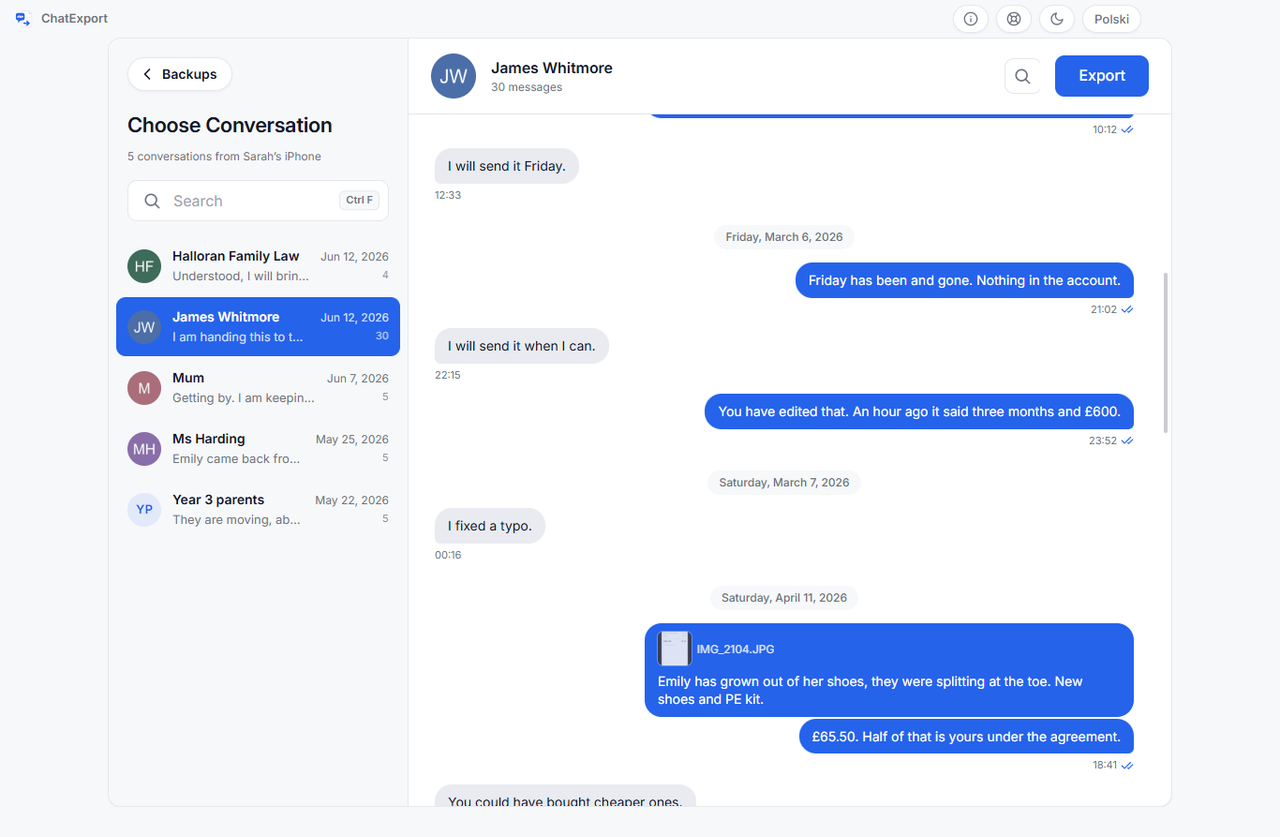
Every name, number and message in these files is fictional. The bank confirmation, the school note and the receipt are drawings, not documents.
Features
A screenshot loses the timestamp. A copy-paste loses the photo. ChatExport keeps the whole conversation, in a document you can print, email or file.
Grey and blue bubbles, grouped messages, date separators. Chat View is close enough to iMessage that nobody has to be told what they are reading.
iPhone HEIC photos are converted so they actually display, at the size you choose. Other attachments are listed with filename and size.
Vector emoji artwork is bundled with the app, so a 🙂 renders identically on every machine instead of collapsing to a black blob.
Real text, not images of text. Ctrl+F works. Every PDF gets a table of contents, page numbers and bookmarks so you can jump to any month.
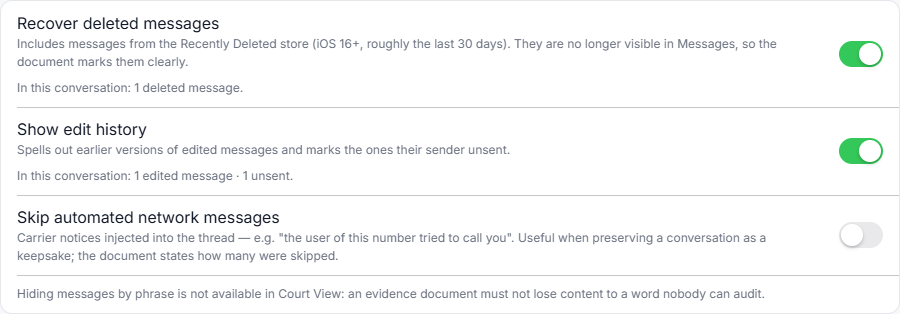
Reactions, threaded replies, edited messages, unsent messages, delivered and read receipts are all preserved, because context is the argument.
A 100 000-message conversation renders in batches so memory stays flat and the window never freezes. Progress is shown the whole way.
PDF for reading and filing, HTML for the browser, TXT for plain text, CSV for a spreadsheet, RSMF for an eDiscovery platform. Same wording and formatting across all of them.
Every export shows a SHA256 fingerprint of the file you can copy and record, so anyone can verify the document has not been altered since.
Contact names are read from the backup’s own address book, so the document says “Anna Kowalski”, not “+48 601 …”.
From an encrypted backup, one switch places the calls with that person, answered and missed, between the messages, with how long each lasted. One-to-one iPhone conversations.
Choose the language of the exported document separately from the language of the app: work in English and hand a German court a German PDF. Headings, dates and statistics were written for each one. Your messages are never translated.
WhatsApp can export a conversation to a file, on iPhone and on Android. ChatExport opens that file and makes the same four documents, naming the file and its SHA256 on the title page.
These fourteen are the document’s languages. The program speaks the same fourteen, and the two are separate choices: work in English, file the PDF in Spanish.
For legal use
Most people who export a conversation are not archiving memories. They are in a custody case, a dispute with a landlord, or an HR process. What they need sits in one program on one Windows PC: the encrypted backup with its call log, the WhatsApp chat, and a document that says what it contains and what it leaves out.
ChatExport reproduces what is in the backup. It cannot promise a court will admit any particular document, and nothing here is legal advice. Ask your lawyer what your jurisdiction requires.
Comparison
Screenshots are free but weak. Phone managers do everything, at a yearly price. ChatExport does one job.
| Feature | Screenshots & OCR apps | All-in-one phone managers | ChatExport |
|---|---|---|---|
| Where the messages come from | Photos of your screen, read back by OCR | The iPhone backup | The iPhone backup, read directly |
| Timestamps | Only what happened to be on screen | Preserved | Preserved to the second, from the record |
| Photos and attachments | Whatever fit in the frame | Usually included | Included, HEIC converted so they display |
| Messages deleted in the last 30 days | Not on the screen, so not in the picture | Varies | Counted before you export, and printed with the date they were deleted |
| What an edited message said before | Only the wording showing now | Varies | The earlier wording under the current one, with the time of the edit |
| Proof the file was not altered afterwards | Nothing to check a picture against | Varies | A SHA256 beside every export, checked with a command Windows already has |
| Very long conversations | Hours of scrolling | Varies | 100 000+ messages in one pass |
| WhatsApp conversations | One screenshot at a time | Some read them out of the backup | From WhatsApp’s own export file, iPhone or Android |
| What else it does | Nothing else | Music, contacts, apps, files… | Nothing else, on purpose |
| Price model | Free or in-app subscription | Increasingly annual subscription | No subscription, ever |
| Encrypted backups, and the calls inside them | A picture of the Recents list, one screen at a time | Varies. Some ask you to switch encryption off, which leaves the calls out | Opened with your password, calls placed between the messages |
| Where your messages go | Depends on the app | Depends on the app | Nowhere. It all stays on your PC |
FAQ
If yours is not here, write to support@getchatexport.com and it probably will be tomorrow.
You need Apple’s own software to make the backup: either the Apple Devices app from the Microsoft Store (recommended) or iTunes. ChatExport does not replace it; it reads the backup afterwards. If ChatExport cannot find Apple’s software or a backup, it walks you through the exact next step.
You do not have to make one first. Plug the iPhone in, unlock it, and ChatExport asks the phone for the backup itself, over the cable. Answer the Trust and passcode prompts on the phone. Apple Devices or iTunes still has to be installed, because the USB driver comes from there, but you never have to open it. How long it takes depends on how much is on the phone, and a repeat backup copies only what changed.
Only while the backup is being made. After that the phone can go back in your pocket. ChatExport works from the backup folder on your PC, with the phone nowhere near it.
No. ChatExport never signs in to anything. It reads a folder of files that Apple’s software already wrote to your own disk. The only password it can ever ask for is the one you set on an encrypted backup, and that one is used on your machine and then forgotten.
The backup is the big one: budget roughly as much as is used on the phone, so 64 GB of photos means about 64 GB on the PC. The export itself is small, a few megabytes for a normal conversation. ChatExport checks the free space before a backup starts and warns you if it looks tight.
Backups from iOS 11 up to the current release. ChatExport detects the database layout of each iOS version and adapts, which is why old backups from a phone you no longer own still open.
Yes, where a backup of that phone exists, and this is one of the commoner reasons people use ChatExport. A backup made years ago on a PC opens normally, long after the phone itself is gone. If the phone is still here and somebody knows the passcode, make a backup from it first and export afterwards. Two limits nobody gets around: a phone nobody can unlock cannot be backed up at all, and a backup encrypted with a password nobody remembers cannot be read, by this program or any other. Whether you are entitled to do it is a question about the estate, not about software.
Yes. Windows 10 and Windows 11, 64-bit. There is no Windows 7 or 32-bit build and there will not be one.
Not yet. Windows came first on purpose: Macs already have the Messages app, and Windows users with an iPhone are the ones with no good option. macOS is on the roadmap.
Yes. iMessage, SMS and MMS all come out in the same document, in one thread, in the order they were sent, exactly as they appear on the phone.
Yes. Plain SMS and MMS are exported exactly like iMessage, including from old backups made years ago on a phone you have since replaced.
Yes, where iOS stores them locally, which means iOS 18 and later. SMS, MMS and iMessage work on every supported version.
Yes, with the group name and every participant listed on the title page, and each message attributed to whoever sent it.
Yes, in place in the conversation, at small, medium or large. iPhone HEIC photos are converted so they display in every PDF reader rather than showing as a broken box. You can also switch photos off, which makes the file much smaller.
They are listed where they were sent, with the file name, the size and the time, and they can be collected in an index at the end of the document. They are not embedded: a PDF cannot play a video, and pretending otherwise would make the document look complete when it is not.
Yes, in colour. The emoji artwork is bundled inside the app, so a 🙂 looks the same on every machine instead of turning into a black square or an empty box, which is what happens when a PDF depends on a font the reader does not have.
Yes. Tapback reactions are printed under the message they were attached to, and a reply says which message it was a reply to. In an argument the reply structure is often the entire meaning.
Yes, and this is one of the reasons the program exists. iOS keeps earlier versions of an edited message, and with "Show edit history" switched on the document prints them under the current wording with the time of the edit. Most tools can only print the word "edited".
It can recover messages that are still in the Recently Deleted store, which on iOS 16 and later means roughly the last 30 days. Those are clearly labelled in the document, with the date they were deleted. Anything older than that window is genuinely gone from the phone and no software can bring it back. Finding out costs nothing: the export screen counts how many your own backup still holds for the conversation you picked, and that count is not limited in the free trial.
The words are gone from both phones and nobody can recover them. What remains is the record that a message was sent at that minute and then withdrawn, and the document says exactly that rather than quietly skipping the line.
Names, taken from the address book inside the backup itself, so the document says "Anna Kowalski" rather than a number nobody recognises. Court View additionally prints the number next to the name, because in evidence the number is the identifier.
Whichever of fourteen you pick, and it is a separate choice from the language of the program itself. English, Polish, German, French, Spanish, Italian, Dutch, Portuguese (Brazil and Portugal), Czech, Romanian, Swedish, Ukrainian and Russian. The choice covers the whole frame of the document: the title page, the integrity statement, the description of what was exported, the statistics and the way dates are written. Your messages are not translated. They appear exactly as they were sent, in whatever language they were sent in.
Yes, by date range, and the screen tells you how many messages fall inside the range before you export. Think twice before narrowing it: a selective export is the first thing the other side attacks.
Not yet. Today it is one conversation per export. Batch export is planned. In practice most people need one thread, and doing them one at a time keeps each document about one relationship.
WhatsApp yes, the other two no. WhatsApp can write a conversation out to a file: open the chat, tap its name, choose Export chat. ChatExport reads that file and gives you the same PDF, TXT, HTML and CSV as an iPhone backup does, with the same search, the same date range and the same photos in place. Messenger, Signal and Telegram have no equivalent this program can read, and each of them properly is its own piece of work.
Yes, and it is the one part of ChatExport that does not need an iPhone at all. The export file is written by WhatsApp rather than by the phone, so an Android export opens exactly like an iPhone one. No backup, no Apple software, no cable. Everything else in the program still reads an iPhone backup, so if you also need your SMS, that part needs an iPhone.
Four things, and the document says so instead of leaving you to be told by the other side. It records that a message was edited or deleted but never when, so those messages are marked and carry no invented time. It has no delivery or read receipts, no reactions and no reply threading, because WhatsApp does not write them into the file. It carries no time zone, so the clock times are read as this computer’s zone and the document names that zone. And the file is a transcript WhatsApp produced on request, not a database lifted off the phone, which is why the title page prints the file’s name and its SHA256: the document says where it came from rather than implying a phone was read.
WhatsApp asks whether to attach media, and the text-only option replaces every picture with a line like “image omitted”. ChatExport prints those lines exactly as WhatsApp wrote them rather than inventing a picture. Export the chat again and choose to attach the media. WhatsApp also caps how much it will attach, so on a long conversation some of the older files can be left out; the import screen counts how many arrived and how many are named but missing, before you export anything.
Contacts, no: the address book is read only so the document can name people instead of numbers. Calls, yes, inside a conversation: one switch on the export screen puts the calls with that person, answered and missed, between the messages, with their duration. It works for one-to-one iPhone conversations, not groups and not imported WhatsApp chats, and only from an encrypted backup, the only kind Apple writes the call log into. The log does not tell a declined call from an unanswered one, and a call from the same person’s other number is not matched. Photo libraries and other apps’ data stay out of scope.
Nobody can promise that, and be suspicious of software that does. Admissibility depends on your jurisdiction, the case and the judge. What ChatExport can do is remove the usual objections: the messages come from Apple’s own backup file rather than a photographed screen, the timestamps come from the record, the thread is complete rather than selected, and the file carries a SHA256 fingerprint. A WhatsApp chat is a step further from the phone, because there the source is a file WhatsApp exported rather than a database, so the document names that file and prints its SHA256 too. Ask your lawyer what your court actually requires.
They can read it, search it and print it, which is usually what they ask for: the whole thread as a PDF with dates and times, rather than screenshots. If an investigator needs a forensic image of the device itself, that is a different job and needs a forensic examiner.
A second PDF style. Monochrome, formal header, plain transcript, no coloured bubbles, and every verifiable detail switched on: full timestamps with the time zone, sender numbers, delivery and read receipts, message numbering. It is meant to look like a document rather than a marketing screenshot. The title page lists every participant with their number or address in both styles, so that detail does not depend on the one you choose.
It is a fingerprint of the exported file. Write it down when you file the document, and anyone can recalculate it later from the same file: if a single character had been altered, the fingerprint would not match. It proves the file has not changed since export. It cannot prove what happened on the phone.
They can claim anything, and a bare PDF is easy to argue with. That is why the export is worth more when you keep the backup folder it came from: the backup is Apple’s own file, anyone can export the conversation from it again, and the messages will read the same. (The new file will not have the same SHA256, because every export stamps its own date. The hash proves one file has not been altered since it was made, not that two exports are identical.) Keep the backup, record the hash, and export the whole thread rather than the convenient parts.
The whole thing, in almost every case. A range that starts the day before the message you like and ends the day after invites the question of what is missing. If the thread is enormous, use a date range that clearly contains the whole dispute and say so.
Yes. There is an option that widens the outer margin specifically to leave room for handwritten comments, which is what a lot of people do on the way to a hearing.
No. The app has no server, no account and no telemetry. You can disconnect from the internet, export a conversation, and nothing about the process changes. That is the simplest way to verify the claim yourself. This website is separate: it counts visits with Umami, with Ahrefs and with a counter of our own, none of which stores anything on your device, which is why there is no cookie banner here. All three are described on the privacy page.
Yes, and if yours is encrypted, leave it that way: Apple writes the call log into encrypted backups only. If "Encrypt local backup" is ticked in Apple’s software, ChatExport asks for that password and then reads the backup normally. It decrypts only the files it actually needs, on your own PC, and wipes them when you close the app. The password is used and forgotten: never written to disk, never sent anywhere. Type it wrong and it simply asks again.
No, and it is better not to. An encrypted backup protects your messages on the disk, and it is the only kind Apple writes the call log into, so a backup made with encryption off has no calls to put in the document. ChatExport asks for the backup password, uses it on your PC and never stores it.
No. There is no activation call, no update ping and no usage reporting. A machine that has never been online behaves identically to one that has.
Whatever is in the backup folder and whatever you exported, exactly as with any other file on that account. ChatExport does not hide anything and does not pretend to be a vault. If that matters, export to an encrypted drive and delete the backup afterwards, which the app can do for you.
A normal conversation is done in seconds. Very large threads with thousands of photos take longer. The app renders in batches and shows the percentage and current step the whole way, and you can cancel at any point.
A hundred thousand in a single conversation, tested rather than estimated. Memory stays flat because the document is built in batches, so the window does not freeze and the PC does not run out of RAM halfway through.
Yes. It is real text, not pictures of text, so Ctrl+F works in any reader. Every PDF also gets a table of contents, page numbers and bookmarks so you can jump straight to a month. You can also search inside a conversation in the app before you export it.
Wherever you choose, and the app remembers it for next time. When the export finishes it shows the full path, with buttons to open the file or the folder it is in.
What you can download today is a free trial. It exports every format and reads encrypted backups, but each document carries a watermark on every page and stops at the 50 most recent messages in a conversation. A one-time licence costs 34.99 USD and lifts both limits. The payment window opens on this site and charges in your own currency, and there will never be a subscription.
Then you get your money back. Thirty days, no form and no questions: write to support@getchatexport.com. Whatever you already exported stays on your machine and is yours to keep.
Email support@getchatexport.com. The app keeps local log files you can attach. They describe what the app did, not what your messages say.
Guides
Each of these answers one whole question, from the cable to the finished file. Everything else on the blog narrows a single point inside one of them.
Print iPhone text messages for court with every message dated, numbered and carrying the sender number, plus a fingerprint showing the file was not edited.
Apple has no export button. The complete method for turning iPhone text messages into a searchable PDF with timestamps and photos, on Windows or Mac.
Five ways to print text messages from an iPhone, from AirPrint to a backup export, compared by what survives: who said what, when, and whether it is whole.
How to export text messages from an iPhone to a computer: the backup Apple makes, the program that turns it into PDF, CSV, HTML or TXT, and the limits.
Export an entire iMessage conversation, not the part you scrolled to. Every message of a years-long thread in one file, and the setting that shrinks it.
How to archive text messages on an iPhone with no archive button: Keep Messages on Forever, a local backup, and an export you can search in ten years.
Back up iPhone text messages to a PC without iCloud: no account, no upload, works with the internet off. Five steps, and how to check the messages made it.
Eleven iPhone message export tools, checked 4 August 2026: prices, platforms, and the difference nobody lists, whether it reads the database or a screen.
WhatsApp writes the file, you convert it. How to export a WhatsApp chat to a searchable PDF with photos, on iPhone or Android, and what it cannot prove.

Krzysztof Kowalski, founder of ChatExport
Why this exists
After my divorce I was preparing for a child support and custody case. Almost everything that had been agreed in those months was sitting in my messages, and the only thing I knew how to do with them was take screenshots. I took 150 of them.
The programs I found do thirty things at once, and this one thing worst of all. I have written software for years, so in the end I built my own. The first PDF ChatExport ever produced was filed in my own case, and my lawyer was impressed by it.
Then it occurred to me how many people are in exactly the same position, so I finished it properly and put it out for everyone. There is a registered business behind it and one address that reaches me directly, which counts for more here than it would for most software: if you are filing a conversation with a court, someone may ask what produced the document.
If ChatExport does not do what this page promises, I refund the full amount. Thirty days from purchase, no forms and no awkward questions: write to support@getchatexport.com. Whatever you exported stays on your computer and belongs to you alone.
One conversation, one PDF, about two minutes. Nothing uploaded, nothing to sign up for.
The download has started.
If you cannot see it, open your browser’s list of downloads and look for chatexport-setup-1.2.1.exe. The first time, the browser may ask you to confirm the file before it keeps it. That question is about how many people have downloaded this release so far, not about what is inside it.
What Windows asks when you run it, and how to check the file