How to print text messages from an iPhone for court
To print iPhone text messages for court, back the phone up to a computer, then open that backup with a tool that reads the message database and renders the conversation as a document. What comes out is the whole thread in order, with a timestamp on every message, the sender’s number, the photos in place and a fingerprint that shows the file has not been altered since. Screenshots are the usual alternative, and they carry almost none of that, which is what makes them easy to argue with.
This is not legal advice, and nothing here is a promise about admissibility. The rules cited below are the US Federal Rules of Evidence. Most state codes track them closely but not exactly, family courts often add local practice, and other countries work differently altogether. What your court requires is a question for a lawyer licensed where your case is heard. What follows is a description of how the document is made and what is in it.
Why are screenshots weak evidence?
A screenshot is a picture of a screen. Everything below follows from that one fact, and the problems compound.
| A screenshot | The same thread exported from the backup |
|---|---|
| iOS prints the time above some messages and not others, so ten messages in one frame may carry one visible time or none | Every message carries its own full timestamp, with the time zone the document states |
| You chose where the frame started and stopped, and the first question is what sat directly above and below it | Exported whole, the thread runs from the first message to the last, so there is no edge to ask about |
| Fifty images of text cannot be searched, indexed, or cited as “message 47” in a filing | The text is text, and every message is numbered, so a filing can point at one line |
| A picture of a screen carries no record of which device it came from or when | The title page names the device, the backup it was read from and the date of each |
| Nothing shows whether the image was altered after it was taken | The finished file has a SHA256 anyone can recalculate later |
None of this makes screenshots inadmissible. It makes them cheap to challenge, which is a different and more expensive problem, and it is the one you can remove before you file anything.
What is a court actually looking at?
Two questions do most of the work: is this what you say it is, and has it changed since you made it. Everything below is one of those two wearing a rule number.
Authenticity. Federal Rule of Evidence 901(b)(4) lists, as one way of showing a thing is what its proponent claims, the appearance, contents, substance, internal patterns or other distinctive characteristics of the item, taken together with all the circumstances. For a message thread that means the ordinary texture of a real conversation: consistent timestamps, the back and forth, the details that only the two participants would write. A complete thread supplies that texture. A folder of cropped images works against it. The same rule’s list continues at 901(b)(9): evidence describing a process or system and showing that it produces an accurate result, which is the entry shaped most like a document produced by software.
Records produced by a machine. Rule 902(13) covers records generated by an electronic process shown to produce an accurate result, and 902(14) covers data copied from an electronic device, when the copy is authenticated by a process of digital identification. Read 902(14) precisely, because it is easy to over-claim: the process it describes is comparing the hash of a copy against the original, so it fits the backup, which is a copy of the phone’s data. The finished PDF is not that copy. It is a document rendered from the database, there is no original PDF to compare it against, and its own SHA256 does a different and narrower job, described in step 5: proving the file has not changed since it was exported.
Three riders on the 902 routes, each cheap to miss: the certification comes from a qualified person, meaning someone who can vouch for the process, and that is not automatically your lawyer; both rules require reasonable written notice to the other side before the trial or hearing, with the record and certification made available for inspection; and none of it happens by itself. Raise these two rules with your lawyer early, not on the way in.
The practical version, stripped of rule numbers: bring the whole conversation, keep the source it came from, and be able to show the document has not moved since you made it.
What does a strong message export show on the page?
Seven things, and each one closes a specific line of attack rather than decorating the document. This is the reason a formal layout exists at all.
| On the page | What it is doing |
|---|---|
| Full timestamp on every message, with the time zone | Fixes the order of events and survives the timezone question below |
| The sender’s phone number beside the name | In evidence the number is the identifier. A name is a label from your address book |
| A message number on every line | Lets a filing say “message 47” and lets anyone else find it |
| Delivery and read receipts, where iOS recorded them | Distinguishes “I sent it” from “it arrived” from “it was read”. A read receipt exists only when the other person had them switched on, so an absent one proves nothing |
| Title page: participants, message count, date range, time zone | Says what the document contains before anyone reads a word of it |
| Attachment index, which is its own switch rather than part of Court View | Shows what was sent alongside the words, and what is missing |
| SHA256 of the finished file | Shows the file has not changed since export |
How to export iPhone messages for court on Windows
The phone is only needed for the first step.

1. Make a local backup with Apple’s own software
Install the Apple Devices app from the Microsoft Store, plug the phone in, unlock it, and tap Trust when the phone asks. Choose to back up to this computer.
Tick Encrypt local backup and set a password you will not lose. Two reasons: the folder that lands on your PC contains every message you have ever sent, and an encrypted backup also carries data an unencrypted one leaves out. Nobody, Apple included, can open an encrypted backup without that password.
The first backup of a full phone takes 10 to 50 minutes as a rule of thumb. When it finishes, unplug the phone. Nothing after this point needs it.
One setting to know about before you rely on the result: if Messages in iCloud is switched on, Apple documents computer backups as not including messages that already live in iCloud. The check is the next two steps themselves: open the backup, find the conversation, and confirm it is complete up to the date of the backup. If it is not, that switch is the first suspect, and the the complete guide to exporting iPhone messages to PDF covers what to do about it.
2. Open the backup

ChatExport finds the backups Apple’s software already wrote to your disk. If the backup was encrypted, it asks for that password here, uses it, and forgets it.
3. Pick the conversation
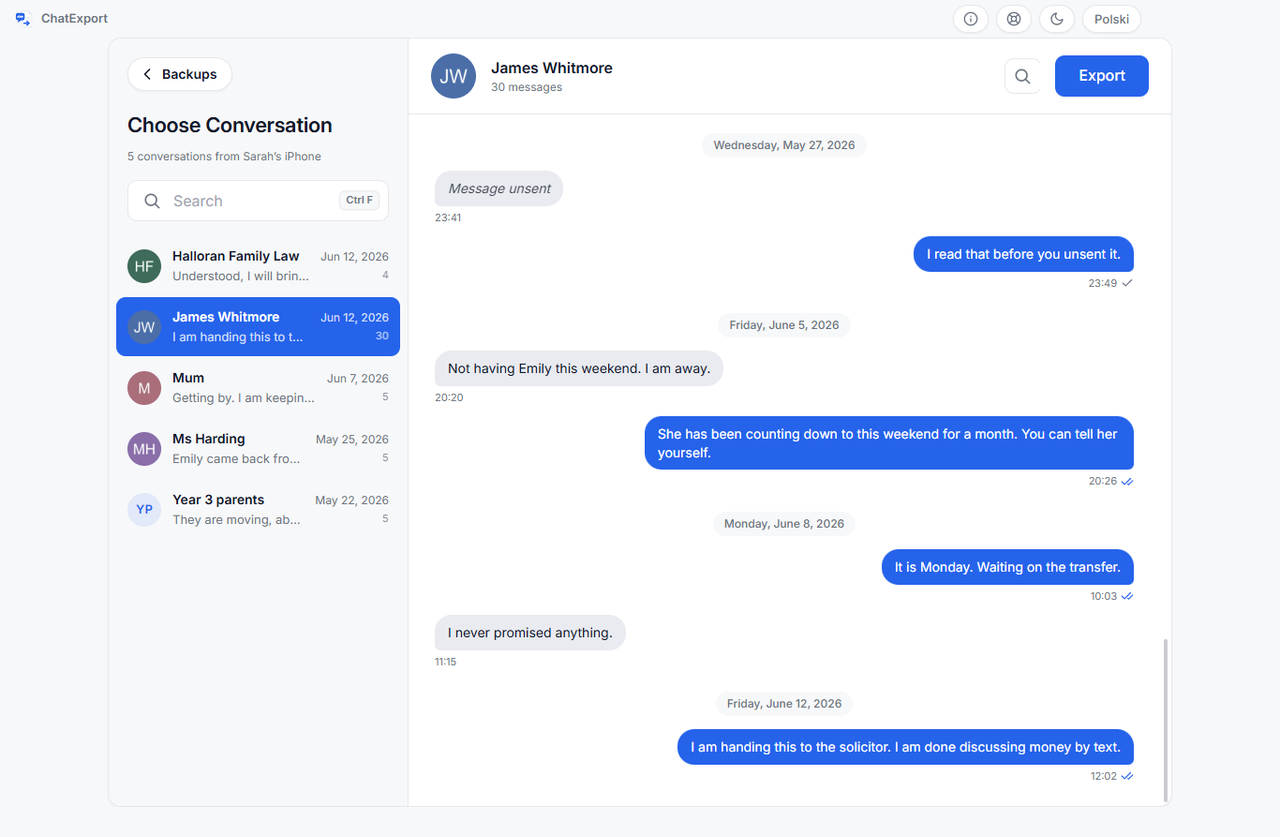
Conversations are listed by contact name, taken from the address book inside the backup itself. Read the thread here before exporting it. If you are looking for a particular exchange, search inside the conversation for something you remember someone saying.
That name is worth a second look before you export, because an address book holds nicknames and a filed document should not. How the name and the number both reach the page, and how to correct a label without touching the number it belongs to, is contact names against phone numbers in an export.
4. Choose Court View, and be careful with the date range
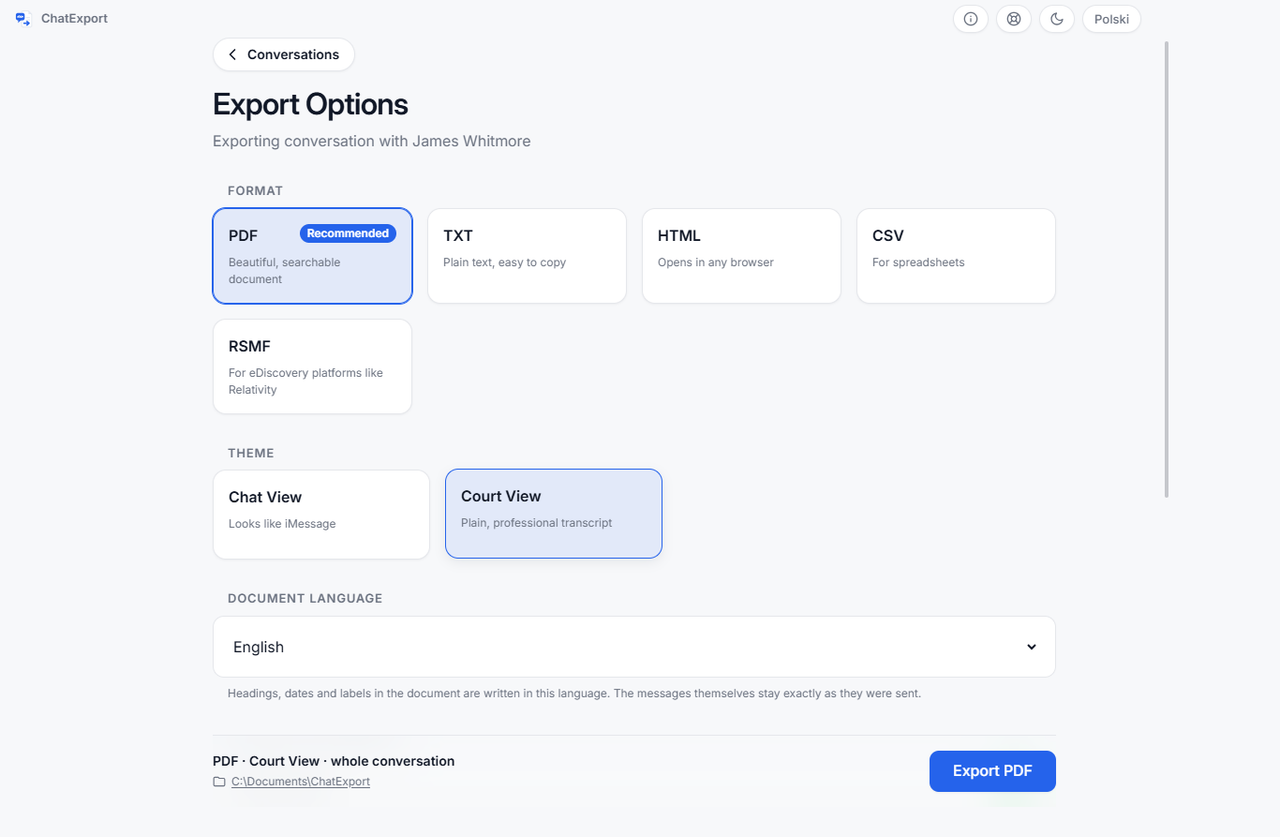
Court View is the monochrome layout: formal header, plain transcript, full timestamps with the time zone, sender numbers, delivery and read receipts, message numbering. It is meant to look like a document rather than a marketing screenshot.
Export the whole thread if you can. A range that begins the day before the message that helps you and ends the day after invites exactly the question you are trying to avoid. If the conversation is enormous, choose a range that plainly contains the whole dispute, and say so when you file it.
5. Record the hash
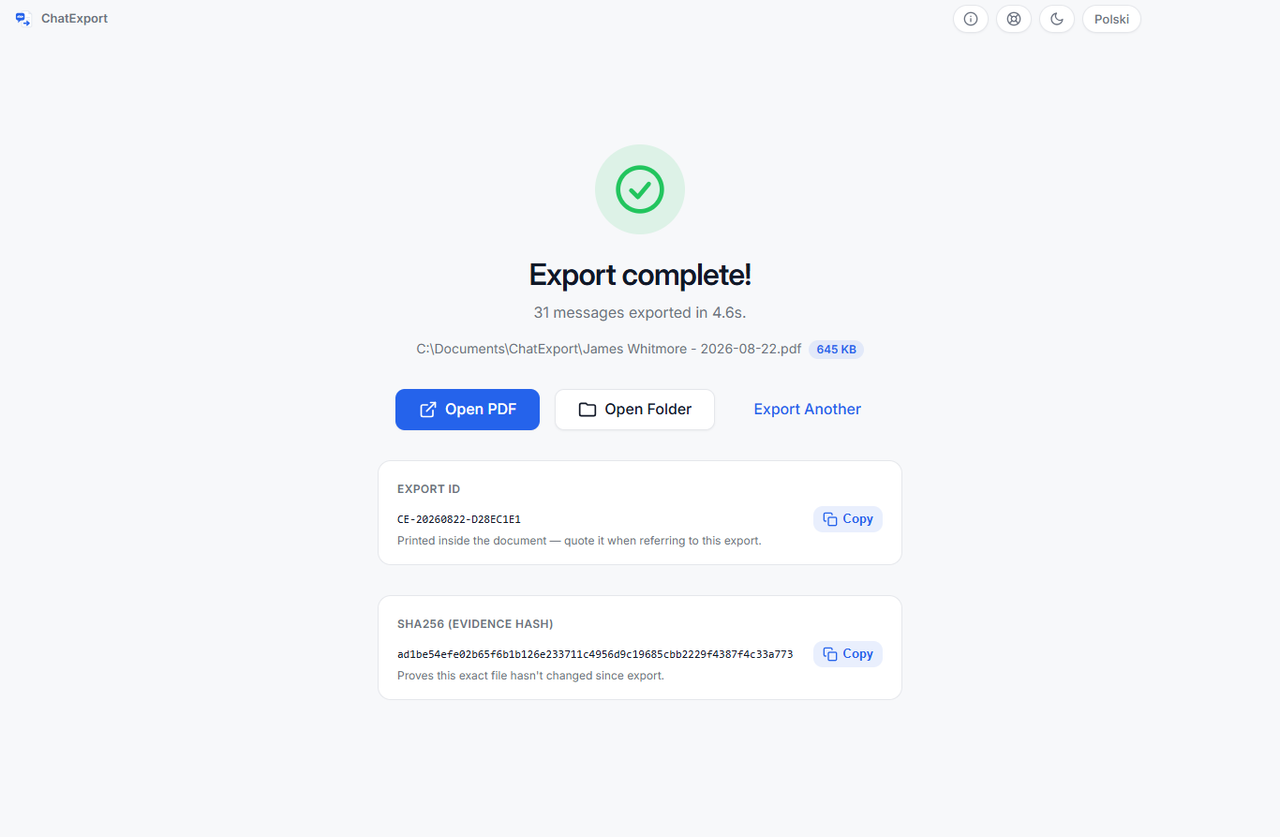
When the export finishes, the app shows a SHA256 fingerprint of the file. Copy it into your notes with the date. Anyone can recalculate it later from the same file. On Windows:
certutil -hashfile "Conversation.pdf" SHA256If a single character of the document had been altered, the result would not match. Record it at export time, because a hash cannot be recreated for a file that has since changed.
Note two dates while you are at it: the date of the export and the date of the backup it was made from. The document describes the phone as it stood on the backup date, not on the day you exported, and the title page states which backup was used so the two are never confused.
What will the other side ask about the document?
“How do we know this was not edited?” The hash answers it for the document, and the backup answers it for the content. Keep the backup folder for as long as the matter can resurface, and treat it as part of the record: anyone can export the same conversation from it again and read the same messages, and if the backup is encrypted, its password now matters to the case too, because without it nobody can repeat that check.
Worth knowing before someone tries it as a trap: a second export will not produce the same SHA256, because every export stamps its own date inside the file. The hash proves that one file has not been altered since it was made. It does not prove that two exports are byte for byte identical, and it was never meant to.
“Why does this message appear at a different time on their copy?” Time zones. The same conversation can appear in a different order on two phones set to different zones, which is why the export records the zone it used on the title page rather than leaving the reader to guess.
“What about the parts you left out?” This is the question a full thread makes unanswerable and a curated extract invites. It is the single strongest argument for exporting more than you need.
Each of those three objections has a rule of evidence behind it, and the rule decides how the argument ends. Which rule of evidence each objection is really about takes them one at a time, with the two cases where screenshots lost and the reason your PDF counts as an original rather than a copy.
Those same questions are the fairest way to compare the programs that produce these documents. The best app to print text messages for court sets five of them against the six an opponent asks, and names the one column that decides it.
What can this method not do?
It cannot reach messages the backup never received, recover what was deleted long before the backup was made, prove who was holding the phone, or make anything admissible. Each of those in turn:
- It cannot read messages the backup never received. If Messages in iCloud is on, Apple documents computer backups as not including messages already stored in iCloud. Check the backup before relying on it, as step 1 describes.
- It cannot recover messages deleted long before the backup was made. iOS 16 and later keep recently deleted messages for roughly thirty days, so a backup made inside that window still contains them and the export options carry a switch that includes them. Past it a backup is a copy of a moment rather than a history of one, and an older backup made before the deletion is the only route.
- It cannot recover the words of a message the sender unsent. They are gone from both phones. What survives is the record that something was sent at that minute and then withdrawn, which the document states rather than skipping.
- It cannot prove what happened on the phone. It reproduces what is in the backup. Who was holding the device is a question for other evidence.
- It cannot make a document admissible. No software can. It can remove the usual objections, which is a different and more modest claim.
Frequently asked questions
Do I need iTunes?
You need Apple’s own software to make the backup, either the Apple Devices app from the Microsoft Store or iTunes. ChatExport does not replace it. It reads the backup afterwards.
Does my iPhone need to stay plugged in?
Only while the backup is being made. After that the phone can go back in your pocket.
Will the document show names or phone numbers?
Names, from the address book inside the backup. Court View additionally prints the number beside the name, because in evidence the number is the identifier.
Should I export the whole conversation or only the relevant messages?
The whole thing, in almost every case. See the date range note above.
Can I write on the printed document?
Yes. There is an option that widens the outer margin to leave room for handwritten notes.
What does the software cost?
The download is a free trial: it exports every format and reads encrypted backups, but each document carries a watermark and stops at the 50 most recent messages in a conversation. A one time licence lifts both limits and is on sale now. There will never be a subscription, and paid licences come with a thirty day money back guarantee.
Is an export accepted in court?
Nobody can promise that, and software that does should worry you. Admissibility depends on your jurisdiction, your case and your judge. Ask your lawyer what your court requires.
Where to go next
If you want the method in full, including the Mac route and what changes between iOS versions, the complete guide to exporting iPhone messages to PDF covers it. If the photos in the thread are part of what you are proving, or the other side sent files rather than words, export iPhone messages with photos and attachments says exactly how each type appears in the document and how a file the backup never held is marked. If you would rather see what the finished thing looks like first, the sample court exports of a real conversation open without an email address, and what Court View switches on is set out on the home page. If the cost is the constraint rather than the method, how to print text messages for court free describes four free routes well enough to follow, and does the arithmetic on where free stops paying: roughly three hours of screenshotting for 400 messages.
If the process you are preparing for is not a court at all but a grievance or a disciplinary hearing at work, the document is the same and one decision on this page reverses: how to submit text messages as evidence in a workplace grievance explains why the whole thread, which is almost always right here, is usually the wrong thing to hand an employer.
If the other side has only screenshots, or a typed-up transcript of them, screenshots, OCR and a database export compared sets out what each of the three records holds and what it cannot. If two copies of the same thread disagree about when a message was sent, why message times differ between export tools explains the clock each document uses and how to check it.