Text messages as evidence: what a court actually needs to see
What a court needs to see in a message export is that it is what you say it is, that it is complete, and that it has not changed since you made it. Those are three separate hurdles with three separate rules behind them, and this page attaches the rule to each decision you make while producing the document.
It assumes you already know how to produce one. If you do not, the step by step method for printing iPhone messages for court covers that part on Windows, and this page picks up where it ends: the objections that arrive afterwards. It is about the iPhone throughout, because Android stores and exports messages differently and none of the mechanics transfer.
This is not legal advice. Rule numbers are from the US Federal Rules of Evidence. Most state codes mirror them closely, but not identically, and family courts often have local practice on top. Confirm anything that matters with a lawyer licensed where your case is heard.
About the author. I built ChatExport, which means I know how iOS stores messages, what a backup actually contains, and where exports lose information. I am not a lawyer. The legal sections below cite primary sources so you can check them yourself, and I have flagged the places where the answer genuinely depends on your jurisdiction.
The short version
If you read nothing else:
- The phone or its backup is realistically your only source. Carriers do not keep message content. Apple has it, but in a civil case you cannot reach it.
- Export the complete thread with metadata switched on. Every message you leave out is an argument you have handed the other side.
- Your PDF export is an “original,” not a copy. This surprises people and it is the single most reassuring fact in this article.
- Record the hash and describe it accurately. It proves the file has not changed. It does not prove the messages are genuine, and overclaiming it damages your credibility.
- Preserve the source and stop tidying your phone. Deleting after a dispute starts can cost you more than the messages were worth.
The rest explains why, and what to do when the simple version does not apply.
Contents
- The three hurdles
- Who actually has your messages
- Why screenshots lose, in two cases
- Is your export an original or a copy?
- Five ways to produce messages, compared
- Building an export that holds up
- Which setting answers which objection
- What the hash proves
- Self-authentication under 902(13) and 902(14)
- Redaction
- Getting it into the record
- Preserving the source
- If you already screenshotted everything
- When this method is not enough
- Frequently misunderstood points
- Troubleshooting
- FAQ
The three hurdles
Evidence has to clear three separate obstacles. People preparing their own usually think about only the first, which is how they end up solving a problem nobody was going to raise.
Authentication. Rule 901 requires you to show the thing is what you say it is. Not conclusively. Just enough that a reasonable juror could find it genuine. This is the hurdle your export format actually affects.
Completeness. Rule 106 lets the other side demand the rest of a conversation once you introduce part of it. Since the amendment effective December 2023 they can do this over a hearsay objection, and the rule now reaches oral statements. This hurdle is about what you leave out, not about your file format.
Hearsay. Here is the part that surprises people. The other party’s own messages are usually the easy case: under Rule 801(d)(2), a statement offered against an opposing party and made by that party is defined as not hearsay at all. Your own outgoing messages are harder, because you are the one offering them.
A beautiful PDF does nothing for hurdles two and three. Knowing that stops you over-investing in presentation and under-investing in preservation.
Who actually has your messages
Ask around and someone will tell you to subpoena the phone company. It sounds procedurally sophisticated and for message content it is close to useless. The full picture is more interesting, and it splits by case type.
| Holder | Has message content? | Reachable in a civil case? | Reachable in a criminal case? |
|---|---|---|---|
| Mobile carrier | Generally no, metadata only | Metadata, by subpoena | Metadata, by subpoena or order |
| Apple (iCloud Backup) | Yes, if iCloud Backup is on | No, blocked by statute | Yes, by search warrant |
| The device | Yes | You control it, or discovery | Yes, by warrant |
| A local backup | Yes | You control it | Yes |
Three things follow, and they matter more than the table.
Carriers keep metadata, not content. They record which number messaged which number and when. Retention runs from months to years depending on the carrier and the record type. The words themselves are generally not stored at all. A carrier subpoena can corroborate that a message passed between two numbers at a time. It will not tell anyone what it said.
iMessages never touch carrier SMS infrastructure, so for blue-bubble conversations the carrier has nothing at all, not even metadata in the usual sense.
Apple does have content, with two conditions attached. iCloud backups include iMessage, SMS and MMS content, and Apple can produce it under a search warrant. But a warrant is a criminal process requiring probable cause, and the Stored Communications Act bars providers from disclosing content to civil litigants even with a subpoena. So if your matter is a custody dispute or an employment claim, Apple has your messages and you cannot get them. If there is a criminal track, police can. The second condition is newer: a user who has switched on Advanced Data Protection puts their iCloud backup under end to end encryption, and then Apple cannot produce readable content for anyone, warrant included. The table’s Apple row assumes that setting is off, which is its default state.
The practical consequence holds regardless of the details: the phone, or a backup of it, is realistically the only place you can reach the actual words. You are not choosing a convenient file format. You are handling the only copy you can obtain.
Why screenshots lose, in two cases
Two federal decisions make the argument from opposite directions, and reading them together is more useful than either alone.
Edwards v. Junior State of America Foundation (E.D. Tex. 2021) is the one that should worry an honest litigant, and the worry is spoliation. The plaintiffs offered screenshots of Facebook messages; the native data behind them was never produced, and the account that held it was deleted after the screenshots were taken. The court found a failure to take reasonable steps to preserve the source, treated the possibility of intentional spoliation as live, and imposed sanctions under Rule 37(e), excluding the message evidence.
The lesson is sharper than “screenshots are weak”: screenshots plus a destroyed source cost the plaintiffs the evidence and earned sanctions on top. A screenshot is a picture that cannot speak for its own origin, so when the source behind it disappears, nothing is left to save it. That is the whole argument for the section on preserving the source below, made at someone else’s expense.
Rossbach v. Montefiore Medical Center (S.D.N.Y. 2021, affirmed in part 2d Cir. 2023) shows the other direction. A plaintiff supported harassment claims with a photograph of text messages, saying her damaged iPhone 5 meant she could only produce an image. A defence expert established that an emoji in the image could not have been rendered by the operating system that phone ran. The court found by clear and convincing evidence that the messages were fabricated, that she had testified falsely, and that she had spoliated evidence to conceal it. Dismissal and sanctions followed.
The obvious lesson is not to fabricate. The useful lesson for everyone else is that an image of a message is forensically thin enough that its authenticity can turn on emoji glyph versions. If a fabrication was caught that way, a genuine screenshot can be attacked the same way, and you will have nothing underneath it.
Is your export an original or a copy?
An original. Almost everyone assumes their PDF is a second-class copy of the “real” evidence sitting on the phone, and quietly worries about it. That assumption is wrong, and the rule that unmakes it is short enough to quote.
Under Rule 1001(d), for electronically stored information, an “original” means any printout or other output readable by sight that accurately reflects the information. Your export is not a copy of the original. It is an original.
This matters for the best evidence rule. Rule 1002 requires an original to prove content, and your export qualifies. Separately, Rule 1003 makes a duplicate admissible to the same extent as an original unless a genuine question is raised about authenticity.
The load-bearing words are “accurately reflects.” That is the whole ballgame, and it is why everything in the next section matters. An export that silently drops reactions, hides edits, merges in recovered deleted messages without saying so, or renders emoji as substitute glyphs is weaker on exactly this point. Accuracy of reflection is a property of your export process, not of the file format.
Five ways to produce messages, compared
| Method | Timestamps | Metadata | Searchable | How it fails |
|---|---|---|---|---|
| Screenshots | Partial, iOS shows few | None | No | Edwards. Native data existed and was not produced |
| Photo of a screen | Partial | None | No | All of the above, plus no file metadata at all |
| Print from a Mac | Partial | Minimal | Yes | No per-message seconds or receipts; Mac only |
| Export from a local backup | Every message, to the second | Handles, receipts, edits, attachments | Yes | Depends on you preserving the source and explaining the process |
| Forensic image plus expert | Complete | Complete, plus deleted artifacts | Yes | Rarely. Usually disproportionate for small matters |
The gap between rows three and four is where most people lose value they already have. If you only want the mechanics of the fourth row on Windows, the short procedural version covers it. For format choices across PDF, TXT, HTML, CSV and RSMF, see how to export iPhone messages to PDF.
Building an export that holds up
Several of these steps are the opposite of what people instinctively do.
1. Make a local backup, encrypted
Connect the iPhone to a Windows PC with the Apple Devices app, and back up to this computer rather than iCloud. Tick Encrypt local backup.
Encryption here is not about secrecy and does not lock you out. Apple includes additional data categories in the backup only when encryption is on, so the encrypted version is the more complete record. Set a password you will not lose, because there is no recovery path.
2. Note the backup’s own timestamp
Write down when the backup completed. Your export can only contain messages that existed at that moment. If the conversation continued afterwards, your document is a snapshot with a knowable cut-off, and being able to state that cut-off precisely is far better than being asked and guessing.
3. Resist the urge to narrow the date range
Date filtering is the most commonly misused control in this whole process.
Every message you exclude is an invitation under Rule 106, and a narrow window makes the exclusions look chosen rather than incidental. You also rarely know in advance which surrounding messages establish context that helps you.
Export the full thread when you reasonably can. If the conversation spans years and one month is relevant, export the full thread anyway and keep it, then produce the narrower document as the exhibit. Having the complete version ready turns a completeness objection from a threat into a formality.
4. Use the formal layout
Chat View reproduces the iMessage look, with coloured bubbles and left or right alignment. It is the right choice for a personal archive.
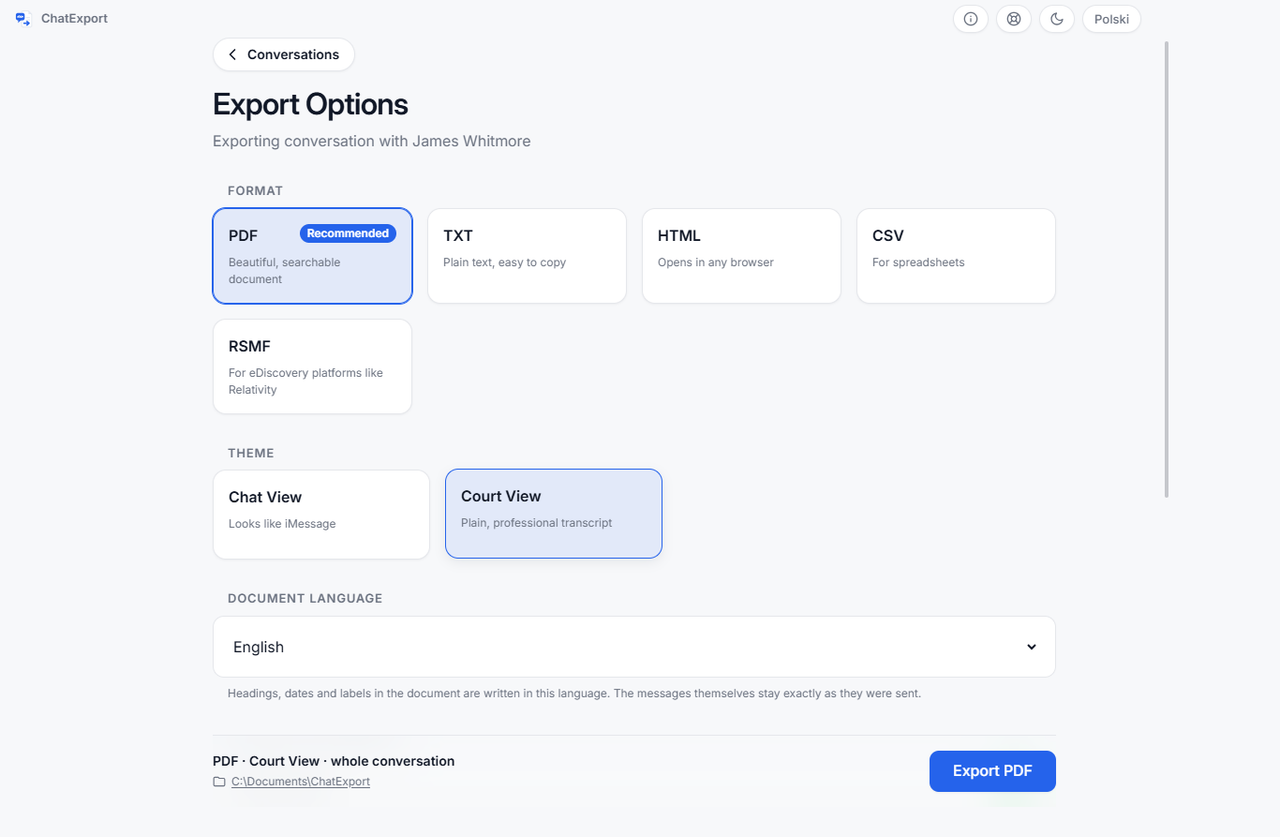
For a filing, use Court View. The difference is not decorative. Chat View encodes the sender positionally, through colour and alignment, and that information survives neither photocopying nor monochrome printing nor a visually impaired reader. Court View names the sender on every row, spells reactions out as words rather than floating badges, and drops styling that makes a record look like a chat toy.
Selecting Court View also switches on every metadata field at once, which is the next step.
5. Turn the metadata on
These fields are read from the backup either way. The toggles only decide whether the document prints them. What each one is for is set out in the table below.
6. Understand the delivery receipt distinction
This is subtle, and getting it wrong in testimony is worse than omitting it entirely.
For outgoing messages, a read receipt means the recipient’s device reported that they opened it, and only if they have receipts enabled. That is meaningful evidence of receipt.
For incoming messages, iOS records locally that you read it. Every received message has this. It says nothing whatsoever about the other party.
A document labelling both “Read” invites a cross-examination you will lose. ChatExport prints “Read by me” for the incoming case precisely so the record cannot be misread as the other side confirming something they never did. Whatever tool you use, check how it handles this before relying on a receipt in an argument.
7. Decide about deleted messages deliberately
iOS 16 and later keeps a Recently Deleted store holding messages removed within roughly the last 30 days. These can be recovered and included.
Never include them silently. Those messages are not part of the conversation as the phone displays it today, and merging them invisibly misrepresents the record, which is a serious problem if anyone compares your document against the device. It also undercuts the “accurately reflects” requirement that makes your export an original in the first place.
ChatExport keeps this off by default. When enabled, it counts recovered messages separately on the title page and prints a note stating they came from the Recently Deleted store and are no longer visible in Messages on the device. Include them if they are relevant, and label them so nobody can say you disguised their status.
The same reasoning applies to edited and unsent messages. That a message was edited, and what it previously said, is frequently the most probative thing in a thread.
8. Record the hash
The export produces a SHA256 hash, written beside the document as a .sha256 file in the standard
format, so it can be re-checked with tools that have nothing to do with this software. On Windows:
certutil -hashfile "Conversation.pdf" SHA256Copy it into your notes with the export date and time.
Which setting answers which objection
Each export setting exists to close a specific line of attack, and this table is the map between them.
| Setting | What it adds | Objection it forecloses |
|---|---|---|
| Full timestamps | Date and time to the second | “You cannot establish when this happened” |
| Sender handles | Raw number or email beside the contact name | “That contact name is just something they typed in” |
| Delivery status | Delivered and read receipts as recorded | “There is no proof it was ever received” |
| Message numbers | Sequential #1 to #N | “Which message are we actually discussing?” |
| Attachment details | Original filename and size | “That photo could have come from anywhere” |
| Full thread, no date filter | Everything, in order | Rule 106 completeness demand |
| Court View layout | Sender named on every row | “This is unreadable in monochrome” |
| Recovered messages labelled | Explicit count and note | “You merged deleted messages in without saying so” |
| Attachment index | Exhibit list with section references | “Nobody can find anything in a 400-page document” |
| Stated time zone | IANA name and offset on the title page | “Those timestamps could mean any zone” |
| SHA256 hash | Integrity fingerprint | “This document was edited after the fact” |
The sender handle row deserves emphasis. A contact saved as “Mum” proves nothing about who sent a message, because anyone can rename a contact. The underlying handle is the identifier that connects to something external and checkable, which is exactly why it belongs in an evidence document even though it clutters a personal archive.
The time zone row is quietly important too. A message at 11pm in one zone is a different calendar date in another, and when the timing of a message is the disputed fact, that decides things. ChatExport converts every timestamp to one zone and names it on the title page in IANA form, for example “Europe/Warsaw (UTC+02:00)”. The IANA name is what makes historical daylight-saving transitions interpretable; an offset alone does not.
What the hash proves, and what it does not
A SHA256 hash establishes exactly one fact: this file has not changed since the hash was taken.
That forecloses any suggestion you edited the PDF afterwards. If the hash recorded on the export date matches the hash of the document filed months later, it is byte-identical.
What it does not do, and you should be the one to say so rather than have it drawn out of you:
- It does not prove the export accurately reflects what was on the phone. It fingerprints the output, not the fidelity of the process.
- It does not prove the underlying messages are genuine. Hashing a fabrication produces a perfectly valid hash.
- It does not authenticate anything by itself under Rule 901.
Integrity is not authenticity. Where the hash becomes powerful is combined with a certification, which is next.
Self-authentication under 902(13) and 902(14)
Amendments effective December 2017 added two provisions to Rule 902 built for electronic records.
902(13) covers a certified record generated by an electronic process or system, where the certification speaks to the accuracy of the process.
902(14) covers certified data copied from an electronic device, storage medium or file, authenticated by a process of digital identification. The Advisory Committee Note contemplates exactly the hash scenario: a qualified person certifies that she checked the hash value of the proffered item and it was identical to the original.
If accepted, the evidence is self-authenticating, meaning no live witness is needed purely to authenticate it. In a contested matter that removes a category of expense.
Three conditions, all regularly missed:
- A qualified person must certify. Whether you can certify your own export is a question for your lawyer, and in a contested case the answer is often no.
- Notice is mandatory. Both provisions incorporate Rule 902(11)‘s requirement of reasonable written notice to the adverse party, and making the record and certification available for inspection in advance. Skip it and the route closes. This is the most common way the provision fails in practice.
- Self-authenticating is not admissible. It clears Rule 901 only. Hearsay, relevance and completeness objections all remain live.
No vendor can certify on your behalf, and any product advertising “court certified” output is describing a legal category that does not exist. What software can do is produce output with the properties a certification would need to describe.
Redaction: do not improvise
Filings routinely require removing information: third-party phone numbers, minors’ names, account numbers, medical details, and material subject to privilege.
The trap is that redacting evidence yourself, unilaterally, looks like exactly what the other side will accuse you of, which is deciding what the court gets to see. General practice is that you should not unilaterally redact for relevance. Redaction for privilege is different and usually permitted, and many courts want a privilege log alongside it.
Practical approach:
- Ask your lawyer, or check local rules, before redacting anything.
- Where possible, get written agreement from the other side, or the court’s permission.
- Redact the exhibit copy, never the original export. Keep the unredacted original and its hash.
- Redact properly. Drawing a black box over text in a PDF annotation layer does not remove the text underneath, and it remains selectable and searchable. Use a tool that genuinely removes content, then verify by searching the redacted file for what you removed.
That last point is worth repeating: a redaction that can be undone by copy and paste is worse than no redaction, because it looks deliberate and it discloses anyway.
Getting it into the record
Producing the document is not the same as getting it in front of a judge, and the second half has rules of its own.
You cannot simply hand printed messages to the judge. In broad outline, and subject to local practice, an exhibit is marked for identification, copies go to all parties and the court, a witness lays the foundation by testifying to what it is and where it came from, you formally move its admission, and the other side gets to object.
Things worth knowing in advance:
- Exhibit numbering. Courts have conventions, sometimes numbers for one side and letters for the other. Ask the clerk.
- Copies. You will usually need several, including one for the judge, one for opposing counsel, one for the witness stand, and your own.
- Advance exchange. Many courts require exhibits be exchanged before a hearing. If you intend to rely on the 902(13) or 902(14) route, the written notice requirement makes this mandatory rather than courteous.
- Message numbers earn their keep here. Being able to say “page 34, message 412” instead of describing a message is the difference between a smooth hearing and an argument about which text everyone is looking at.
Preserve the source, and the spoliation trap
Everything above assumes the underlying data still exists.
Keep the backup. Do not delete the backup folder after exporting. It is the source record, and if the export is challenged, the backup is what an examiner would re-derive it from. Copy it to external storage.
Stop tidying the phone. Once you reasonably anticipate litigation, a duty to preserve attaches. Deleting messages, clearing threads, resetting the device, or trading in the old phone can all be characterised as spoliation. Consequences can exceed whatever the deleted messages would have cost you: adverse inference instructions, sanctions, dismissal. In Rossbach the spoliation finding sat alongside the fabrication finding.
Do not edit the export. Annotate a copy, keep the original untouched, preserve its hash. ChatExport’s note margin option widens the outer margin so a printed copy has room for handwritten annotation, which keeps the digital original pristine.
Write down what you did. Backup date and time, software and version, export settings, the hash, and where the source is stored. Contemporaneous notes beat reconstructing your process from memory a year later.
If you already screenshotted everything
Most readers arrive here with a folder of screenshots and a sinking feeling. That is recoverable.
Screenshots are not poison. Nothing about having taken them prevents you producing a proper export now, and Edwards turned on native data existing and not being produced, not on screenshots being taken.
What to do:
- Do not delete the screenshots. They are part of your record now. Deleting them after a dispute has begun is the exact behaviour spoliation doctrine punishes.
- Make a backup and a full export immediately, before anything else changes on the phone.
- Compare them. If a message in a screenshot is absent from the export, you need to understand why before anyone else asks. Common innocent explanations are that the message was deleted, or that it postdates the backup.
- Keep both. Screenshots can corroborate that a thread looked a certain way at a certain time, which is occasionally useful.
The one situation that needs real care is where the messages have since been deleted and only your screenshots remain. Say so plainly and early, and take advice. That is precisely the fact pattern Rossbach makes courts suspicious of, and the honest version of it needs handling rather than hiding.
When this method is not enough
The messages are on the other party’s phone. You cannot export a device you do not lawfully control. Accessing someone else’s phone without authorisation can be criminal and can taint the evidence. The route is discovery, a preservation letter, or a court order. This is the most common situation where none of the above applies.
The stakes are high or authenticity is contested. A qualified forensic examiner producing a full device image and expert report is a different tier of reliability. The export approach is proportionate for routine matters, not a substitute for an expert when one is warranted.
The messages are not in the backup. Disappearing messages, third-party apps like Signal or Messenger, and anything deleted beyond the Recently Deleted window may be absent. A WhatsApp conversation is not in the backup either, but WhatsApp will export one to a file that can be read instead, and that document names the file and prints its SHA256 so the source is on the record. RCS support depends on iOS version and whether Apple stores it locally.
It is a group chat. Group threads carry an extra problem: establishing who was in the conversation at the time, since participants can join and leave, and a name displayed today may not reflect the membership when a message was sent. Export the full thread including the join and leave events where available, and expect more argument about attribution than in a one-to-one thread.
The device is broken. No backup, no export. Specialist data recovery comes first.
Opposing counsel wants native e-discovery production. In larger matters you may be asked for RSMF or a similar short-message format rather than PDF. That is a different workflow and worth raising with your lawyer early rather than producing a PDF twice.
Frequently misunderstood points
Screenshots are not banned. Courts admit them routinely on a witness’s testimony. Edwards did not create a rule against them. The problem is that they are cheap to attack, and defending them costs more than producing something better would have.
“Certified” and “court approved” are marketing terms. No software carries a court’s imprimatur.
A PDF is not automatically better than a screenshot. A PDF of pasted screenshots has every weakness of screenshots plus false formality. The value is in the underlying data.
Deterministic output matters. ChatExport formats dates and numbers by the chosen export language rather than the machine’s locale, so the same conversation exported on two computers produces identically worded documents. Wording that shifted by machine would be an avoidable line of attack.
Emoji are evidence. Rossbach turned on one. Reactions, emoji and the fact of an edit are substantive content, not decoration, and a document that silently drops them is less accurate and therefore weaker under Rule 1001(d).
Troubleshooting
The backup finished suspiciously fast, or recent messages are missing. The backup probably did not complete. Check its completion time against the last message you expect to see, and re-run with the phone unlocked and connected until it genuinely finishes.
Messages are on the phone but missing from the export. The usual suspect is Messages in iCloud: Apple documents computer backups as not including messages already stored in iCloud, so with that switch on, part of the history can be absent from a backup that otherwise looks complete. What is checkable is the backup itself, and opening it shows what it holds. If messages are missing, turning Messages in iCloud off (Settings, your name, iCloud) keeps the history on the phone, and a fresh backup made after that contains what the phone holds.
A contact shows as a phone number. The handle did not resolve against the address book. This does not weaken the evidence and arguably strengthens it, since the handle is the verifiable identifier.
The export is enormous. Photos dominate. Reduce photo size, or export without photos and produce attachments separately as a referenced set.
The hash does not match later. The file changed. Opening a PDF in an editor and saving it does this even with no visible edit. Return to the original and never re-save the file you hashed.
Frequently asked questions
Will a court accept a PDF export of my messages?
Frequently, but nobody can guarantee it. It depends on jurisdiction, the judge, how you obtained the messages, and whether the other side objects. A complete, timestamped export with metadata and a recorded hash is substantially harder to challenge than screenshots, and that part you control.
Is my PDF export an original or just a copy?
An original. Under Rule 1001(d), for electronically stored information an original includes any printout or output readable by sight that accurately reflects the information. The words that carry weight are “accurately reflects,” which is why completeness and metadata matter.
Are text messages hearsay?
Often not. Under Rule 801(d)(2) a statement by an opposing party offered against them is not hearsay. Your own messages are harder and may need another route. Ask your lawyer about the specific messages.
Can I subpoena the carrier for message content?
Almost certainly not. Carriers retain metadata, not content, and iMessages never pass through carrier SMS infrastructure. A subpoena can corroborate timing, not wording.
Apple has my messages in iCloud. Can I get them?
Not in a civil case. The Stored Communications Act bars providers from disclosing content to civil litigants, and the warrant route requires a criminal predicate. If there is a criminal investigation, law enforcement can, unless the account holder enabled Advanced Data Protection, which puts the backup beyond Apple’s own reach.
Do I need an encrypted backup?
Use one. Apple includes additional data categories only when encryption is on, so it is the more complete record. Do not lose the password; there is no recovery.
Can I export messages from someone else’s iPhone?
Not lawfully without authorisation. Unauthorised access can be criminal and can taint the evidence. Use discovery or a court order.
What about deleted messages?
Messages deleted within roughly the last 30 days may sit in the Recently Deleted store on iOS 16 and later. Older ones generally need forensic tools and are not guaranteed. If you include recovered messages, label them as recovered.
Can I redact things before filing?
Sometimes, but do not improvise. Unilateral redaction for relevance is generally improper. Privilege is different. Get agreement or permission, redact only the exhibit copy, and make sure the redaction actually removes the text rather than covering it.
Does the hash prove my messages are real?
No. It proves the file has not changed since you hashed it. It says nothing about whether the export reflects the phone or whether the messages are genuine.
Should I export the whole conversation or just the relevant part?
Export the whole thread and keep it, even if you file a narrower extract. Rule 106 lets the other side demand the remainder.
Do I need a forensic expert?
For routine matters where authenticity is not seriously contested, usually not. If the case is substantial, or the other side disputes authenticity, or the messages are central, an expert is worth the cost.
Does this work on a Mac?
ChatExport is Windows software. macOS users can print from the Messages app, though that loses per-message timestamps and delivery data, which are the fields that matter most here.
Where to start
If your messages are on your own iPhone and you have a Windows PC, the practical next step is a local encrypted backup, then a full-thread Court View export with metadata on, then recording the hash. ChatExport produces exactly that document, works offline, and never uploads your messages anywhere. If you would rather just see the steps, the short Windows walkthrough is the faster read.
The gap between a folder of screenshots and a complete, hash-verified record is a couple of hours. The gap in how hard each is to attack is considerably larger.