How to export iPhone messages to PDF
The short version. iOS cannot save a conversation as a PDF, and no setting adds that. The method that works is: back the iPhone up to a computer, then open that backup with a tool that reads the message database and renders it as a document. On Windows that is the Apple Devices app plus ChatExport, and the export itself takes about two minutes. On a Mac you can print a thread from the Messages app for free, with the limits set out below. Screenshots also work, and produce the weakest possible version of text messages you already own. If paper rather than a PDF is what you actually need, the five routes to it are compared in how to print text messages from an iPhone.
| What you need | iPhone, cable, its passcode, a Windows PC or Mac |
| Free disk space | Budget what the phone says it is using: a 128 GB phone that is three quarters full, about 90 GB. The backup usually comes out smaller, because apps and synced media are not copied, but the full budget means it cannot fail halfway |
| Time, first run | 10 to 50 minutes, almost all of it the backup |
| Time, later runs | Around 2 minutes per conversation |
| Works offline | Yes, at every stage |
| Phone needed after backup | No |
This page is the long version, and it compares every route before it walks one. If you want the short one, a single conversation saved properly today, read how to save text messages as PDF from an iPhone instead and come back here when you need the detail.
Jump to: the five methods · Windows, step by step · Mac, step by step · settings that matter · what you can and cannot recover · verify the file yourself · for a court · FAQ
Why is there no export button on the iPhone?
Open Messages on any iPhone and look for Export, Print or Save as PDF. There is nothing. You can forward individual messages, and that is the end of the list. Messages in iCloud syncs your threads between your own Apple devices, which is a different problem from getting them out.
So the people who need text messages as a document all arrive at the same wall:
- a parent assembling six months of scheduling messages for a custody hearing
- a tenant who needs the landlord’s promise to fix the boiler, in writing, with dates
- a freelancer whose client approved a quote by message and now disputes the invoice
- someone moving to Android who wants ten years of family messages kept readable
- an HR investigator who needs a clean record of a workplace exchange
They all want one object: a document, in order, with real dates on it, that opens without a phone in the room.
Scope. This guide covers SMS, MMS, RCS and iMessage, the threads inside the Messages app. Signal and Messenger keep their history separately and are exported from inside those apps. A WhatsApp conversation takes a different route, through the file WhatsApp exports itself, and has its own guide: how to export a WhatsApp chat to PDF.
Three terms worth defining first
Local backup. A copy of the phone written to a computer by Apple’s own software. It is a folder of thousands of files with hashed names, not a browsable archive. It contains the Messages database, with one condition attached: if Messages in iCloud is switched on, Apple’s own documentation says a computer backup does not include messages that already live in iCloud, in Backup methods for iPhone or iPad. Step 2 below says how to check whether yours are in the backup, which takes a minute and settles the question for your phone rather than in general.
The Messages database. A single SQLite file, sms.db, that iOS itself uses to store every
message. Each row carries the text, the sender, a timestamp accurate to the second, and links to
any attachments. Reading it is how a PDF gets built from data rather than from pixels.
Evidence hash. A SHA256 fingerprint of the finished file. Change one character of the PDF and the fingerprint changes completely, which is how you show later that a document was not edited.
What does a good export actually contain?
Not all PDFs of a conversation are equal. A strong one has these eight properties:
| Property | Why it matters |
|---|---|
| Complete thread | A continuous run is far harder to challenge than a selection |
| Exact timestamps | iOS displays a time on some messages only. A record needs one on every message |
| Sender identity | Every message attributed, by contact name or phone number |
| Photos in place | An attachment described in a footnote is not the attachment |
| Searchable text | The reader can search the file and cite a page |
| Stable pagination | Page 41 means the same thing to everyone who opens it |
| A title page | Participants, message count, date range, export date |
| Integrity check | A hash proving the file has not changed since it was made |
A screenshot has one of the eight. It has photos in place.
The five methods compared
| Method | Cost | Timestamps | Photos | Searchable | Full thread | Best for |
|---|---|---|---|---|---|---|
| Screenshots into a document | Free | Partial | Yes | No | Manual | Two or three messages |
| Mac Messages, print to PDF | Free | Partial | Yes | Yes | Manual scroll | Mac owners, short threads |
| Forwarding by email | Free | No | Sometimes | Yes | No | Showing a friend |
| Carrier records request | Fees, weeks | Metadata only | No | Yes | Metadata only | Proving a message existed |
| Backup based export tool | Free trial, then a one time licence | Every message | Yes | Yes | Yes | Anything that has to hold up |
Pick by situation
| Your situation | Use |
|---|---|
| Windows PC, any length of thread | Backup plus export tool |
| Mac, short thread, nothing formal | Print from Messages |
| Mac, long thread or a formal document | Backup plus export tool on a Windows machine |
| You need it in Excel | Export as CSV |
| You no longer have the phone | Any backup of it still on the computer |
| Only the other person still has the messages | Their phone, their permission, or a carrier request |
Why screenshots lose
Ten screenshots might carry one visible timestamp between them. The frame you chose invites the obvious question about what sat directly above and below it. Fifty images of text cannot be searched or quoted by page. None of that makes them inadmissible anywhere. It makes them easy to argue with, which is a slower and more expensive problem than it sounds.
Why forwarding and carrier records do not replace an export
Forwarding a selection by email produces a stripped transcript with no reliable timestamps and often no clear attribution. Carriers hold billing metadata such as numbers, dates and counts, but generally not message content, and getting even that usually requires a subpoena or court order. Both are useful for confirming that a message existed. Neither shows what it said, in order, with the photos.
If you arrived looking for a converter rather than a method, the same ground is covered from that angle in convert text messages to PDF, which also says when PDF is the wrong target format and CSV or HTML is the right one.
Step by step: export iPhone messages to PDF on Windows
Six steps. The first two are Apple’s software, the last four are the export.
Step 1. Install Apple’s software (5 minutes)
Open the Microsoft Store and install Apple Devices, Apple’s current replacement for iTunes on Windows. If you already run iTunes, that works too.
ChatExport does not replace Apple’s software and does not try to. Apple makes the backup, and ChatExport reads the folder afterwards. If either the software or the backup is missing, the app says which of the two it is and what to do next, instead of showing an empty list.
Step 2. Make a local backup (10 to 50 minutes)
Connect the iPhone. Unlock it. When the phone asks whether to trust this computer, tap Trust and enter the passcode. In Apple Devices, select the phone, choose Back up to this computer, and start.
Encrypt local backup is worth ticking. ChatExport reads encrypted backups: it asks for the password, decrypts only the files it needs on your own machine, and forgets the password when it closes. Choose one you will not lose, because an encrypted backup cannot be opened without it by anyone, Apple included.
Expert tip. Apple’s encrypted backups also carry saved passwords, Health data and Wi-Fi settings, which unencrypted ones leave out. The security argument matters more here than the completeness one: an unencrypted backup holds every message you have ever sent, in readable form, in an ordinary folder on your PC. If this is for a legal case you may be keeping that folder for months. Encrypt it.
The first backup of a full phone takes 10 to 50 minutes as a rule of thumb, and no two phones take the same time. Later ones are incremental and much faster. When it finishes the phone can be unplugged. Nothing after this point needs it.
If you use Messages in iCloud, check the backup before relying on it. Apple documents computer backups as not including data that already lives in iCloud, and it names messages specifically. Whether that affects your phone is checked in one minute: make the backup, open it in ChatExport, and see whether the conversation is there with its recent messages. If it is missing or ends early, the likely cause is the Messages in iCloud switch (Settings, your name, iCloud). Turning it off keeps your messages on the phone itself, after which a fresh backup contains them. Check first, though: many phones with the switch on still back up fine, and there is no reason to change a setting the check says you do not need to.
For reference, Windows stores backups in one of two places, depending on which Apple software wrote them. ChatExport scans both, so this is only useful if you want to copy a backup to another drive or check its date by hand:
| Apple software | Backup location |
|---|---|
| Apple Devices (Microsoft Store) | %USERPROFILE%\Apple\MobileSync\Backup |
| Classic iTunes installer | %APPDATA%\Apple Computer\MobileSync\Backup |
Step 3. Open the backup (10 seconds)
Launch ChatExport and choose iPhone Messages. It lists every backup it found with the device name, the date it was made and the iOS version. On a machine that has backed up two phones, those three facts are how you tell them apart, and if the same phone has several backups, take the newest one that predates nothing you need.

The app opens the message database read only. It never writes to your backup and never touches the phone.
Step 4. Find the conversation (30 seconds)
You get a searchable list of every thread, with names resolved from the backup’s own address book rather than raw phone numbers. Search matches contact names, numbers and message content, so a half remembered phrase is enough to find a thread.
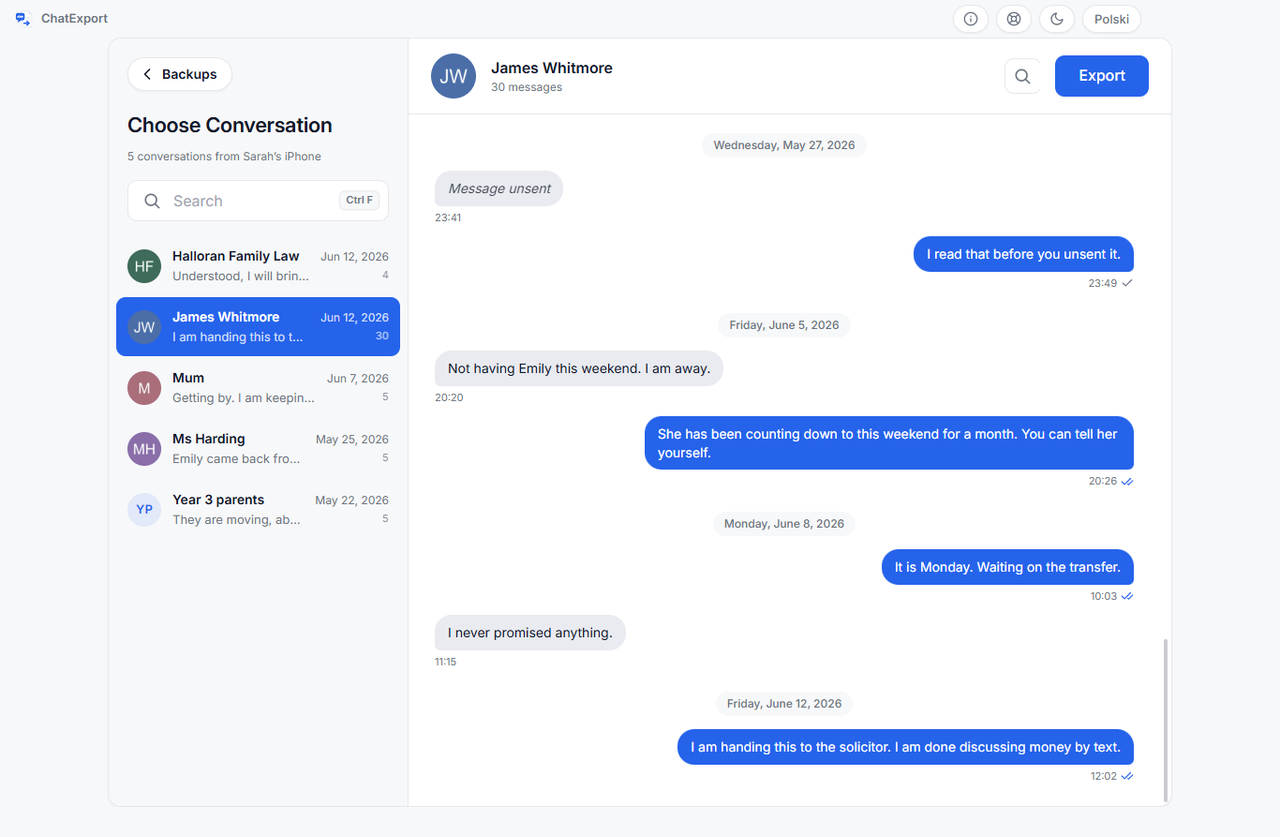
Selecting one shows a preview of the most recent messages, capped at around 300 so the list stays instant. The preview is for confirming you have the right thread. The export contains the full history regardless of what the preview shows.
Step 5. Choose the settings (30 seconds)
Every setting has a working default, so this screen can be a single glance if you are in a hurry.
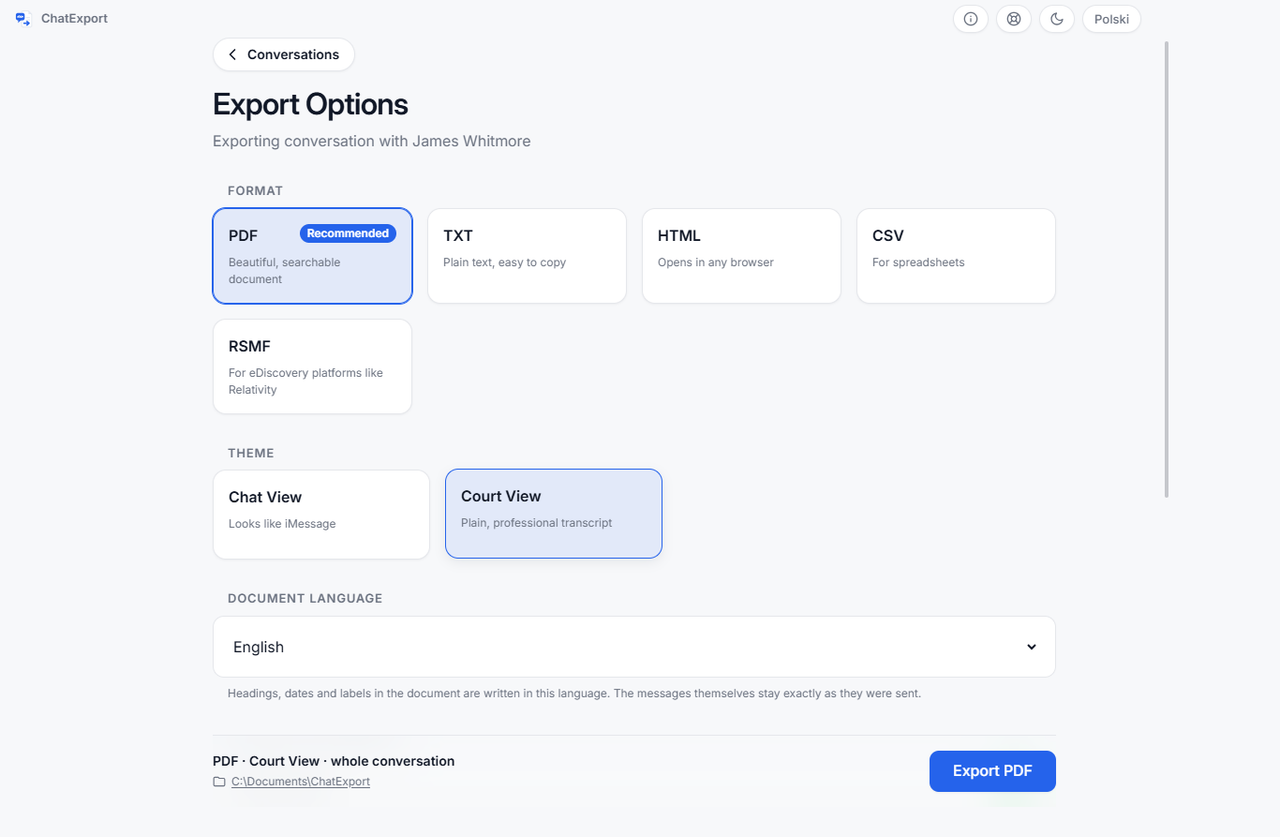
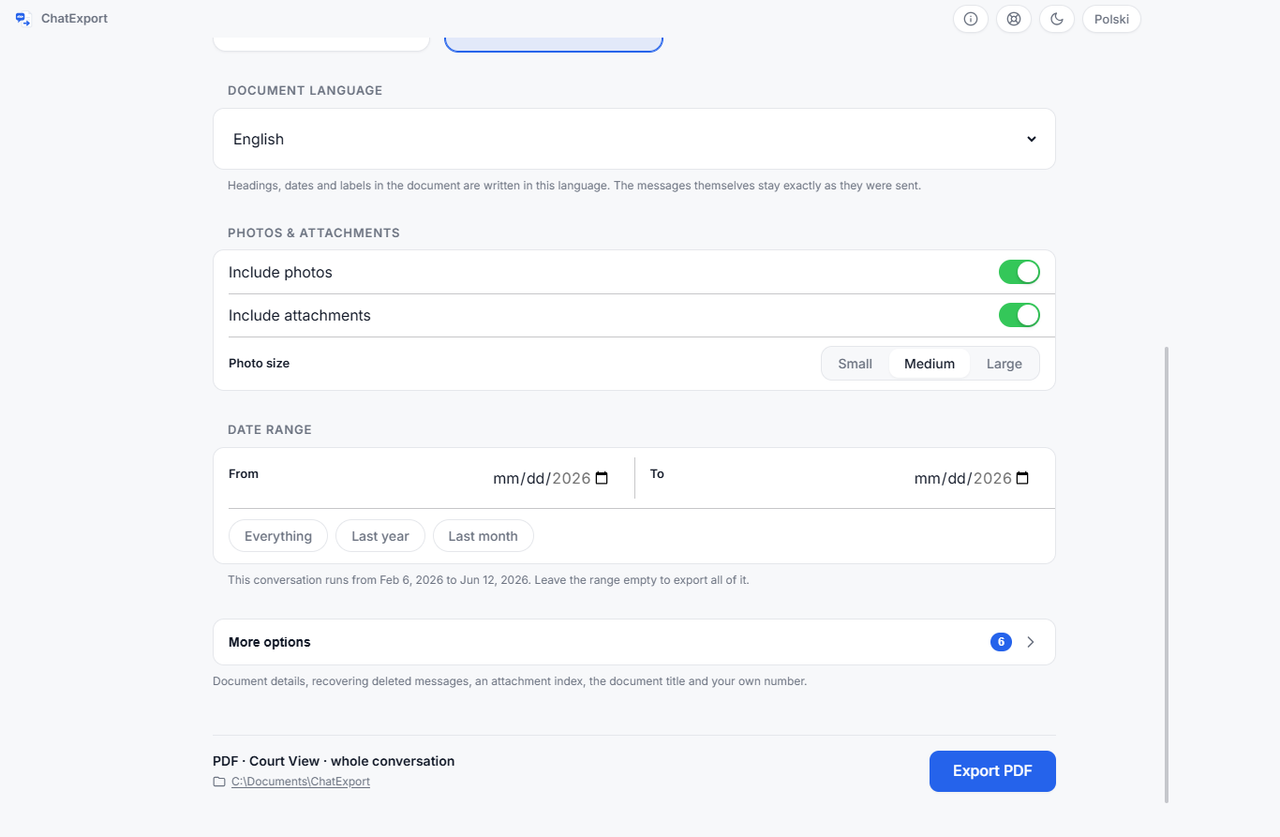
| Setting | Default | Change it when |
|---|---|---|
| Format | You want Excel (CSV), a browser file (HTML) or plain text (TXT) | |
| PDF theme | Chat View | The document is going into a filing, then use Court View |
| Photos | On | The thread is huge and images do not matter |
| Photo size | Medium | Image content itself is the point (large), or file size is (small) |
| Date range | Everything | You genuinely need a window, using From and To or the presets |
| Document title | Generic | Always. This is what appears on the title page |
| Destination | Last used folder | You want it somewhere specific |
A title like Messages with J. Alvarez, January to June 2026 is worth the ten seconds it takes to
type, because it is the first thing any reader sees.
Step 6. Export and record the hash (about 2 minutes)
Press Export. A progress bar shows the percentage and the current step, and you can cancel at any point. Long conversations render in batches, so memory stays flat and the window stays responsive even on threads of a hundred thousand messages.
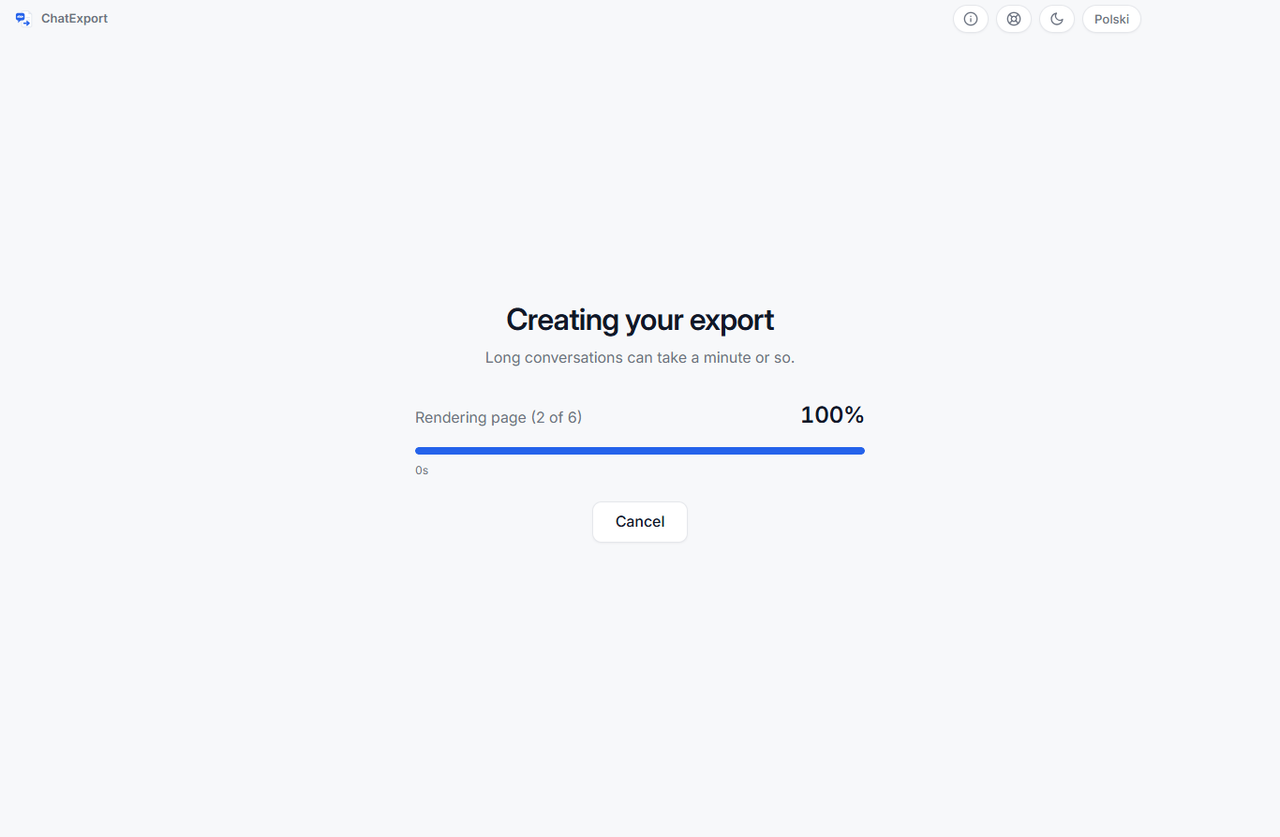
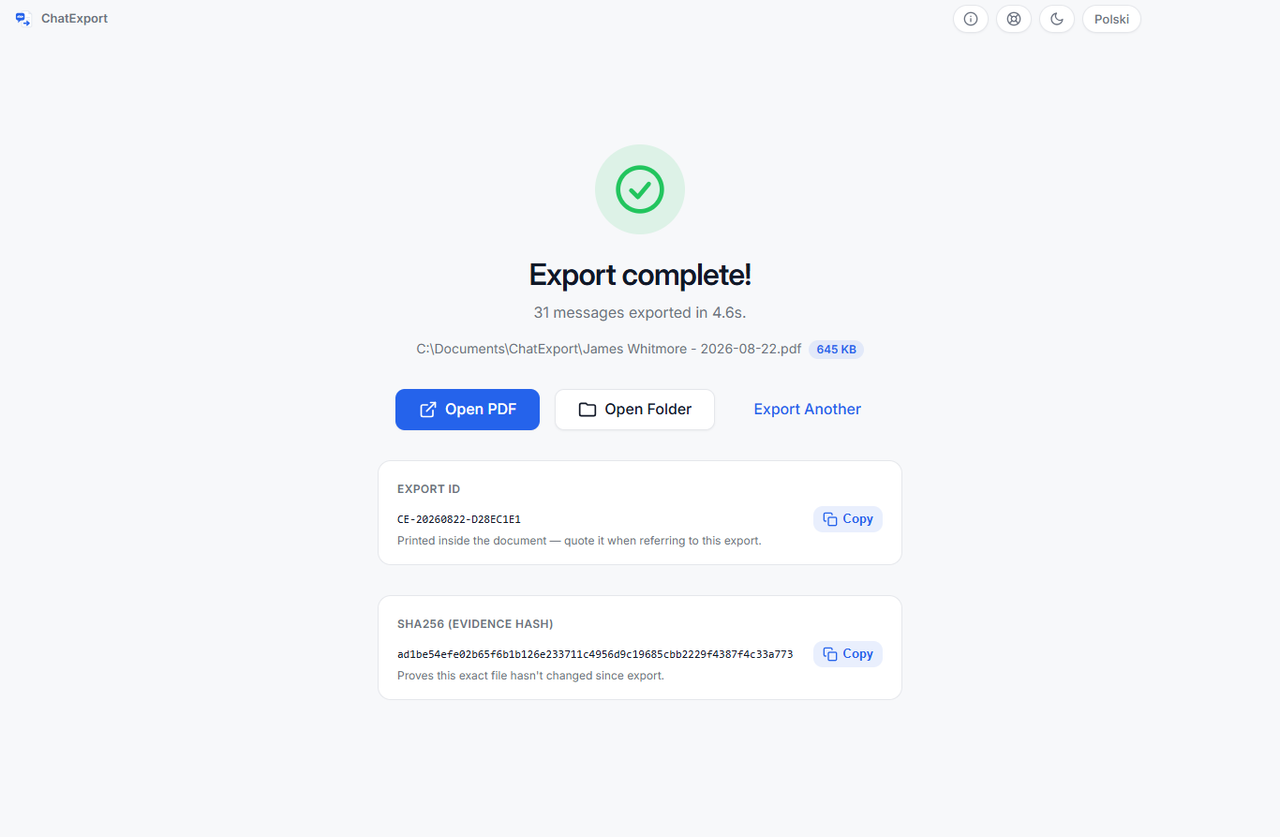
When it finishes, the success screen shows the file’s SHA256 hash with a copy button. Paste it into your notes with the export date. It takes ten seconds now and cannot be recreated later if the file is ever questioned.
Step by step: print iPhone messages to PDF on a Mac
If you own a Mac and the thread is synced to it, this costs nothing and needs no extra software.
- Open Messages and select the conversation.
- Scroll to the very top of the thread, waiting for older messages to load. On a multi year conversation this is the slow part, and it can stall.
- Press Command and P.
- In the print dialog, open the PDF menu at the bottom left and choose Save as PDF.
- Name the file and save it.
What the Mac method gives you, and what it does not
| Print from Messages | Backup based export | |
|---|---|---|
| Cost | Free | Free trial, then a one time licence |
| Timestamps | Only those the interface displays | Every message |
| Full history | Only what you scrolled into view | Always complete |
| Title page and contents | No | Yes |
| Bookmarks by month | No | Yes |
| Date range filter | No | Yes |
| Formal layout option | No | Court View |
| Integrity hash | No | Yes |
| Very long threads | Often stalls | Handles 100,000 messages |
For a short exchange you want on file, printing from Messages is the right tool and there is no reason to install anything. For a long thread, or any document that someone else will scrutinise, it leaves too much out. ChatExport is Windows only today, so a Mac owner who needs the stronger document currently needs access to a Windows machine. macOS is on the roadmap, and saying so is better than pretending otherwise.
Chat View or Court View: choosing the layout
| Chat View | Court View | |
|---|---|---|
| Look | Blue and grey bubbles, like iMessage | Monochrome transcript, formal header |
| Reads as | The conversation as it happened | A document of record |
| Timestamps | On each message group | On each message |
| Best for | Personal archives, family, showing context | Filings, insurers, HR, bulk printing |
| Print cost | Colour | Black and white |
Chat View is better when the reader should feel the conversation, including who replied instantly and who took two days. Court View is better when the document will be photocopied, bundled and read by someone with forty other exhibits to get through. For legal work, use Court View.
A third layout, Book View, sets the conversation as a printed book: 6 × 9 inch pages, a chapter for each month, each message a paragraph. It is for keeping a conversation rather than filing it.
What ends up in the exported file?
Every export includes, with no extra configuration:
- a title page and summary with participants, message count, date range and export date
- a table of contents with page numbers, and PDF bookmarks that jump to any month
- date separators between days, with messages grouped the way the phone groups them
- photos inline, with iPhone HEIC images converted to JPEG so they display in any viewer
- colour emoji, embedded as artwork rather than left to whatever font the reader has
- page numbers, selectable searchable text, A4 pages, no cropped bubbles
The parser also carries across what is easiest to lose: reactions and tapbacks, threaded replies, edited messages, unsent messages, and delivery and read receipts where iOS recorded them.
Videos, voice messages and other files cannot sit inside a page the way a photo can, so each is recorded where it was sent, by name, type and size. What happens to every attachment type in every format, and the sizes photos are embedded at, is set out in export iPhone messages with photos and attachments. If an export from another tool shows empty frames or small OBJ boxes where photos should be, why photos come out blank in an iPhone message export names the three causes and what to do about each.
Choosing a format
| Format | Use it for | Notes |
|---|---|---|
| Reading, printing, filing, sending to a lawyer | The default, and the only one with a title page and bookmarks | |
| HTML | The same layout in a browser | Handy when photos are large and you want to zoom |
| TXT | Quoting into a letter or statement | Plain text with date separators |
| CSV | Excel or Sheets | RFC 4180 with a UTF-8 marker and Windows line endings, so Excel opens it without mangling accents |
Exporting one thread twice, PDF for the file and CSV for your own timeline, takes seconds and is often worth it.
How big will the PDF be
Exact size depends on the thread, so treat these as rules of thumb from the arithmetic rather than measurements of your conversation. If the thread runs to tens of thousands of messages, the whole subject of exporting it complete has how to export an entire iMessage conversation:
| Thread | Text only | With medium photos |
|---|---|---|
| 500 messages | Roughly 15 to 25 pages | Add about one page per two photos |
| 5,000 messages | Roughly 150 to 250 pages | Photos usually dominate the file size |
| 50,000 messages | Roughly 1,500 to 2,500 pages | Consider splitting by year |
Court View fits more messages per page than Chat View because bubbles carry more whitespace. If the file has to be emailed, export at small photo size first and check.
What can you recover, and what is gone?
Anything the backup holds can be recovered, and nothing else can. That single line decides every row below, because a backup is a copy of one moment rather than a history of the phone.
| Situation | Recoverable | Why |
|---|---|---|
| Messages on the phone now | Yes | They are in the next backup you make |
| Messages deleted within about thirty days of the backup | Yes, with a switch | iOS 16 and later keep them in a Recently Deleted store, and a backup made inside that window still holds them |
| Messages deleted long before the backup | No | Past that window a backup is a copy of a moment, not a history of one |
| Messages deleted after an older backup was made | Yes, from that older backup | It predates the deletion |
| Phone lost, sold or broken, backup still on the PC | Yes | The backup is the source, not the phone |
| Backup is encrypted and you have the password | Yes | ChatExport asks for the password and reads it normally |
| Backup is encrypted and the password is lost | No | The encryption is Apple’s and it has no back door. Nothing can read it |
| Messages only in iCloud, no local backup | Not directly | Sync is not an export. Make a local backup first |
| WhatsApp conversation | Yes, by the other route | WhatsApp exports the chat to a file itself, and that works from an Android phone too |
| Signal, Messenger, Telegram | No | Different databases, exported from inside those apps |
How do timestamps survive the export?
Every message carries the timestamp iOS wrote when it was sent or received, converted once and correctly, because the export reads the number out of the database rather than reading a clock off a screenshot. That is the whole difference between the two methods.
iOS stores each message’s date as a number of nanoseconds since 1 January 2001, Apple’s own reference point, and older releases stored seconds instead. The schema itself has moved several times.
| iOS era | What changed in the message store | Consequence for exports |
|---|---|---|
| iOS 9 and earlier | Flat backup layout, second based timestamps | Before this tool’s support begins |
| iOS 10 | Sharded layout arrives, with Manifest.db as the index; timestamps still in seconds | The transition release |
| iOS 11 to 15 | Nanosecond timestamps, text in the text column | The straightforward case |
| iOS 16 and 17 | Message text often moved into an attributedBody blob written by Apple’s object archiver. Edits and unsends arrive | A reader that only checks the text column returns blank messages |
| iOS 18 and later | RCS stored locally alongside SMS and iMessage | Green bubble threads with modern features export too |
ChatExport detects which layout a backup uses and selects the matching adapter, which is why a backup from an iPhone you no longer own opens next to one made last week. Backups from iOS 11 through the current release are supported.
The practical result: every message in your PDF carries the timestamp iOS wrote when it was sent or received, converted once, correctly. Not the time you took a screenshot.
How do you verify the file yourself?
The hash on the success screen is not something you have to take on faith. Windows can recompute it with a built in tool. Open Command Prompt and run:
certutil -hashfile "C:\Users\you\Documents\messages-alvarez.pdf" SHA256The output looks like this:
SHA256 hash of C:\Users\you\Documents\messages-alvarez.pdf:
be488fa234f7e3d6358169af68e385892fd2d9902fce2b30b4d601bbfdcfdc08
CertUtil: -hashfile command completed successfully.
If that string matches the one you recorded at export time, the file is byte for byte the one you
produced. If it does not, something changed. On a Mac the equivalent is shasum -a 256 file.pdf.
Anyone can run this, including the person on the other side of a dispute, which is exactly why it is worth recording.
Ten things worth doing
- Export wider than you need. A full thread including the boring parts is harder to challenge than a tight extract. You can always point a reader at page 14.
- Name the file properly.
messages-alvarez-2026-01-to-06.pdfbeatsexport.pdfwhen three versions sit in a folder six weeks later. - Back up on the day you export. Then the backup date, export date and hash tell one consistent story.
- Do the whole job in one sitting. Backup, export, hash, notes. Returning in a week means reconstructing what you did.
- Keep the backup, not only the PDF. If a question later lands on a message the export left out, the backup is the answer.
- Check the first and last page before sending. Thirty seconds, and it catches a wrong date range.
- Do a small photo pass first. Confirm the content and range, then re-export at large size if the images matter.
- Make two documents for two audiences. Court View for the filing, Chat View for the family archive. Same source, same afternoon.
- Write down what produced the file: tool and version, backup date, export date, hash, and where the backup is kept. Five lines, and it answers most later questions.
- Never edit the exported PDF. Highlighting or annotating changes the bytes and invalidates the hash. Annotate a copy, keep the original untouched.
What goes wrong most often?
The expensive mistakes are all made before the export runs, not during it: a stale backup, a trimmed date range, a missed Trust prompt.
| Mistake | What it costs | Fix |
|---|---|---|
| Exporting a stale backup | Four months of messages silently missing | Read the backup date in the list, or make a fresh one |
| Screenshotting first, finding the tool later | An evening, and a weaker document | Export first, screenshot never |
| Trimming the range to the helpful messages | Looks like selection, invites the obvious question | Export the surrounding context |
| Treating iCloud as a readable backup | Time lost looking for an export path that does not exist | Make a local backup to a computer |
| Missing the Trust prompt | The backup silently never starts | Unlock the phone and watch for the prompt |
| Too little disk space | A backup that fails at 80 per cent | Free roughly what the phone is using |
| Closing the app without the hash | An unverifiable file | Copy it from the success screen |
Troubleshooting
| What you see | What is happening | What to do |
|---|---|---|
| No backups found | No backup yet, or Apple’s software missing | The app detects which and shows the exact next step |
| Backup listed as encrypted | Encrypt local backup was ticked | Enter the backup password when ChatExport asks. It is used once and not stored |
| Phone never appears in Apple Devices | Cable, port or trust prompt | Different cable, a port on the machine itself, unlock and tap Trust |
| A thread is missing from the list | It was deleted before this backup was made | Only a backup predating the deletion contains it |
| Contacts show as raw numbers | The number was never saved to contacts | Expected, and still an unambiguous identifier |
| Export feels slow | Thousands of photos in a very long thread | Smaller photo size, or narrow the range and export in parts |
| Emoji look wrong elsewhere | Some readers substitute fonts | Open in a standards compliant reader. The artwork is embedded |
Two typical jobs, two different exports
Both of these are composites, drawn to show how the settings combine rather than to report a case.
A custody schedule. Eleven months of messages about pickup times, two of them photographs of a school calendar. Court View, photos on, full eleven months rather than the helpful weeks. One PDF with a table of contents, hash recorded the same day. The lawyer receives a single file instead of a folder of images.
A contractor dispute. Six weeks of messages including photos of the work. PDF at large photo size for the file, plus CSV so the dates line up against invoices in a spreadsheet. Twenty minutes of work, and the timeline makes the argument on its own.
What changes when the document is going to a court?
The export itself does not change; what changes is what you record around it. Use Court View, export the whole thread rather than the helpful part, and write down the five facts listed below at the moment you export rather than months later.
This section is context, not legal advice, and it deliberately promises nothing about admissibility. Rules vary by country, by state and by judge, and how you obtained the messages matters as much as their format. Ask your own lawyer what your court expects. There is a longer piece on this in Export iPhone messages for court on Windows.
What holds broadly is that whoever offers a document has to show it is what they say it is. In United States federal practice that principle sits in Rule 901, and Rule 902(14) specifically contemplates records copied from an electronic device being authenticated by a hash produced by a qualified person. Two riders that rule carries, worth knowing before anyone relies on it: the qualified person is whoever can vouch for the process, not necessarily your lawyer, and the rule requires giving the other side reasonable written notice before the hearing. England and Wales, Canada and Australia each have their own equivalents.
That is why the hash matters, and why five facts are worth recording at export time:
- whose phone the messages came from, and how you had lawful access to it
- the date of the backup, and which software made it
- the date of the export, and with which tool and version
- the SHA256 hash of the exported file
- where the original backup is kept now
None of that guarantees acceptance. All of it removes easy reasons to doubt the document, and that is the part you control.
Privacy
The app has no server, no account and no telemetry, and the export never leaves your machine. The simplest way to verify that is to disconnect from the internet before exporting. Everything works identically. For a tool that handles the most personal data on your phone, being verifiable offline is worth more than any policy page, though this site’s own privacy page sets out what the website itself measures.
Frequently asked questions
Can I export iPhone messages to PDF without a computer?
No. iOS has no way to save a conversation as a PDF, and apps that promise it on the phone are generally stitching screenshots together, which keeps every weakness of screenshots. Exporting iPhone text messages properly needs a computer and a local backup.
Do I need iTunes to export iPhone text messages?
You need Apple’s own software to make the backup, either the Apple Devices app from the Microsoft Store, which is the current recommendation, or iTunes. ChatExport reads the backup afterwards and does not replace Apple’s software.
Does the iPhone have to stay plugged in?
Only while the backup is being made. After that the phone can go back in your pocket, because the export runs entirely from the backup folder on the computer.
Can ChatExport read encrypted iPhone backups?
Yes. If Encrypt local backup was ticked, ChatExport asks for that password, then reads the backup normally. It decrypts only the files it actually needs, on your own machine, and clears them when the app closes. The password is used and forgotten: never written to disk, never sent anywhere. Type it wrong and it simply asks again. What nobody can do, including Apple, is open an encrypted backup whose password is lost.
Which iPhones and iOS versions are supported?
Backups from iOS 11 through the current release. ChatExport detects the message database layout each iOS version uses, so backups from phones you no longer own still open.
Are SMS and iMessage both included?
Yes, along with MMS. Blue bubbles and green bubbles come from the same database and both appear in the exported PDF. RCS is included where iOS stores it locally, which means iOS 18 and later.
Will photos and emoji survive the export?
Yes. iPhone HEIC photos are converted to JPEG so they display in any viewer, at small, medium or large size, and emoji are embedded as colour artwork rather than depending on a font installed on the reader’s machine.
Is the exported PDF searchable?
Yes. The text is real selectable text, so search works in any reader, any passage can be cited by page number, and the file carries a table of contents plus month by month bookmarks.
How large a conversation can be exported?
Threads of a hundred thousand messages and more. Rendering happens in batches so memory stays flat, with a live progress indicator and a cancel button throughout.
Can I export a single message rather than a whole thread?
Not as a filter, and usually you should not want to. Export the thread or a date range around the message, then point the reader at the page. A single message with no surrounding context is the easiest kind of evidence to question.
Can I export deleted iPhone messages?
Only if they were still on the phone when the backup was made. A backup is a copy of a moment, so an older backup made before the deletion may contain them while a new one will not.
Will the other person know I exported our conversation?
No. Exporting reads a backup already sitting on your computer. Nothing is sent, no read receipt is generated, and the other participant sees nothing.
Is it legal to export text messages from an iPhone?
Exporting messages from your own phone, or one you are authorised to access, is normally straightforward. Accessing someone else’s device without permission is not, whatever tool is involved, and how you obtained messages can matter more in a case than what they say. If there is any doubt about authorisation, ask a lawyer before you start.
Does exporting change anything on my iPhone?
No. ChatExport never talks to the phone and opens the backup read only. The phone can be switched off in a drawer while the export runs.
How do I check the exported PDF has not been altered?
Run certutil -hashfile yourfile.pdf SHA256 in Windows Command Prompt, or shasum -a 256 yourfile.pdf on a Mac, and compare the result with the hash recorded when the file was exported.
Matching strings mean the file is byte for byte unchanged.
Is there a Mac version of ChatExport?
Not yet. Windows came first because Macs can already print a thread from the Messages app, while Windows users with an iPhone have no good option at all. macOS is on the roadmap.
What does it cost?
The download is a free trial: every format works and encrypted backups open, but each document carries a watermark and stops at the 50 most recent messages in a conversation. A one time licence lifts both limits and is on sale now. There will never be a subscription, and paid licences come with a thirty day money back guarantee.
Can I export messages from a phone I no longer have?
Yes, if a backup of it still sits on your computer. That is one of the most common uses: the phone is long gone, the backup is in a folder, and the conversation is still inside it.
Can I use the export to move messages to Android?
You can take the conversation with you as a readable document, which is what most people actually want. Injecting old iMessages into an Android messaging app is a different problem, and no export format solves it.
Key takeaways
- iOS has no export button, and no setting anywhere adds one.
- The most complete source for a thread is the Messages database inside a local backup, with one check to run first if Messages in iCloud is on, described in Step 2.
- Screenshots lose timestamps, look selective and cannot be searched.
- On a Mac, Messages can print a thread free, after scrolling the whole history into view.
- Tick Encrypt local backup. ChatExport asks for the password and reads it, and the folder on your PC is then not readable by anyone else.
- Chat View is for archives and context. Court View is for filings and print.
- HEIC photos must be converted to JPEG, and emoji embedded as artwork, or both break for the reader.
- From iOS 16 the
textcolumn is often left empty and the words live in a binary blob, which is why some tools return blank messages. - A deleted message is only recoverable from a backup made before it was deleted.
- iCloud sync is not a backup you can export from. Make a local one.
- Record the SHA256 hash at export time, because it cannot be recreated later, and never edit the exported file afterwards.
- No tool can promise a court will accept a document. Completeness and verifiability are yours to control.
- Everything runs locally. Disconnect from the internet and nothing about the process changes.
Export your first conversation
ChatExport is a Windows application that does this one thing. No cloud, no account, no subscription, no telemetry. It reads a backup already on your computer and writes a PDF to a folder you choose. The download is a free trial, watermarked and capped at 50 messages, and a one time licence lifts both.
Get ChatExport for Windows and export your first conversation in the next five minutes.