How to export a WhatsApp chat to PDF
To export a WhatsApp chat to PDF, use WhatsApp’s own Export chat to write the conversation out to a file, then convert that file with a tool that reads it, such as ChatExport, which runs on Windows. There is no backup to make and no cable involved, which is why this is the one route on this site that works from an Android phone as readily as from an iPhone. The free download reads the file and previews the whole conversation, while a trial export watermarks every page and stops after the 50 most recent messages; a one time licence lifts both.
Why does WhatsApp need a different route?
Because the history is not in the iPhone backup in any form this program reads. Messages, the Apple app, keeps SMS, MMS, RCS and iMessage in a database that a backup copies out whole, which is what the complete guide to exporting iPhone messages to PDF describes. WhatsApp keeps its own store, in its own format.
What WhatsApp does have is an export button, which no Apple app offers. It writes the conversation into a plain transcript and, if you ask, attaches the photos and files beside it. That file is the thing to convert, and it is the reason the answer here is yes at all.
The trade is worth understanding before you rely on it. A backup is a database Apple’s software wrote. An export is a transcript WhatsApp produced on request, so it is a step further from the phone and carries less. What that costs you is set out below, and the document says it too rather than leaving the other side to find it.
How do you export a WhatsApp chat to PDF?
Four steps. Only the first happens on the phone.
1. Export the chat from WhatsApp
On an iPhone, open the conversation, tap its name at the top, scroll down and choose Export chat. On Android the same command sits in the chat’s three dot menu, under More. Either way WhatsApp asks whether to attach media. WhatsApp documents the command itself in How to export your chat history.
Choose to attach it. Without media, every picture in the document is replaced by the line WhatsApp writes in its place, something like “image omitted”, and a conversation about a damaged car with no photographs of the car is a weaker document than it needed to be. If you are reading this holding a file that already says it, how to fix “image omitted” in a WhatsApp chat export is the two minute repair, and the one case where exporting again is not enough.
That choice has a second effect, and it is the one to understand before you rely on the file. WhatsApp caps how much a single export may contain, and attaching media lowers that cap sharply. What falls off is the oldest end of the conversation, not the newest, so an export of a long thread can be missing its beginning while looking complete at the point you are reading. The cap is WhatsApp’s and no converter can undo it, and the export offers no way to pick a date range, so exporting “just the older part” instead is not on the menu either.
Check it rather than assume it. Open the .txt and look at the date on its first line. If
the conversation began before that date, the export is truncated and the missing part is the
early history. ChatExport’s import screen reports the same thing: the message count and the date
range it found, before anything is exported.
One more thing can stop the export before it starts. If anyone in the chat has switched on Advanced Chat Privacy, WhatsApp blocks exporting that conversation, and the option is simply not there.
2. Get the file onto the computer
WhatsApp offers to share it: email it to yourself, put it in a cloud folder, or connect the phone
and copy it across. What arrives is a .zip when the media came along, or a bare .txt when it
did not.
Do not unzip it and do not rename it. The zip is what the program expects, and its name and fingerprint are what the finished document will cite.
3. Open the file in ChatExport
On the first screen, choose the WhatsApp option instead of the iPhone one, then pick the file. The import screen then shows what it found before anything is exported: the message count, the date range, how many photos and files arrived, how many are named in the conversation but absent, and how it read the dates.
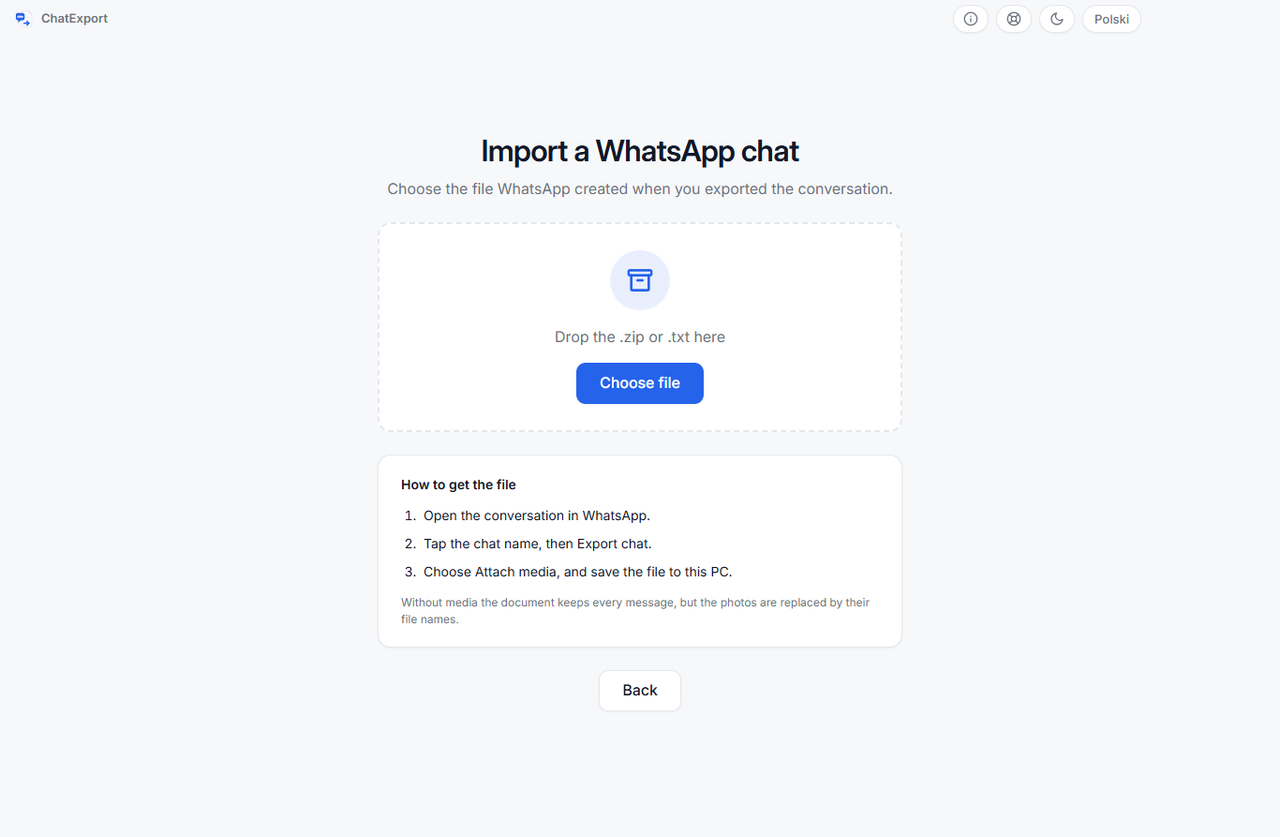
It also asks one question that has to be answered by a person, covered below.
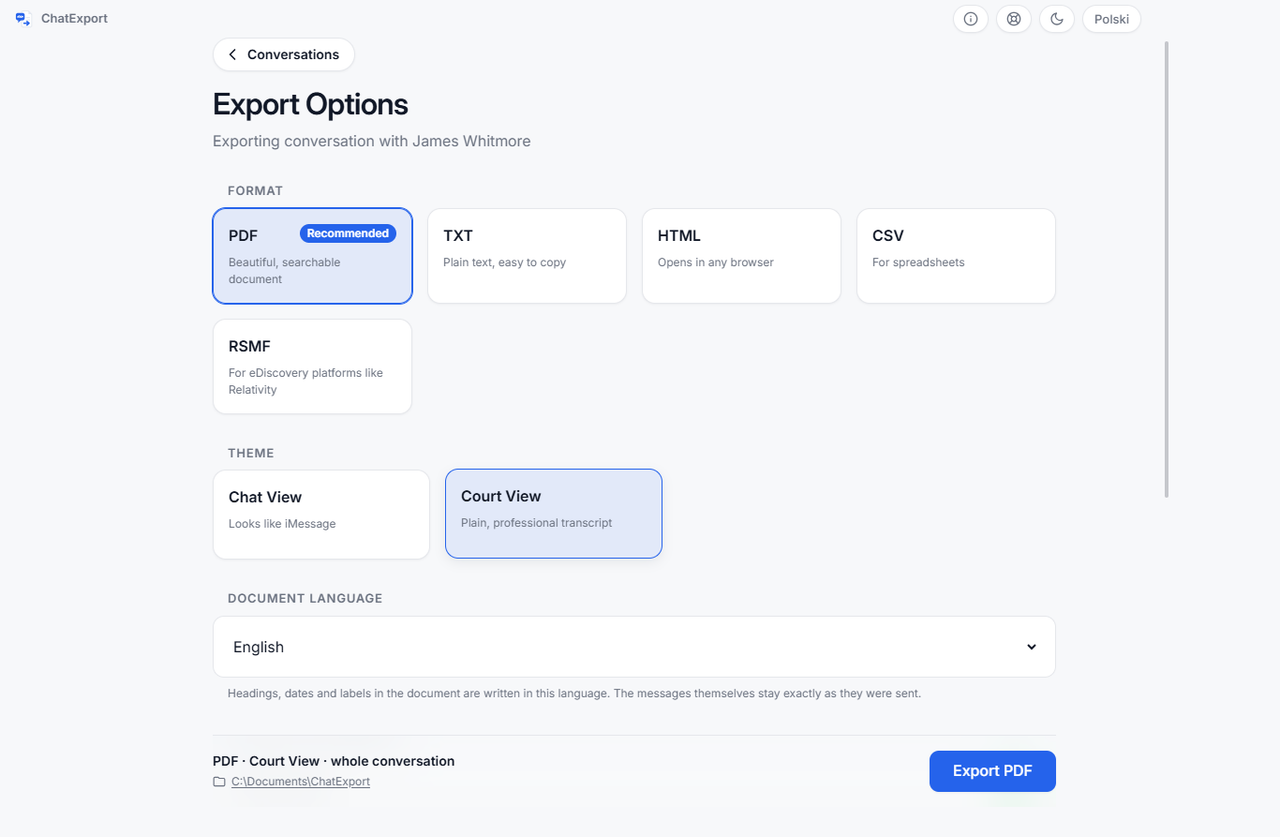
4. Choose the format and export
From here nothing is specific to WhatsApp. The same five formats, PDF, TXT, HTML, CSV and RSMF, the same three PDF styles, the same date range, the same search, and the same SHA256 fingerprint on the finished file, which one command re-checks any time.
Which participant are you?
The export file does not record who made it. In the transcript both sides look identical, so nothing in the file says which name belongs to the person holding it.
That is why the program asks, and why nothing continues until you answer. The choice decides which half of the conversation is laid out as sent and which as received, which is to say it decides how half the document reads. Guessing it from who wrote more, or who wrote first, would be wrong often enough to be unusable in a document that has to hold up.
How does it know whether 03.04.2026 is April or March?
A WhatsApp export records nothing about the phone that made it, so a date written with two small numbers is genuinely ambiguous, and reading it the wrong way shifts every date in the document by weeks or months. Rather than assume, the program decides once, across every timestamp in the file at the same time, and shows you what settled it:
| What decides it | What the screen says |
|---|---|
| The file writes full years first, as in 2026-04-03 | Certain |
| Any component above 12, anywhere in the file | Certain, a date in the file settles it |
| The order of the file, which is written oldest first, so only one reading runs forwards in time | Certain, only this reading runs forwards |
| None of the above, which is when both readings run forwards in time and nothing in the file separates them | Assumed, day before month |
The last row is the one to look at. When the file cannot settle the question, the screen says so in exactly those terms rather than quietly picking. An interpretation nobody can check does not belong in a document going in front of a court, and you see which case you are in before you export.
What does a WhatsApp export not contain?
This is the honest half, and it is shorter to read now than to discover later.
| What is missing | What the document does instead |
|---|---|
| The time a message was edited | WhatsApp records that it was edited, never when. The message is marked and the time is left blank, rather than filled in with the send time, which would print an edit time nobody recorded |
| The text of a deleted message | The notice becomes a withdrawn message with no text, so it reads as a withdrawal rather than as words the sender typed |
| Delivery and read receipts | Absent. WhatsApp does not write them into the file |
| Reactions | Absent, for the same reason |
| Which message a reply answered | Absent. The reply is there, the link is not |
| The time zone | The file carries none. Its clock times are the local time of the phone that made the export, with no offset recorded, so an import in another time zone has nothing to convert from. The import screen and the title page name the zone the times are read in, which is the only honest thing to say about them |
Lines WhatsApp writes about the group itself, somebody joining, a name change, a missed call, the notice about encryption, carry a time but no sender. They are left out of the transcript, counted, and the count is shown on the import screen. Dropping them silently would hide part of the file from the person relying on it.
All of that is present in an iPhone Messages export, because the database records it. If the conversation you need is in Messages rather than WhatsApp, that is the stronger document, and exporting iPhone messages for court covers what to do with it.
Is a WhatsApp export good enough for court?
Nobody can promise what a court will accept, and software that does is worth being suspicious of. What can be said is what the document carries.
Because the source here is a file rather than a device, the title page names it: the file name, and a SHA-256 fingerprint of that file. So the finished document makes two separate statements, and they are worth keeping apart:
- The source hash covers the file WhatsApp wrote. It says this document was made from that file and no other.
- The evidence hash, written beside the export as a
.sha256file, covers the document itself. It says the document has not changed since it was made.
Keep the original export file exactly as WhatsApp saved it, the way you would keep a backup folder. It is what anyone checking the document would convert again. The one format that does not carry the source rows is CSV, which is a data schema rather than prose, so a provenance line would have to become a column on every message or a comment that breaks every parser.
Frequently asked questions
Does this work if my phone is an Android?
Yes, and it is the only part of ChatExport that does. The export file is written by WhatsApp rather than by the phone, so an Android export opens exactly like an iPhone one: same two file shapes, same import screen. Nothing else in the program reads an Android phone, so if you also need your SMS, that part still needs an iPhone and a backup.
Are the photos included in the PDF?
Yes, in place in the conversation, at the size you choose, as long as you chose to attach media when WhatsApp asked. Files that are named in the conversation but missing from the export are marked as missing rather than skipped, and the import screen counts them before you export.
Can it recover WhatsApp messages I deleted?
No. The export contains what the conversation holds when you export it. A message deleted before that is not in the file, and nothing can read what is not there. This is a real difference from an iPhone backup, where iOS 16 and later keep recently deleted messages recoverable for about thirty days.
Does the import upload my conversation anywhere?
No. The file is unpacked on your own computer and read there. The unpacked copy lives in a session folder that is wiped when you close the app, because a zip has to be unpacked for the photos to render and nothing you did not deliberately save should outlive the session. Your original export file stays where you put it.
How large a chat can it take?
The importer accepts an archive of up to 2 GB holding up to 20,000 files, and says so plainly rather than filling the disk trying when a file is larger. Those figures are a guard against a malformed or hostile archive rather than a promise about conversations: a chat whose attachments are photos stays well under them for years, while a handful of long videos can approach the size limit on its own.
Does it export Signal, Messenger or Telegram too?
No, and the reason is worth stating precisely, because some of them do produce export files. Telegram’s desktop app writes HTML and JSON, and Meta hands over Messenger data through its own download tool. ChatExport does not read any of those formats. Its two sources are the iPhone Messages database and WhatsApp’s own export file.
What about voice notes?
They are listed where they were sent, with the file name and the time, in the PDF and TXT exports. A PDF cannot play audio, and pretending otherwise would make the document look more complete than it is. One gap worth knowing: the self-contained HTML export copies images beside the page but not voice notes, so if the recordings matter, keep the original export file, which you should be keeping anyway.