How to verify a PDF with SHA256 in 30 seconds
To check that a PDF has not been altered since somebody recorded its fingerprint, run
certutil -hashfile "yourfile.pdf" SHA256 in Windows Command Prompt and compare the string it
prints with the one you were given. If the two match, the file on your disk is byte for byte the
file that hash was taken from. If they differ by a single character, something about the file is
different, and a hash cannot tell you what.
That is the whole technique. The rest of this page is what the answer means, which is where people go wrong.
How do you check a file hash on Windows?
Run certutil -hashfile "yourfile.pdf" SHA256 in Command Prompt. certutil ships with Windows,
so there is nothing to install and nothing to trust beyond what is already on the machine.
certutil -hashfile "chatexport-sample-court-view.pdf" SHA256It prints three lines: a heading naming the file and the algorithm, the hash itself, and a line confirming the command completed. The middle line is the answer.
Two things worth knowing before the output surprises you. Current Windows builds print the hash as one unbroken lower case string. Older builds insert a space between every byte pair, so the same hash arrives looking twice as long. They are the same value: strip the spaces and compare.
Try it on a real file. The sample Court View export published on this site has this SHA256:
608bf739d941bb0ea1583aad55c8b785342ec152141cd7a321be1ce48b453a45Download the sample Court View export, run the command against it, and you should get exactly that string. If you do, you have just verified that the file that reached your disk is the file that left this server, and you now know the technique works on your machine rather than only in an article.
How do you check a hash on PowerShell, macOS and Linux?
Every one of them has the command already installed: Get-FileHash in PowerShell, shasum -a 256
on macOS and Linux. Nothing here needs downloading either.
PowerShell:
Get-FileHash "yourfile.pdf" -Algorithm SHA256It prints the hash in upper case. Hexadecimal is case insensitive, so A30C and a30c are the
same value. Compare case insensitively or lower case both sides first.
On macOS and Linux:
shasum -a 256 yourfile.pdfIf somebody handed you a .sha256 file alongside the document, every platform can check it
directly instead of making you compare by eye. On Linux:
sha256sum -c yourfile.pdf.sha256On macOS, which does not ship sha256sum, the built in shasum does the same job:
shasum -a 256 -c yourfile.pdf.sha256Both print OK or they print FAILED. There is no third answer.
On Windows, certutil cannot read a sidecar file, but one line of PowerShell can, and it ends in
True or False:
(Get-FileHash "yourfile.pdf").Hash -eq ((Get-Content "yourfile.pdf.sha256") -split '\s+')[0]That reads the first word of the sidecar, hashes the document, and compares the two without
anyone squinting at 64 characters. Case does not matter to it, which is convenient, because
Get-FileHash prints upper case and sidecar files are usually lower.
How do you compare two hashes without going cross eyed?
A SHA256 is 64 hexadecimal characters. Nobody reads all 64, and nobody should pretend they do.
In practice people check the first six and the last six, which is a reasonable habit for spotting the wrong file, a truncated download or a copy that never finished. It is not a reasonable habit if you are worried about someone deliberately constructing a near match, because that is a different threat and the answer to it is to let a machine compare the strings.
Letting the machine do it, on Windows:
fc /b yourfile.pdf theirfile.pdfThat compares two files directly. For one file and a recorded hash, the sidecar commands above do
the job on every platform: sha256sum -c or shasum -a 256 -c on Linux and macOS, and the
PowerShell line on Windows.
Can you check a hash without the command line?
You can, and it is worth knowing which of the two answers fits your situation, because they are
not interchangeable. ChatExport has a Check a document screen: drop the file in, and it reads
the .sha256 file sitting beside it, or takes a value you paste, and says whether the two match.
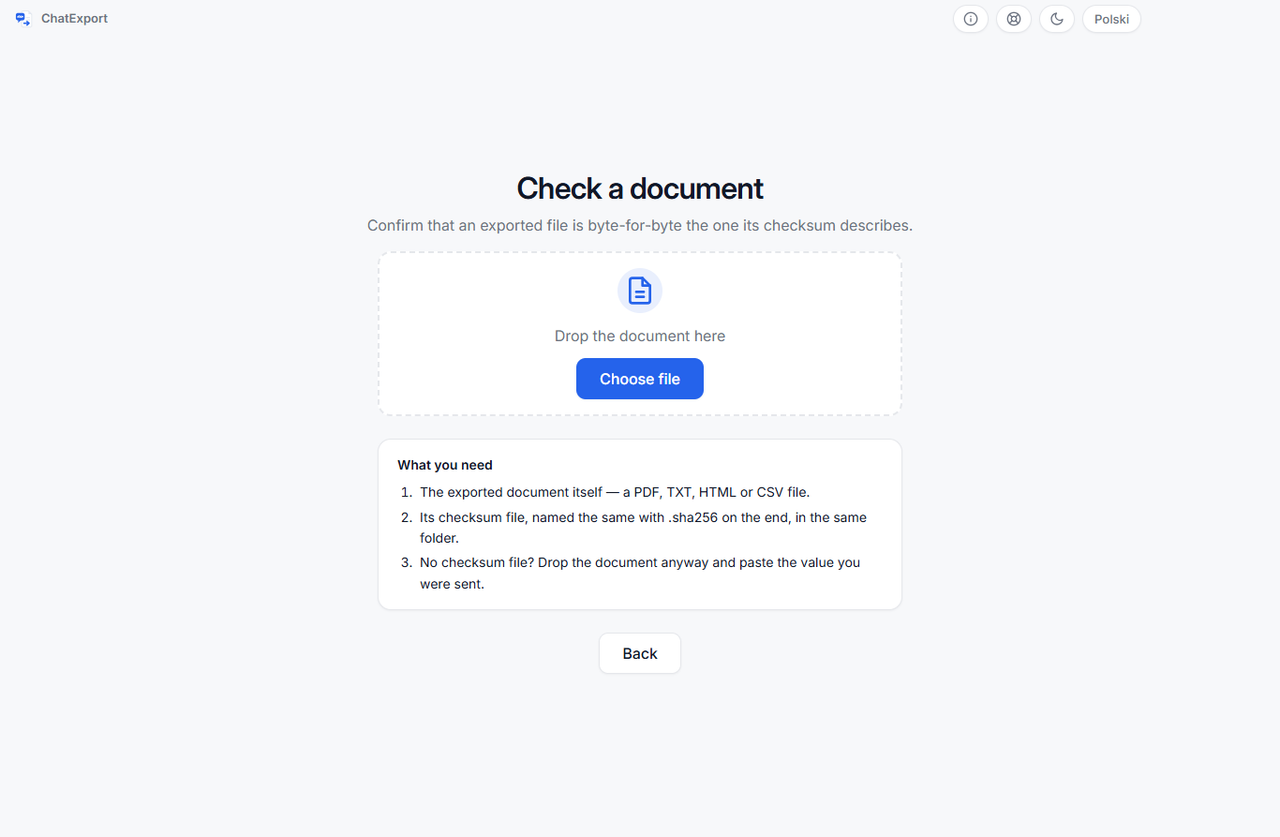
Use it when the file is yours and you are checking your own work before you hand it over. When the
document arrived from somebody else, use certutil or shasum instead. Not because the screen is
worse at arithmetic, but because a document and the tool vouching for it should not come from the
same place: the command ships with your operating system, it was not written by whoever made the
file, and the person you are trying to convince can run it themselves.
What does a matching hash prove?
It proves the file has not changed since the hash was taken. That is a narrow and genuinely useful fact. If you recorded the hash on the day you exported a conversation, and it still matches six months later, then nobody has edited a date, removed a message or redrawn a page in the file you are holding.
It does not prove anything about the phone. A hash covers a file. It says nothing about whether the conversation inside it happened, who was holding the device, or whether the backup it came from was complete. It is evidence about one file’s integrity and nothing else, and claiming more for it is the fastest way to have the whole point dismissed.
It does not prove two exports are identical. This one catches people out. Export the same conversation twice and you get two different hashes, because each export records its own generation date inside the document. The messages read the same. The bytes do not. A hash proves that one file has not been altered since it was made, not that two files made at different times are the same thing.
When should you record the hash?
A hash is not something you can go back and produce later. It has to be taken from the file in the state you want to prove, which in practice means the moment the export finishes.
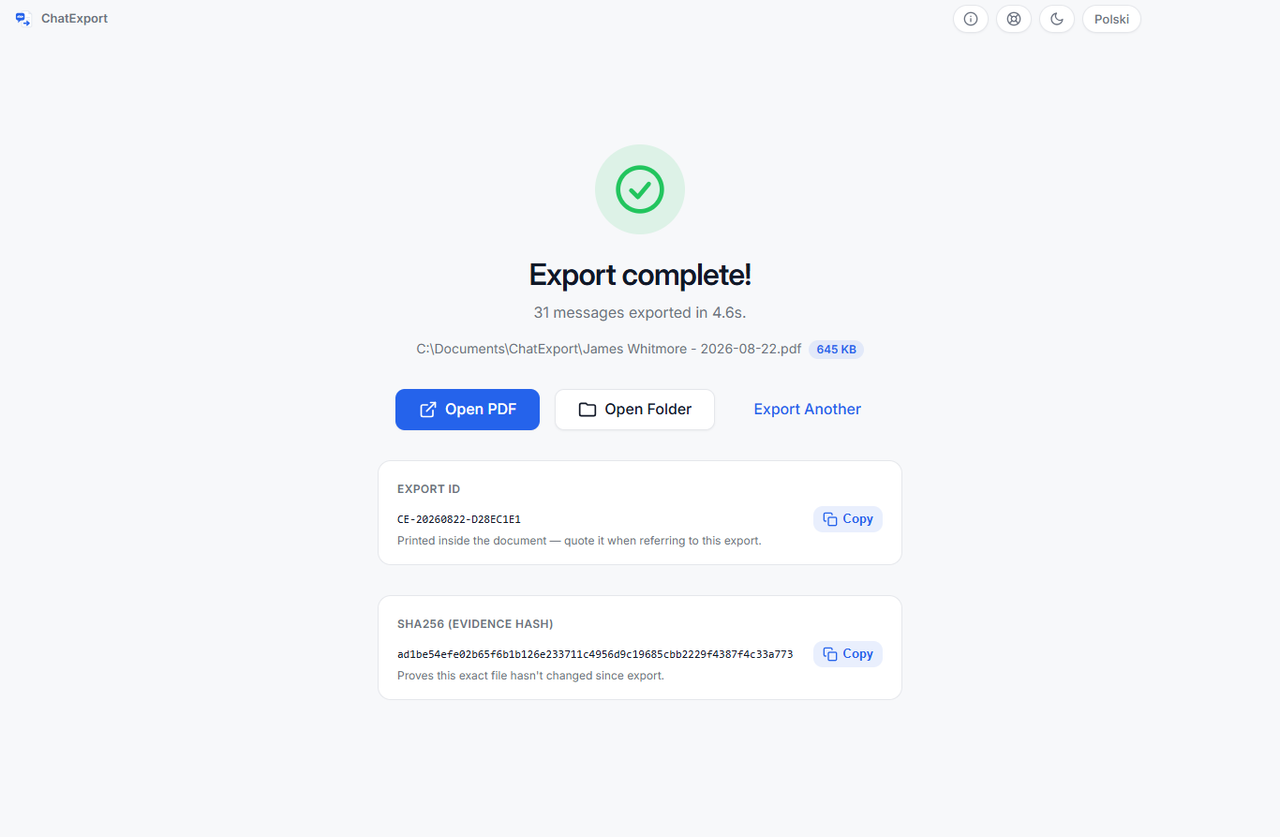
ChatExport computes it for you as soon as the document is written, shows it on the final screen
with a button to copy it, and writes it beside the file as <filename>.sha256 in the format
sha256sum -c and certutil already understand. Every format gets one, not only PDF, because a
CSV handed to a lawyer deserves the same treatment.
What to do with it: copy it into your notes with the export date, and keep the backup folder the export came from. Between the two you can show both that the document has not moved and where its contents came from. Making and keeping that backup is its own job, covered in how to back up iPhone text messages to a PC without iCloud.
Questions people ask
Is SHA256 the same as a password or a signature?
No. It is a fingerprint of content, computed by anyone, with no secret involved. That is why anyone can re-check it, and also why it says nothing about who made the file. A cryptographic signature answers the “who” question. A hash answers only “is this the same bytes”.
Someone changed one comma. Will the hash notice?
Yes. Any change at all produces a completely different hash, not a slightly different one. There is no partial match to interpret.
The hash does not match. What now?
Assume the file is not the one you were given, in the boring sense first: a download that stopped early, a copy that was opened and re-saved by a PDF editor, a mail system that recompressed an attachment. Ask for the file again before you assume anything worse.
Can I hash a whole folder?
Not with one command in a way that means anything. Hash each file, or make an archive of the folder and hash that, remembering that the archive’s hash covers the archive rather than the files.