How to save text messages as PDF from an iPhone
To save text messages as PDF from an iPhone, back the phone up to a computer with Apple’s own software, then export the conversation with a tool that reads the backup, such as ChatExport. The first run takes 10 to 50 minutes, almost all of it the backup, and every conversation after that takes about two minutes. There is no way to do it on the phone alone, because iOS has no Save as PDF anywhere in Messages.
This page is the short route: one conversation, saved properly, today. The full guide to exporting iPhone messages to PDF compares every alternative method and covers the Mac path in detail.
What does saved actually have to mean?
A conversation is only saved when it exists as a file that opens with no phone in the room, keeps a timestamp on every message, and can be shown later to be unchanged. Most of what people call saving fails at least one of those tests, and the failure only shows up years later, when the phone is gone:
| Where the messages are | Opens without the phone | Timestamp on every message | Searchable | Provably unchanged |
|---|---|---|---|---|
| Still in the Messages app | No | Only on the phone | Only on the phone | No |
| Screenshots in the camera roll | Yes | Only what the screen happened to show | No | No |
| Synced to iCloud | No, needs a signed-in Apple device | Only on that device | Only on that device | No |
| PDF exported from a backup | Yes | Yes | Yes | Yes, by SHA256 hash |
The iCloud row surprises people most. Messages in iCloud keeps your threads on your own Apple devices. It is a sync, not a file, and the day the account closes or the last device is wiped, it stops being anything at all. It has a second effect that matters here: Apple documents computer backups as not including messages already stored in iCloud, so with that switch on, check the backup after making it, which step 3 does anyway when you open the conversation and confirm it is complete.
The four screens, start to finish
Saving a conversation is four screens: make a backup, open it, pick the conversation, take the file. Only the first one costs real time.
1. Make the backup (10 to 50 minutes, once)
Install Apple Devices from the Microsoft Store, or use iTunes if it is already on the machine. Connect the iPhone with a cable, unlock it, tap Trust when it asks, then choose Back up to this computer and start.
Tick Encrypt local backup and choose a password you will not lose. ChatExport reads encrypted backups normally by asking for that password, and an encrypted backup is the safer thing to have sitting on a PC, for reasons set out in how to read an encrypted iPhone backup on Windows.
The first backup of a full phone is the slow part. When it finishes, unplug the phone. Nothing after this point needs it.
2. Open the backup (10 seconds)
Launch ChatExport. It finds the backups already on the PC and lists each with the device name, the date it was made and the iOS version, which is how you tell two phones apart.

3. Pick the conversation (30 seconds)
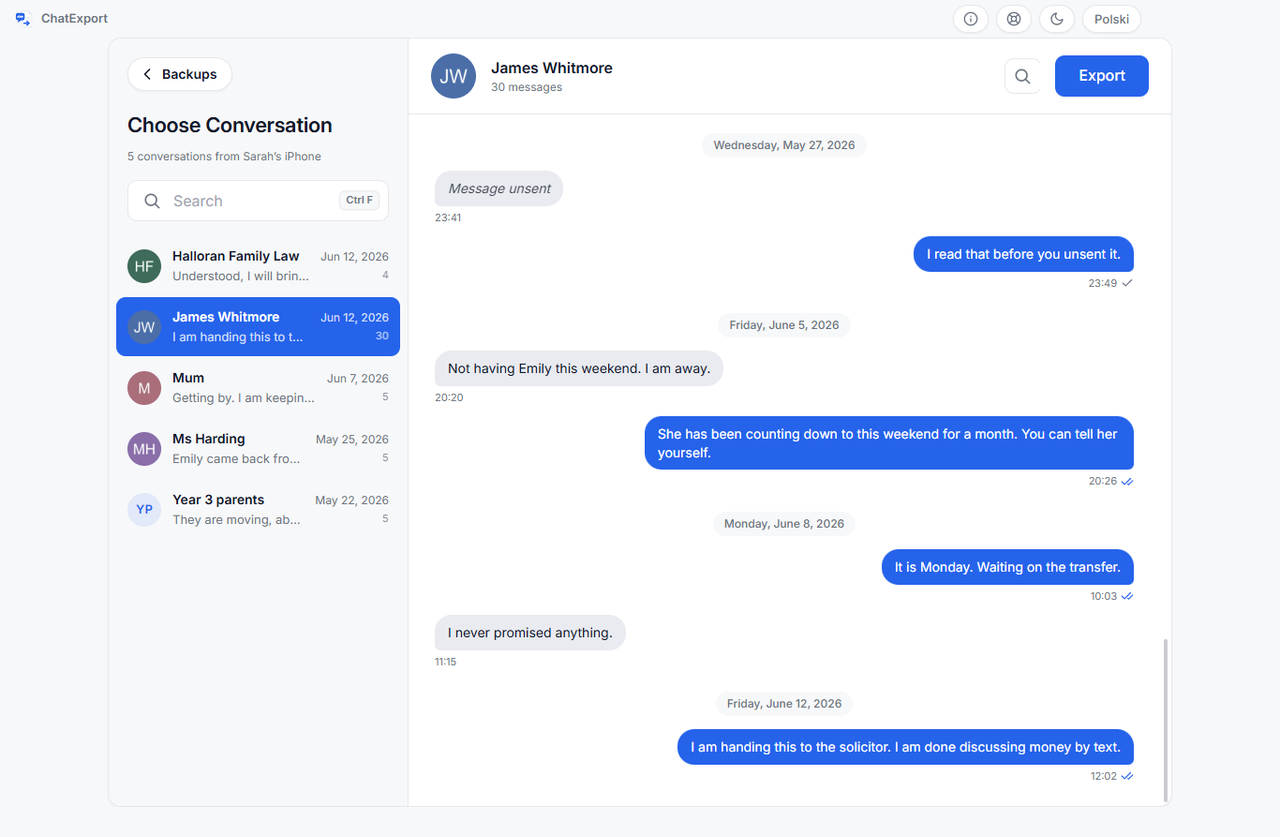
You get a searchable list of every thread, with contact names resolved from the backup’s own address book. Search matches names, numbers and message content, so a half remembered phrase is enough. The preview shows the most recent messages so you can confirm it is the right thread; the export always contains the full history.
4. Choose the settings and export (about 2 minutes)
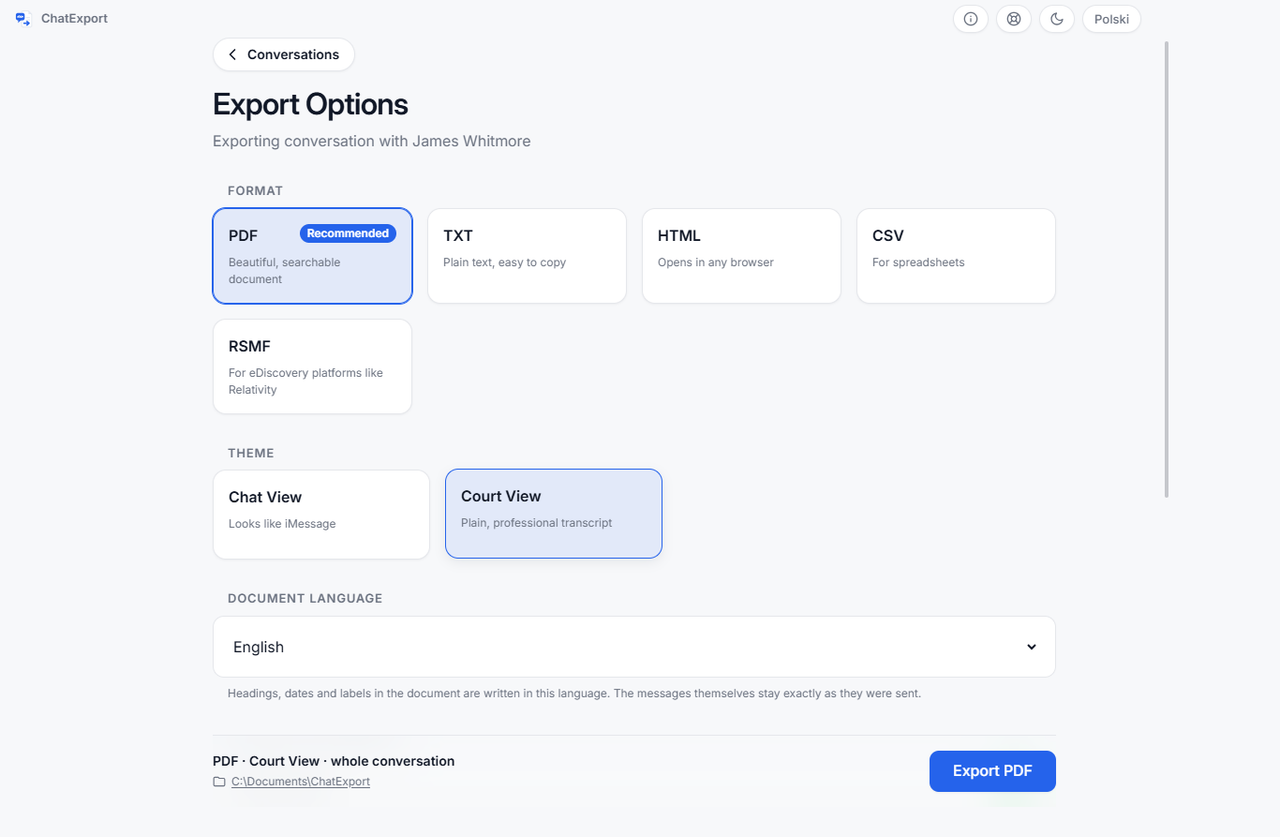
Every setting has a working default, so this screen can be a single glance.
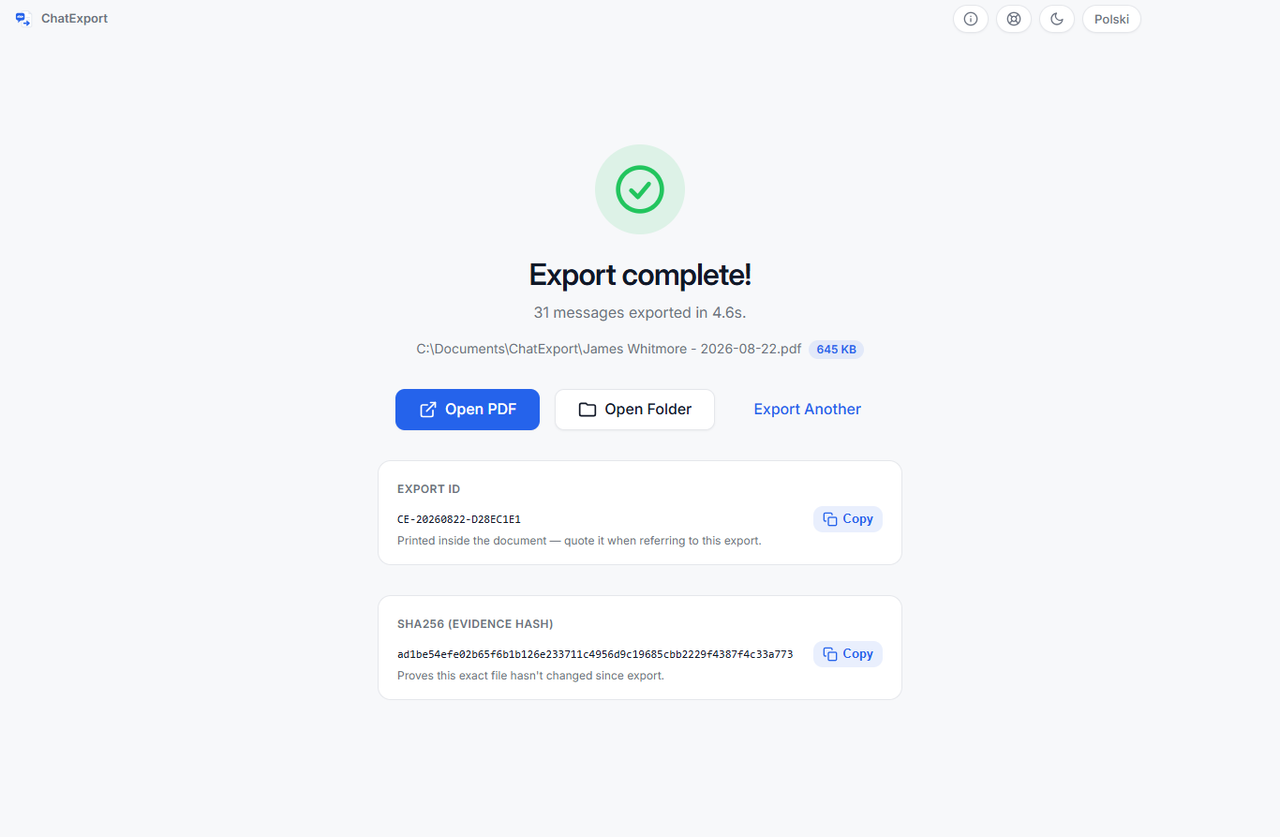
Press Export, watch the progress bar, and when it finishes the success screen shows the file’s
SHA256 fingerprint with a copy button. ChatExport also writes that fingerprint to a small file
next to the PDF, named like the export with .sha256 on the end.
Three settings that matter when the goal is keeping
For an archive, set a real document title, leave the date range at everything, and keep photos on.
- Title. It becomes the first line of the title page.
Messages with J. Alvarez, 2019 to 2026is worth ten seconds of typing; a generic title costs a minute of confusion every time the file is opened. - Date range. Leave it at everything. An archive that starts at the beginning never has to answer why it does not.
- Photos. On, at medium unless the photos themselves are the point, in which case large. On the printed page the options come to about 6.4 cm on the longest edge, about 12.7 cm, and up to the full width of the text column, so large photos make a noticeably heavier file.
The layout choice is separate: Chat View looks the way the conversation looked, with bubbles, and is the right archive of a family thread. Court View is a monochrome transcript for filings and formal review. If there is any chance the file ends up in a dispute, export both. Same source, same afternoon.
Where should you keep the file so it stays kept?
Keep the PDF in two places, keep the hash with it, and keep the backup folder too if the disk can spare the space.
Two places means what it says: the PC and one other location you control, a second drive or a
private cloud folder. The .sha256 file travels with the PDF, and anyone can recheck it later
with one built in Windows command, shown in
how to verify a PDF with SHA256.
Name the file so it explains itself: messages-alvarez-2019-to-2026.pdf beats export.pdf the
moment a folder holds three of them. And never edit the saved PDF. Annotating a copy is fine; the
original stays byte for byte as exported, or the hash stops matching.
The backup folder is worth keeping because it is the source. If a question ever lands on a message the export left out, the backup answers it, and where Windows stores iPhone backups shows exactly which folder to preserve.
What can saving as PDF not do?
A PDF is a snapshot of what the backup contained on the day it was made, and no export can put into it what was never there.
- Messages the backup never received. With Messages in iCloud switched on, Apple documents computer backups as not including messages already stored in iCloud. Open the backup and check the thread is complete before treating it as saved.
- Messages deleted more than about a month before the backup. iOS 16 and later hold deleted messages for roughly thirty days, so a backup made inside that window still contains them. Older than that, only a backup that predates the deletion does.
- Messages sent after the export. The file does not update itself. A fresh export next year is a new file with a new hash.
- Signal, Messenger and Telegram. Those apps keep their own databases and export from inside the app. The Messages database holds SMS, MMS, RCS and iMessage. WhatsApp is the one exception, and it takes a different route: how to export a WhatsApp chat to PDF.
- An encrypted backup with a lost password. Nothing can read it, Apple included. The password is the key, and there is no back door.
- A promise that a court accepts the document. No tool can make that promise. What an export can do for a legal matter, and what it cannot, is covered in export iPhone messages for court.
Frequently asked questions
Can I save text messages as PDF without a computer?
No. iOS has no way to save a conversation as a document, and apps that promise it on the phone are stitching screenshots together, which keeps every weakness of screenshots. The real route runs through a local backup on a computer.
Does saving the PDF change or delete anything on the iPhone?
No. The backup is made by Apple’s own software, and ChatExport opens it read only. The phone is not involved after the backup finishes and can be switched off in a drawer.
How many pages will the saved PDF have?
As arithmetic rather than a measurement of your thread: around 15 to 25 pages per 500 messages without photos, so a 5,000 message conversation lands roughly between 150 and 250 pages. Photos add pages and dominate the file size, which is why the photo size setting exists.
Can I save only part of a conversation?
Yes. The date range settings take a From and a To date, with presets for common windows. For an archive the better default is the whole thread: you can always point a reader at one page, and you cannot add January back into a file that starts in March.
Will photos be inside the saved PDF?
Yes, in the exact place they were sent. iPhone HEIC photos are converted to JPEG so every PDF viewer can display them. What happens to videos, voice messages and other attachments is its own subject, covered in export iPhone messages with photos and attachments.
What does saving this way cost?
The download is a free trial. The saved PDF carries a watermark and stops at the 50 most recent messages in a conversation. A one time licence lifts both limits and is on sale now, and there will never be a subscription.
Is the saved PDF proof that the messages are genuine?
The hash proves one specific thing: the file has not changed by a single byte since the moment it was exported. Whether a document is accepted, and what weight it carries, is always the decision of whoever receives it. Recording the hash and the export date is the part you control.
If your situation is more specific
- Weighing every method against each other, including the free ones: convert text messages to PDF, every method compared.
- The complete walkthrough with the Mac path and troubleshooting: how to export iPhone messages to PDF.
- No backup appears in the list: where Windows stores iPhone backups.
- The backup is encrypted: how to read an encrypted iPhone backup on Windows.