Export iPhone messages with photos and attachments
An export built from an iPhone backup can carry the conversation’s photos inside the document, placed exactly where they were sent, with every other attachment recorded in place by file name, type and size. In ChatExport nothing attached to a message disappears silently: a message whose only content was a photo still appears in every format, and a file the backup does not contain is marked as missing rather than skipped.
Where do attachments live in a backup?
In an iPhone backup, every attachment is a separate file stored under a hashed name, and the message database records which file belongs to which message, with the original file name, its type and who sent it. The photos are the ones the phone holds, not thumbnails, which is why an export can embed them at real quality. What that folder of hashed names actually looks like is mapped in where Windows stores iPhone backups.
What does each attachment type become in the export?
Every attachment type has a defined fate in each export format:
| Attachment | In the PDF and HTML | In CSV | In TXT |
|---|---|---|---|
| Photo sent as HEIC | Embedded in place, converted to JPEG so every viewer displays it | File name in the attachments column | File name, type and size under the message |
| Photo sent as JPEG | Embedded in place | File name | File name, type and size |
| Screenshot or sticker (PNG) | Embedded in place, kept as PNG so transparency survives | File name | File name, type and size |
Video (.mov, .mp4) | A labelled card at the point it was sent, with file name and size | File name | File name, type and size |
Voice message (.caf, .m4a, .amr) | A labelled card with file name and size | File name | File name, type and size |
Contact card (.vcf) | A labelled card with file name and size | File name | File name, type and size |
| Any other file | A labelled card with file name and size | File name | File name, type and size |
| A file the backup does not contain | The same card, marked as missing | File name | File name |
Two details in that table are deliberate. In the HTML export the photos are real image files,
written to a folder named after the export with _files on the end and linked relatively, so the
archive keeps its pictures when the folder moves to another drive. And the CSV records attachment
names for every message even when the export was made with photos switched off, because a
spreadsheet that silently dropped photo-only messages would present itself as a complete
transcript while missing rows.
How big is a photo on the printed page?
About 6.4 cm on the longest edge at small, about 12.7 cm at medium, and up to the full width of the text column at large. Those three settings are the only control over it.
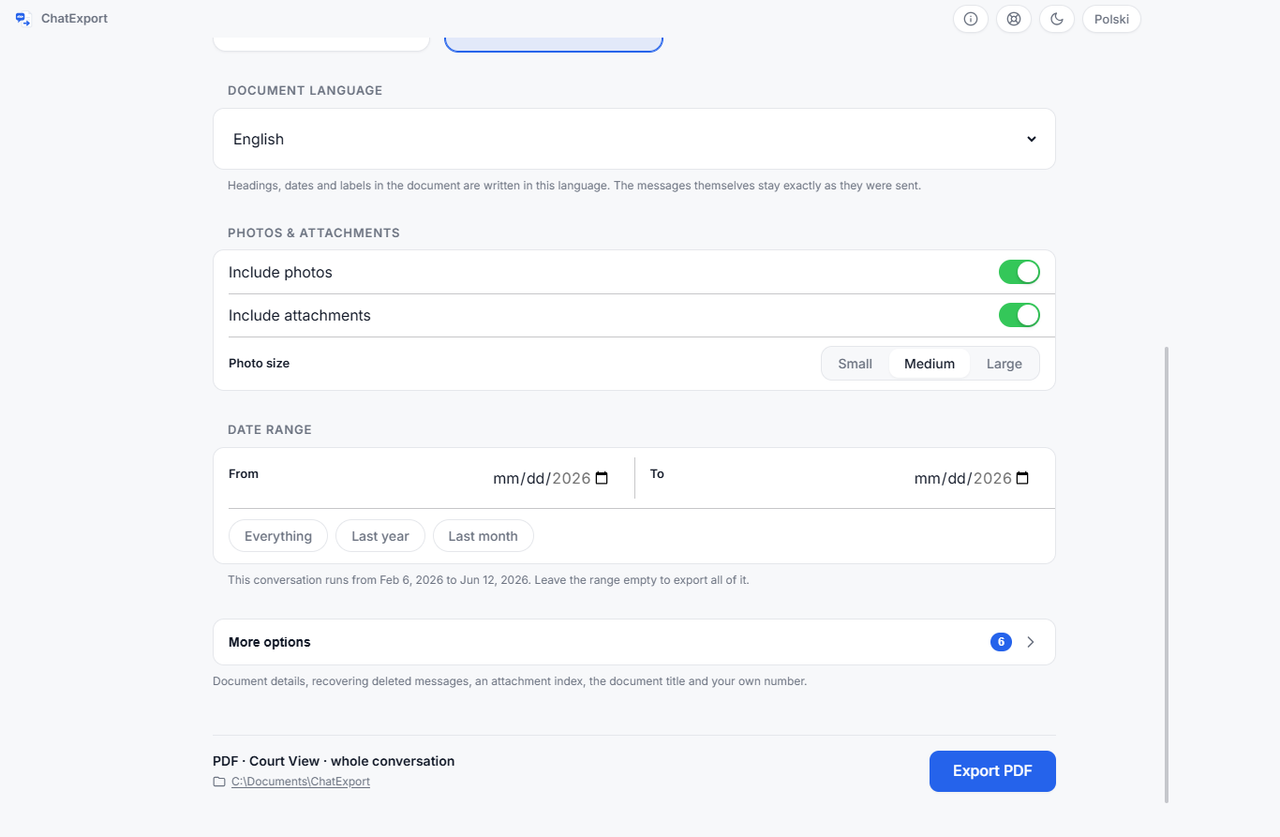
Small, medium and large decide how much of the page a photo may take. On the printed A4 page that comes to about 6.4 cm on the longest edge, about 12.7 cm, and up to the full width of the text column, which is roughly 17 to 18 cm depending on the layout. The figures are derived from the page geometry rather than measured with a ruler on paper, which is why they say about. A photo never overflows the column, and a very tall one is capped just under a full page so it cannot be sliced across two.
| Option | On the page | Choose it when |
|---|---|---|
| Small | About 6.4 cm on the longest edge | The thread is long and photos are context rather than content |
| Medium | About 12.7 cm on the longest edge | The default, right for most exports |
| Large | Up to the full text column, roughly 17 to 18 cm | The photos are the point: photographed documents, schedules, damage |
The embedded image data is written at twice the displayed size (480, 960 and 1,800 pixels on the longest edge), which works out to about 190 dots per inch on paper at small and medium, and around 250 to 270 when the layout caps a large photo. A photo already smaller than the target is embedded without downscaling.
Re-encoded photos are written as JPEG at 85 per cent quality, and images that arrived as PNG stay PNG so stickers and screenshots keep their transparency. HEIC is converted because PDF viewers do not display it; the conversion happens on your machine, like everything else. A separate toggle prints a caption under each photo with the original file name and size, describing the file as it exists on the phone, not the re-encoded copy in the document.
What is the attachment index?
Any PDF export can end with an attachment index: an annex listing every attachment with its file name, its sender, the date it was sent, and a reference to where in the conversation it appears. It exists for the reader who asks how many photos there were in March, and it is an annex rather than a change to the conversation pages, so the messages themselves print exactly as they came out of the backup.
What can the export not do with attachments?
A document format has hard limits, and it is better to know them before exporting than after.
- No playback. A PDF cannot play a video or a voice message, so they are recorded, not embedded. If a recording itself matters, keep the backup: it holds the original file.
- No extraction of originals. The export is a document, not a file dump. Even the HTML export’s image folder holds the display copies, re-encoded for viewing. What that folder is for and why it has to travel with the file is the HTML export of a text conversation. That matters if a photo itself is evidence: a re-encoded copy hashes differently from the original file and does not carry the camera’s metadata, so the exhibit is the original in the backup, and the picture on the page is how the reader finds it. One more reason to keep the backup.
- Nothing the backup does not hold. A message can reference an attachment whose file never made it into the backup. The export marks it as missing instead of hiding it, and an older backup may still contain the file.
- Nothing from other apps. Photos sent in Signal or Messenger live in those apps’ own databases, not in the Messages database, and export from inside those apps. WhatsApp photos do come out, but by the other route: WhatsApp attaches them to the file it exports itself, which is how to export a WhatsApp chat to PDF. When they do not come out, the export was made without media and the file says so on every picture, which is what the image omitted line means.
Frequently asked questions
Are photos embedded in the exported PDF or attached separately?
Embedded, at the exact point in the conversation where they were sent, with an optional index annex at the end that lists them all with senders and dates. Nothing arrives as a separate folder you have to cross-reference by hand, unless you choose the HTML format, where the images sit in one folder beside the page by design.
What happens to videos and voice messages?
Each appears as a labelled card in the document, at the point it was sent, with its file name and size, and each is listed in the attachment index. The recording itself stays in the backup, because a PDF cannot play media.
Why did my HEIC photos come out as JPEG?
Because PDF viewers do not display HEIC, so the export converts each photo once, at 85 per cent JPEG quality, on your own machine. The caption toggle still names the original HEIC file, so the document records what the phone actually holds.
Can I export with photos switched off?
Yes, and non-photo attachments have their own separate toggle, so a text-only document is two clicks. The CSV format ignores both toggles on purpose and always lists attachment file names, so no message vanishes from the data.
A photo shows in the Messages app but the export marks it missing. Why?
Three causes cover almost every case. The backup on your PC is older than the photo. The file was never written into the backup, which Apple documents as the expected state for data already stored in iCloud when Messages in iCloud is switched on. Or the file has simply gone from the phone itself. Make a fresh backup and check it; if the photo is old, an earlier backup may be the copy that holds it.
What does exporting cost?
The download is a free trial. Photos and attachments come through in full, but the document carries a watermark and stops at the 50 most recent messages in a conversation. A one time licence lifts both limits and is on sale now, and there will never be a subscription.
Where this fits
- The full walkthrough, from cable to finished file: how to export iPhone messages to PDF.
- Keeping a conversation for good, including where to store the result: how to save text messages as PDF from an iPhone.
- Choosing between PDF, CSV, HTML and TXT for a specific destination: convert text messages to PDF, every method compared.