Convert text messages to PDF: every method compared
Converting text messages to PDF is not a file conversion, because an iPhone never gives you a
message file to convert. The method that works is: back the phone up to a computer, then export
the conversation with a tool that reads the backup’s message database and writes the PDF directly,
such as ChatExport. Two clarifications before anything else. If you are holding .msg
files, those are Outlook emails, not phone texts, and any ordinary document converter handles
them. And if the phone is an Android, this page does not apply: Android has its own export
routes, and everything below is about SMS, MMS, RCS and iMessage conversations on an iPhone.
Why is there no file to convert?
The iPhone keeps every text message in a single database, sms.db, and iOS does not let you open
it, copy it or email it to yourself. The only complete copy of that database you can reach sits
inside a local backup, in a MobileSync folder where every file carries a hashed name, which is
why browsing the folder finds nothing recognisable. The layout is mapped in
where Windows stores iPhone backups.
So every method that really produces a PDF of your texts does the same three things somewhere: copy the phone into a backup, read the message database out of it, and render a document. Anything that skips those steps is working from pictures of your screen instead, and inherits their weaknesses.
Where does the conversion actually break?
The chain is phone to backup to database to document, and each link has one failure mode worth knowing before you start.
- The backup needs free disk space. Budget what the phone says it is using, which for a 128 GB phone that is three quarters full means about 90 GB; the backup usually comes out smaller, because apps and media synced from a computer are not copied, but the full budget means it cannot fail halfway. It also silently never starts if the Trust prompt on the phone goes unanswered. And one setting changes what arrives at all: with Messages in iCloud switched on, Apple documents computer backups as not including messages already stored in iCloud, so open the backup and confirm the conversation is there before relying on it.
- The database read has a trap that arrived with iOS 16: the plain
textcolumn is often left empty and the words live in anattributedBodyblob instead, so a tool that only reads the column returns blank messages. A converter is only as good as its parser. - The rendering has to convert timestamps once and correctly, from Apple’s count of nanoseconds since 1 January 2001 into readable local time, and it has to convert HEIC photos into a format PDF viewers display.
- The verification is the easy link: one built in Windows command,
certutil, recomputes the file’s SHA256 fingerprint, as shown in how to verify a PDF with SHA256.
Six ways to turn iPhone texts into a PDF, compared
These six cover every route that actually ends in a document, and the honest comparison includes what each one costs, in money and in time on a realistic thread.
| Method | Cost | What it needs | Time for a 400 message thread | Timestamps | Complete thread |
|---|---|---|---|---|---|
| Screenshots pasted into a document | Free | Only the phone and patience | About 130 captures, around 3 hours, estimated below | Only where the screen showed one | Only what you captured |
| Print from Messages on a Mac | Free | A Mac signed into the same Apple ID | Minutes, after scrolling the whole thread into view | Only those the app displays | Manual, stalls on long threads |
| Forward to email, print the email | Free | Only the phone | Minutes, for a handful of messages | No, forwarding strips them | No, selection only |
| Carrier records request | Fees, and usually a lawyer | A subpoena or court order in most US cases; rules elsewhere differ | Weeks | Metadata only, no content | Metadata only |
| Upload to a web converter | Varies | A message file iOS never produces | Does not start | Not applicable | Not applicable |
| Export from a local backup | Free trial, watermarked and capped at 50 messages; a one time licence lifts both, never a subscription | A Windows PC and a cable | 10 to 50 minutes of backup once, then about 2 minutes | Every message, to the second | Always |
The web converter row deserves its one sentence: a converter site needs a file to upload, an iPhone produces no message file, and so whatever such a site converts, it is not your message database.
The screenshot line is an estimate, not a measurement. It stands on two stated assumptions, about three messages per capture and about twenty seconds per capture, and the full derivation is laid out in how to print text messages for court free. Change either assumption and the totals move with it. The Mac route, step by step, is in printing a thread from Messages on a Mac.
When is PDF the wrong format to convert to?
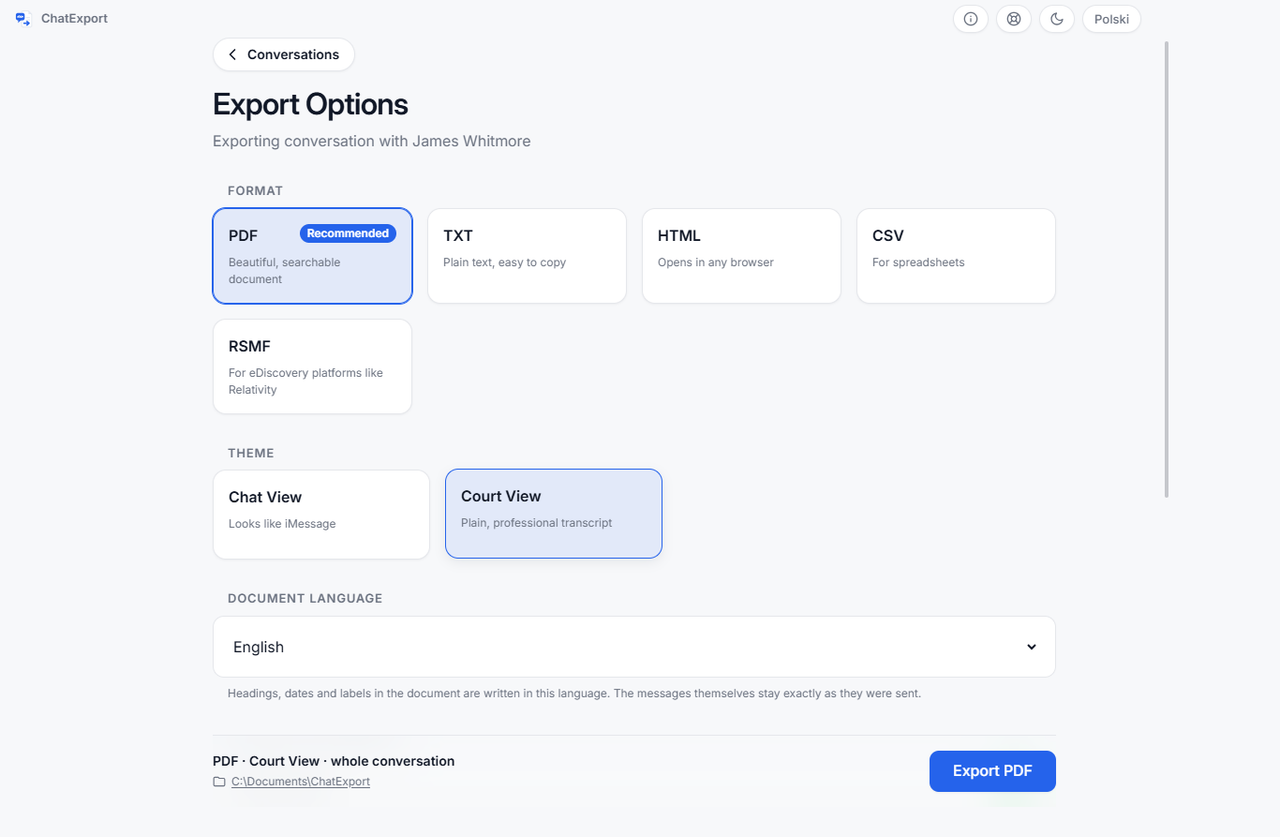
PDF is the right target for reading, printing, filing and sending to a lawyer, and the wrong one when the destination is a spreadsheet, a browser or a quotation in a letter. The same export can produce five formats, and picking by destination beats converting twice:
| The destination | Convert to | What you get |
|---|---|---|
| Reading, printing, filing | Title page, table of contents, bookmarks, page numbers, searchable text | |
| Excel or Sheets, dates lined up against invoices or a diary | CSV | Fourteen columns per message, all of them: timestamp with timezone offset, sender, direction, the transport the message travelled on, text, attachment names, reactions, edited, deleted, when it was edited, the earlier wordings, whether it was unsent, whether it was recovered after deletion, and when it was deleted |
| A browser, with photos you can zoom | HTML | One self-contained page, with its images in a folder beside it so the archive survives being moved |
| Quoting passages in a letter or statement | TXT | Plain text with date separators, ready to copy from |
Exporting the same thread twice, PDF for the record and CSV for the timeline, takes seconds, because the backup is already on disk.
What can no converter produce?
Every method in the table reads what the backup contains, so the limits below apply to all of them equally.
- Messages a computer backup never received. With Messages in iCloud switched on, Apple documents computer backups as not including messages already stored in iCloud. No converter can render what the backup does not hold, and the check costs a minute: open the backup and confirm the conversation is complete.
- Messages deleted more than about a month before the backup. iOS 16 and later keep deleted messages for roughly thirty days, and a backup made inside that window still holds them. Beyond it they are not in the database, so no tool can render them, and an older backup that predates the deletion is the only source.
- Signal, Messenger and Telegram threads. They live in their own databases and export from inside those apps. The Messages database covers SMS, MMS, RCS and iMessage. WhatsApp is the exception, by a different route: it writes a conversation to a file itself, and that file converts the same way, which is how to export a WhatsApp chat to PDF.
- An encrypted backup without its password. The encryption is Apple’s, there is no back door, and with the password the read is routine, as covered in how to read an encrypted iPhone backup on Windows.
- A guarantee of acceptance. A PDF with timestamps and a hash removes easy reasons to doubt a document. What a court makes of it is the court’s decision, a subject with its own guide in export iPhone messages for court.
Frequently asked questions
Is there a free way to convert text messages to PDF?
Yes, two real ones. Screenshots pasted into a document work at any scale you can stand, and a Mac can print a thread from the Messages app after you scroll its whole history into view. Both lose timestamps and both take manual effort that grows with the thread, which is what the comparison table above puts numbers on.
Can I convert text messages to PDF without a computer?
No. The complete copy of the message database only exists inside a local backup, and a backup needs a computer to be written to. Phone-only apps that promise conversion are assembling screenshots.
Do iMessage and SMS end up in the same PDF?
Yes. Blue bubbles and green bubbles live in the same sms.db database, so one export carries
both, along with MMS, and RCS on iOS 18 and later, where iOS stores it locally.
How long does the conversion take?
The first backup of a full phone takes 10 to 50 minutes, and it only has to happen once. After that, each conversation exports in about two minutes, and the phone does not need to be present at all.
How do I prove the PDF was not edited after conversion?
Compare its SHA256 fingerprint against the one recorded at export time. ChatExport shows the hash
on the success screen and writes it to a .sha256 file beside the export, and anyone can recheck
it with one certutil command in Windows.
Start from where you are
- Phone in hand, Windows PC on the desk: the step by step walkthrough is in how to export iPhone messages to PDF.
- The goal is a permanent keepsake rather than a document for a dispute: how to save text messages as PDF from an iPhone.
- The thread is full of photos, videos and voice notes: export iPhone messages with photos and attachments.