How to print text messages for court free, and where free breaks down
The short version. Yes, you can print text messages for court without paying anything. There are four free ways: screenshots taken on the phone, printing a thread from the Messages app on a Mac, forwarding or copying the messages to yourself, and photographing the screen with a second camera. All four work, and all four make the same bargain: you pay in time rather than money, and none of them can show that nothing was removed. The same five routes without the free constraint, paid ones included, are in how to print text messages from an iPhone. Three of the four also lose most of the dates; the Mac route keeps the ones the app displays, which is part of why it is the strongest of the four. Everything here is iPhone specific, because Android has export routes of its own.
| What you need | An iPhone. A Mac for one of the four |
| Time for 400 messages | Roughly 3 hours by screenshot, by the estimate below |
| Timestamps | Only those already on the screen |
| Shows nothing was left out | No, in all four cases |
Jump to: screenshots · Mac · forwarding or copying · the arithmetic · what free costs · FAQ
Method 1: screenshots taken on the phone
Worth describing properly, because most people do it badly and have to do it again.
- Open the conversation and scroll back to the oldest message you need.
- Press the side button and volume up together. On an iPhone SE or an iPhone 8 and older, the home and side buttons.
- Scroll by slightly less than one screen, so the last message of the previous capture appears again in the next one. That overlap is the only thing in the finished document showing that two images were consecutive.
- Repeat to the end of the range.
- Get the images onto a computer: AirDrop, a cable, or email in batches.
- Place them in one document in order, one or two per page, and print that to PDF.
Worth knowing. Dragging the conversation to the left reveals a time beside each message. It slides away the moment you let go, so capturing it means holding the drag with one hand and pressing the buttons with the other. It roughly doubles the time per capture, and it is the largest single improvement available to anyone doing this by screenshot.
What it costs. Time, all of it yours. The arithmetic is below.
What it loses. iOS prints a time above some message groups and not others, so most captures carry no date. Images cannot be searched, so nobody can find a phrase or cite a page. Nothing shows that image 41 and image 42 were adjacent. And you chose the frames, which invites the question of what sat above and below them.
Method 2: print the thread from Messages on a Mac
If you have a Mac and the conversation is on it, this is the strongest free method here and needs no extra software. There is a longer walkthrough of it, with a table of what it keeps and loses, in the Mac section of the complete PDF guide.
- Open Messages and select the conversation.
- Scroll to the very top of the thread, waiting for older messages to load as you go. On a conversation spanning years this is the slow part, and it can stall.
- Press Command and P.
- In the print dialog, open the PDF menu at the bottom left and choose Save as PDF.
- Name the file and save it.
What it costs. Minutes of scrolling on a short thread, far more on a long one, with no progress indicator and no guarantee it finishes.
What it loses. It prints what you scrolled into view and nothing else, so completeness depends on how patient you were, and it carries only the timestamps the interface was displaying. There is no title page, no contents, no bookmarks, no date range, and no way to check later that the file has not been altered. It does produce real searchable text, which is more than any other free method here manages, and it prints only what is on that Mac.
Method 3: forward the messages to yourself
- Press and hold any message in the thread and tap More.
- Tick every message you want. One tap each.
- Tap the forward arrow. iOS composes a new message holding the ones you ticked, and you choose where it goes: another number of yours, or an email address. Use an address not connected to your Apple ID. An address that is gets treated as an iMessage destination, so the whole thing comes back to your own devices instead of arriving in a mailbox you can print from.
- Open it on the computer and print it.
Copy and paste is the same method. Press and hold a message, tap Copy, and paste it into Notes, an email or a document. It is the route the press-and-hold menu puts in front of you, and it is worth knowing that it buys nothing over the arrow: the copy button takes one bubble at a time rather than one tap each, so it scales worse, and what you end up with loses exactly what the arrow loses. Everything below applies to both.
What it costs. Seconds for three messages. It scales badly: selection is one tap per message, with no way to take a range.
What it loses. The dates. What arrives is the text run together, without the day and time each message was sent, and often without a clear indication of which side said what. Photos sometimes come across and sometimes do not. The weakest of the four as a record.
Method 4: photograph the screen with another camera
Point a second phone or a camera at the screen, then transfer, order and place the pictures as in method 1. It costs what method 1 costs plus retaking the ones with glare, and loses what method 1 loses plus sharpness and the flat geometry of a real screenshot.
It is here for one situation: somebody shows you a message on their own phone and will not send it. Everywhere else a screenshot is better and faster.
The arithmetic: 400 messages
These are estimates built from two numbers, not measurements of your conversation. Change either number and the total changes, which is why the derivation is here and not just the total.
About 3 messages fit in one screenshot on a modern iPhone, fewer when the messages are long. About 20 seconds per capture, once you include scrolling to the right overlap, pressing the buttons and glancing at the result.
Both numbers are worth checking against your own thread before you plan an evening around them: take one screenshot, count the messages in it, and time three captures. Short one line texts pack in far more than three per screen, so if your capture holds six, halve the image counts in every table below. The shape of the conclusion survives that; the totals move with your thread.
| Step | How it is derived | Time |
|---|---|---|
| Screenshots needed | 400 messages ÷ 3 per screenshot | about 130 images |
| Capturing them | 130 × 20 seconds | about 45 minutes |
| Off the phone and into order | one transfer, then sorting by capture time | about 30 minutes |
| Into one document | 130 × 25 seconds of placing and checking the overlap | about 55 minutes |
| Reading it back for gaps | one pass over 130 images | about 20 minutes |
| Total | roughly 2.5 to 3 hours |
The same arithmetic at other lengths:
| Thread | Screenshots | Rough total |
|---|---|---|
| 100 messages | about 35 | under an hour |
| 400 messages | about 130 | 2.5 to 3 hours |
| 1,000 messages | about 330 | 6 to 7 hours |
| 5,000 messages | about 1,700 | most of a working week |
Two things the table understates: it assumes you never get the overlap wrong, and it is the cost of one conversation. A second thread costs the same again.
What does free actually cost when the document matters?
The hours are the visible price. These are the rest:
| What is missing | Why it matters |
|---|---|
| A date on most messages | Sequence is the argument in most disputes, and an undated picture cannot carry one |
| Proof of continuity | Nothing shows two images were adjacent, or that a third was not removed from between them |
| Searchable text | Nobody can find a phrase, and nobody can be pointed at a page |
| A statement of what it is | No participants, no period covered, no count, no record of when it was made |
| An answer to the selection question | A set holding only the helpful messages invites the question of what was left out |
None of that makes free methods worthless. For three messages a screenshot is the right answer and installing anything would be silly. The problem is that the cost of free rises with the length of the thread while the strength of the result falls, and those lines cross well below where most people assume.
Past that crossing point the question becomes which program, and five of them are set against each other in the best app to print text messages for court, and the one column that decides it. If the file is going to a manager and an HR panel rather than to a judge, the audience changes what belongs in it, which is how to submit text messages as evidence in a workplace grievance.
On whether any of this will be accepted. Nobody can tell you, and be careful of anyone who says otherwise. Admissibility depends on the jurisdiction, the case and the judge, and how you obtained the messages can matter as much as their format. Ask a lawyer where your case is heard. This article is about procedure and cost, the part you control.
What changes when the document is built from the database?
If the document is going to a court, the full method with the evidence rules attached is in how to print text messages from an iPhone for court. The mechanics on their own, for any purpose, are in how to export iPhone messages to PDF, and a shorter walkthrough for one conversation in how to save text messages as PDF from an iPhone.
Every message an iPhone sends or receives sits in a database file, and a local backup copies that file to a computer. A tool that reads it produces a document rather than a picture of one: every message in order, a timestamp on each, photos in place, searchable text, a title page with the participants and the period, and a SHA256 fingerprint anyone can re-run later to show the file has not changed.
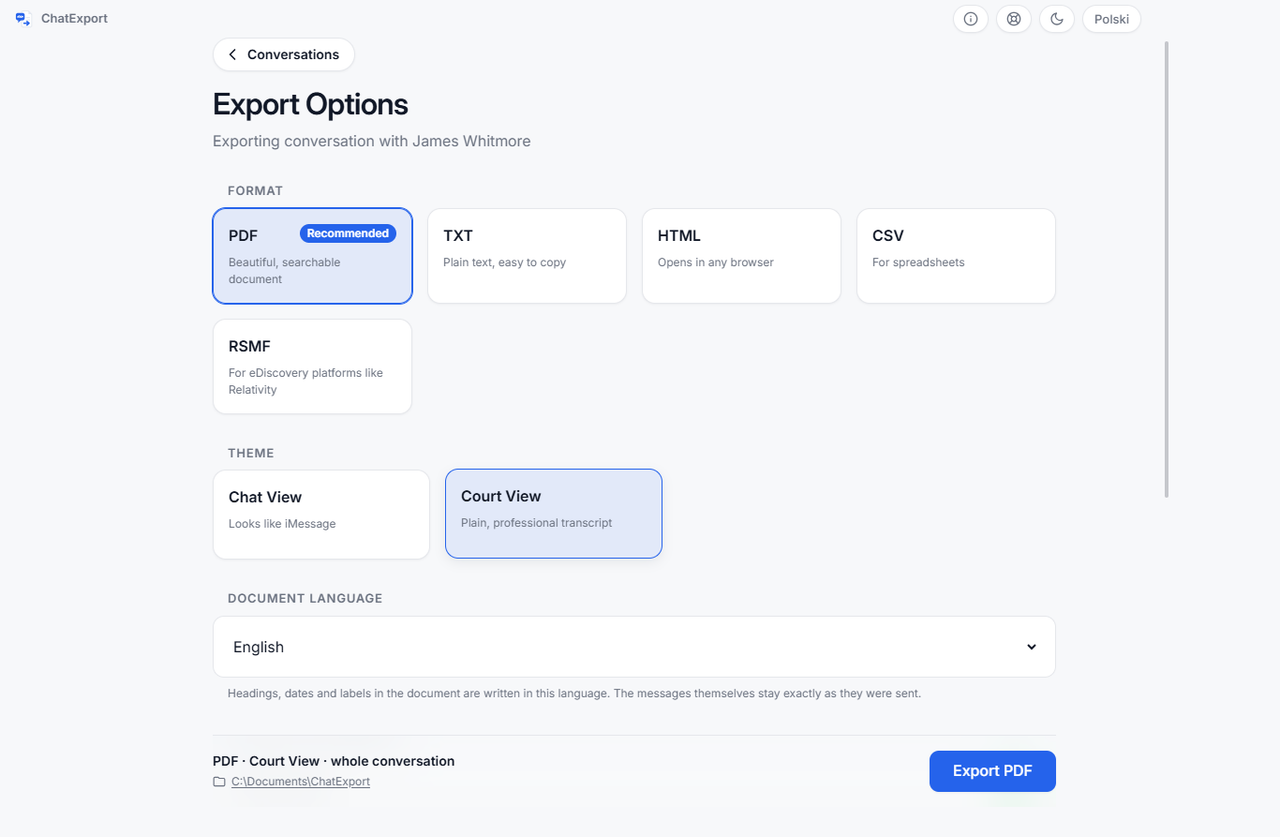
It is here because of the time column, not the feature list:
| Screenshots | Print from Messages | Backup based export | |
|---|---|---|---|
| Cost | Free | Free | Free trial, then a one time licence |
| 400 messages | 2.5 to 3 hours | Minutes of scrolling, and it can stall | About 2 minutes, after a 10 to 50 minute backup |
| A second conversation | The same again | The same again | About 2 minutes |
| Timestamps | Only those on screen | Only those displayed | Every message |
ChatExport is a Windows program that does this one job. There is no macOS version yet, which is why the Mac method above is written out in full. The download is a free trial, watermarked and capped at the 50 most recent messages; a one time licence lifts both and is on sale now, and there will never be a subscription. The what this is built for in a legal matter section of the home page says what it is built for, and states plainly that it cannot promise any court will admit any particular document.
Frequently asked questions
Can I print text messages for court for free?
Yes. Screenshots assembled into a document, or a thread printed from the Messages app on a Mac, both cost nothing and produce a printable file. What free does not buy is a date on every message, searchable text, or anything showing the set is complete.
How many screenshots is a year of texting?
Count the messages and divide by about three. A thread of 5,000 messages, an ordinary year between two people who talk daily, is roughly 1,700 images.
Will a judge accept screenshots?
Not a question anyone selling software can answer. Admissibility depends on the jurisdiction, the case and the judge. Ask a lawyer licensed where your case is heard. What is true regardless is that screenshots are easier to argue with than a complete dated transcript.
Do screenshots show the date and time?
Some do. iOS prints a time above a group of messages rather than on each one, so a capture of ten messages might carry one time or none. Dragging the conversation to the left shows a time beside every message, but only while you hold the drag.
Is there a free way to get the whole thread with a date on every message?
On a Mac, printing from Messages after scrolling the entire history into view gets closest, and even that carries only the times the interface displays. On Windows, Apple’s own software offers no path at all, which is the gap ChatExport was written for. Its trial is free but watermarked and capped at 50 messages, so for a whole thread it is not the free answer this question is asking for.