How to print text messages from iPhone: five routes, compared
There is no print command in Messages on an iPhone, so putting a conversation on paper means getting it out of the app first. Five routes do that. For a handful of messages, screenshot and print from Photos, which needs nothing but the phone and an AirPrint printer. For a whole conversation, and for anything that has to hold up, back the phone up to a computer and export it to PDF: the time on every message, the sender on every message, and a page count that does not grow with your patience.
Jump to: which route · from the phone alone · screenshots into a document · Mac · forwarding · the phone company · the full document · for a court file · when paper is wrong · FAQ
Is there a print button in Messages?
No, and there never has been on the iPhone. Messages on the phone has no print command, no save-as-file and no export, and the share sheet that offers Print in Photos and Safari does not appear for a conversation. Messages on a Mac does print a conversation, which Apple documents in the Messages User Guide for Mac. Apple has never said why the phone lacks it.
So every route below is a way of moving the conversation somewhere printable, and they differ in what survives the move. A conversation is who said what, when, in which order, with which photos, and whether the run is complete. That is what the table compares.
Which of the five routes should you use?
The backup route for a whole conversation or anything that matters, the phone-only route for a handful of messages, and the Mac route if a Mac already holds the thread.
| Route | What you need | Hands-on time for 400 messages | Who said what | When | Photos | Whole thread |
|---|---|---|---|---|---|---|
| Local backup, export to PDF, print | Windows PC (10 or 11), a cable, and ChatExport: free trial, then a one-time licence | Minutes, and none of it per message; the first backup adds 10 to 50 minutes of waiting | Named on every message | A time on every message, with the time zone stated | In place | Yes, as far back as the backup holds |
| Screenshot, print from Photos | The phone and an AirPrint printer | Roughly 45 minutes of capturing, by the derivation in the free guide | Only the layout implies it | Times only if you hold the drag; dates only on day separators | In place | Only what you captured, one image per page |
| Screenshots assembled on a computer | The phone, a computer, an hour of placing images | Roughly 2.5 to 3 hours in total | Only the layout implies it | Same as above | In place | Only what you captured |
| Print the thread from a Mac | A Mac that already holds the thread | The scroll to the top, which grows with the thread and can stall | Named | Only what the window displayed | In place | As far back as you scrolled |
| Forward or copy and paste | The phone | One tap per message: fine for three, not for 400 | Often unclear | No | Sometimes | No |
| Ask the carrier | Your account login, or a lawyer for anyone else’s | Minutes in the billing portal, weeks for a legal request | Numbers, not names | Yes | No | No content at all |
Two rows deserve a note before the details. The backup route is the only one that produces the whole conversation with a timestamp on every message, and the only one whose work does not grow as the thread does. How many pages that turns out to be, and what to do when the answer is four hundred, is its own question: printing an entire text conversation. And the carrier route is in this table because people ask about it, not because it prints texts: carriers hold records of messages, not the messages.
Can you print without a computer?
Yes, for a short exchange, and this is the route most articles on this subject get wrong. Screenshot the conversation, then open Photos, tap Select, tap every screenshot you want, tap the share button and choose Print. Apple’s instructions for printing photos cover the selection: it is one image per page, not one image per print job, so a ten-screenshot exchange is one trip to an AirPrint printer.
What you get is a stack of pictures of a screen, in the order Photos holds them, one per page. That is genuinely enough for three messages to hand to somebody. What it is not is a document: no page numbers to cite, no searchable text, no date on most messages, and nothing tying image four to image five.
The gesture that doubles what a screenshot is worth. Dragging the conversation to the left reveals the time beside every message, but only while you hold the drag, which leaves no hand for the buttons. Set Back Tap to take a screenshot (Settings, Accessibility, Touch, Back Tap) and you can hold the drag with one hand and tap the back of the phone to capture. Without it, most captures carry no time at all.
How do you print screenshots as one document?
Assemble them on a computer first, which is what turns a pile of pictures into something with page numbers. The full mechanics are in the free-methods guide; in brief:
- Scroll to the oldest message you need and capture: side button plus volume up, or on an iPhone with a home button, the home and side buttons.
- Overlap each capture with the last message of the previous one. This is what shows two images were adjacent, which is the one thing a stack of screenshots can be made to show.
- Hold the leftward drag while capturing, using Back Tap, if you need the per-message times.
- Move the images to a computer, place them in order in any word processor, one or two per page, and print that.
Overlapping proves adjacency and nothing more. It cannot show that a message was not deleted before you started capturing, which is the difference between a screenshot and a record, and the subject of ChatExport versus screenshots.
How do you print a thread from a Mac?
If a Mac already holds the conversation, open Messages, scroll to the top of the thread, press Command and P, and print or save as PDF. No extra software, real searchable text, and the strongest free route here.
The condition is the whole difficulty: the thread is on the Mac only if Messages in iCloud has been syncing that account, which covers iMessage, SMS, MMS and RCS alike. Turning on Text Message Forwarding now will not help with old messages: it forwards new ones from the moment you switch it on and never backfills history. If the thread is not on the Mac today, this route is closed.
Then two limits. It prints what you scrolled into view, so on a thread spanning years the slow part is coaxing Messages to load the history, with no progress bar and no guarantee it finishes. And it carries only the timestamps the interface was displaying. Details and a table of what it keeps are in the Mac section of the PDF guide.
Worth saying plainly: a Mac owner with a long thread has no fully satisfying route on this page. The Mac print degrades with length and the backup route runs on Windows. Two workarounds exist: a Mac makes local backups too, in Finder, and the backup folder can be carried to a Windows machine; or borrow one, since after the backup the phone is no longer needed.
Does forwarding or copy and paste work?
For a couple of messages, yes; as a record, no. Press and hold a message, tap More, tick what you want, tap the forward arrow, and send it to another number of yours or to an email address. Use an address not connected to your Apple ID: an address that is gets treated as an iMessage destination, so the message comes back to your own devices instead of arriving in a mailbox.
What arrives is text run together: no date and time per message, often no clear indication of which side said what, photos sometimes included and sometimes not. Copy and paste is the same per-bubble work with the same result. Fine for showing somebody a line or two.
Can the phone company give you your texts?
They can give you records of messages, not the messages. For your own account, that usually needs no lawyer at all: carriers show sent and received message logs in their own billing portal, listing numbers, dates and counts, typically for a few recent months. Anyone else’s records, or history older than the portal shows, needs a legal request, and that is the part measured in weeks.
What no request reliably produces is content. Carriers generally do not retain the text of messages, and where anything is retained it is briefly and for their own purposes. A carrier record supports that a message existed between two numbers on a date. What it said comes from a phone, or from a backup of one.
How do you print a whole conversation, with every message timestamped?
Through the phone’s own backup. Every message the phone holds sits in a database on the phone, and Apple’s own software copies that database to a computer. A tool that reads the copy produces a document instead of a picture of one: every message in order, a timestamp on each, the sender named on each, photos in place, searchable text, page numbers, and a title page saying what the document covers.
1. Back the phone up to your computer
Install Apple Devices from the Microsoft Store on Windows 10 or 11 (iTunes works too), connect the iPhone with a cable, tap Trust on the phone and enter its passcode, choose Back up all of the data on your iPhone to this computer, and start it. Budget free disk space at whatever the phone reports under Settings, General, iPhone Storage; the backup usually comes out smaller than that. The first backup takes 10 to 50 minutes as a rule of thumb and later ones are incremental. Full walkthrough: how to back up iPhone text messages to a PC without iCloud.
Tick Encrypt local backup, because a folder holding every message you ever sent should not sit readable on a shared PC, and choose a password you will not lose. Apple documents that an encrypted backup cannot be opened without its password and cannot be recovered. If you have already lost one, that same page has the way out: on iOS 11 or later, Settings, General, Transfer or Reset iPhone, Reset All Settings clears the backup password without touching your data, and the next backup can use a new one. The old encrypted backup stays unreadable; the messages are still on the phone.
One check before relying on the result: with Messages in iCloud on, Apple documents computer backups as not including data already synced and stored in iCloud, iMessages and text messages among it, so open the backup and confirm the conversation reaches as far back as you need. If it does not, are text messages saved in iCloud covers what to do: in short, scroll the thread on the phone so the device fetches it, then back up again.
2. Open the backup and pick the conversation
Launch ChatExport and it lists the backups it found, then the conversations inside, by contact name. It asks for the backup password if there is one. Group chats are in the same list; in a group every message is attributed to its sender, which on paper is the whole question. The phone is not needed from here on.
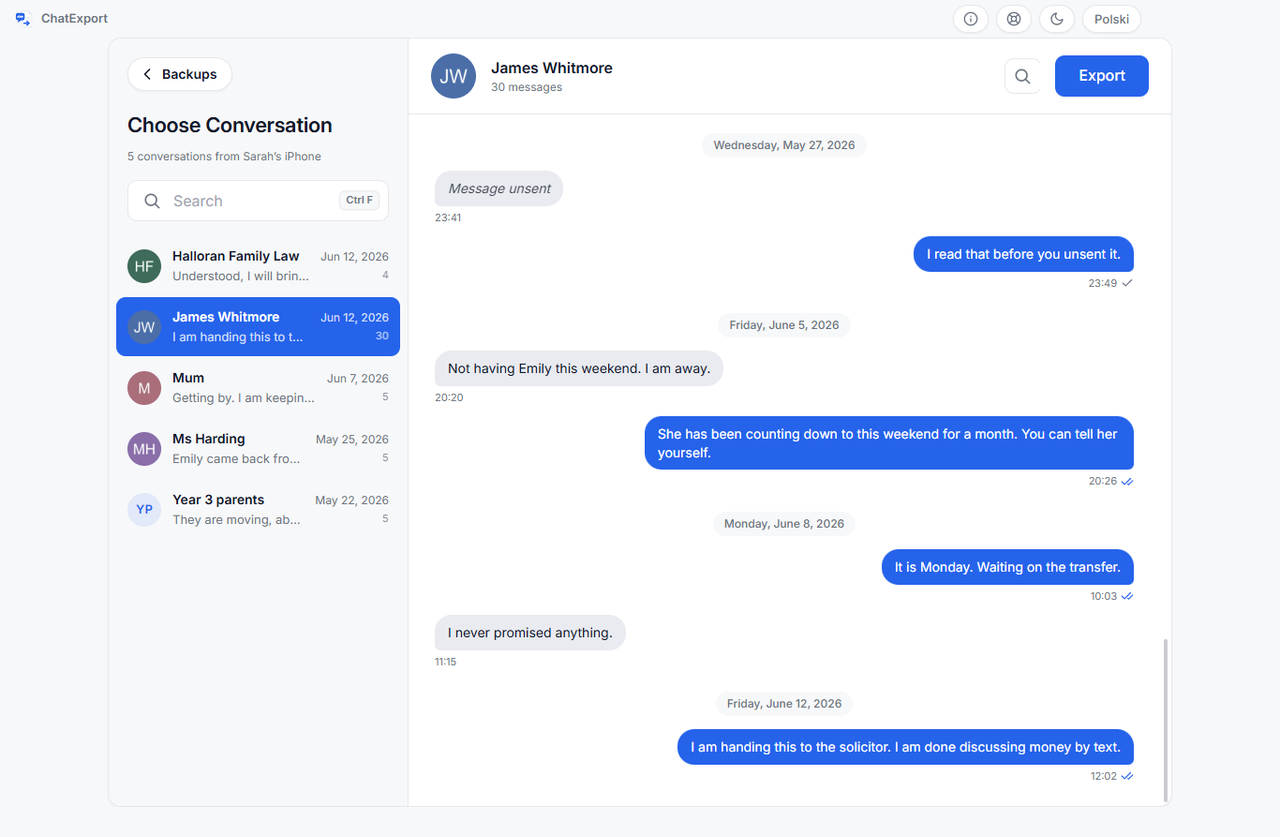
3. Export it to PDF
Choose PDF and one of three layouts. Chat View looks the way the conversation looked, bubbles and all. Court View is a plain transcript with the sender named on every line. Book View sets it as a printed book, a chapter for each month. All three stamp a time on every message and print the date on each day’s separator; switches add the full evidence form and repeat the date on every row, for documents whose pages get cited one at a time. The title page states the time zone the times are in, for example Europe/Warsaw (UTC+02:00), which is the question a careful reader asks first.
A date range, photos and attachments are options on the same screen. The export also writes a
small .sha256 file beside the PDF, a fingerprint taken as the document was made.
4. Print the PDF, and keep the file
Any PDF viewer prints it, on any printer Windows can see. The document is laid out on A4; on Letter paper, print with the viewer’s fit-to-page option, which scales it to about 94 percent. Page numbers mean a reader can cite page 41 and every copy agrees what page 41 is.
Keep the file and its .sha256 beside the paper. A checksum match proves the bytes have not
changed since the fingerprint was recorded. It compares bytes, not intentions, and a checksum
sitting next to the file it describes only ever proves something to somebody else if it was also
recorded somewhere independent: emailed when the export was made, filed, or read into a record.
How much paper to expect. The sample Court View export on this site runs 31 messages with photos to 16 pages, and half of that is the document’s own apparatus: title page, summary, integrity statement, statistics, contents, attachment index, closing page. The apparatus is a fixed cost, so it stops mattering as the thread grows, while the message pages scale with how much you send and how many photos ride along. Text-only stretches pack far denser than photo-heavy ones. The trial’s 50-message cap means a long thread cannot be page-counted before purchase, so the sample is the honest yardstick available beforehand. The arithmetic for a long thread, and what each route does at 400 and at 5,000 messages, is in how to print an entire text conversation from an iPhone.
What survives that most people do not ask about
Four things a conversation contains that a screenshot flattens, and which the document keeps:
- Edited and unsent messages. iOS 16 and later let a sender edit a message or unsend it. The document marks both, and an edited message can carry its earlier wording rather than silently showing the final one.
- Deleted messages, with the date they were deleted. Recoverable ones can be included, marked as deleted, so the document says which they were instead of presenting them as ordinary.
- Attachments that cannot be printed. A video, a voice message, a PDF sent in the thread: the document prints a named card in its place, with the file name and size, so the reader sees that something was there. Nothing is silently dropped.
- How each message travelled. Since iOS 18 a green bubble can be RCS rather than SMS. The document names the transports it contains rather than guessing, and RCS messages on iPhone explains when that matters.
What about printing for a court file?
The same steps, with the setting that exists for this reader. Court View puts the conversation in a plain transcript: sender on every line, no bubbles, nothing decorative, with message numbering so a line can be cited and the raw number beside each contact name. The full treatment is how to export iPhone messages for court.
On whether any printed conversation will be accepted: nobody selling software can tell you, and be careful of anyone who says otherwise. Admissibility depends on the jurisdiction, the case and the judge, and how you obtained the messages can matter as much as their format. Ask a lawyer where your case is heard.
When is printing the wrong goal?
Whenever the recipient needs to do more than read. Paper cannot be searched, so if they will look for phrases or count messages, hand over the PDF itself, or a CSV if a spreadsheet is the destination; the export screen writes both. A law firm loading conversations into an eDiscovery platform is better served by RSMF (Relativity Short Message Format), a container the same program writes, which exists so a conversation arrives as data rather than as pages. Paper is for reading and for filing.
Frequently asked questions
Can you print text messages directly from the iPhone?
Not from Messages, which has no print command. You can screenshot the conversation, select the screenshots in Photos and print them to an AirPrint printer, one image per page, without a computer. For a whole conversation you need a computer, because only a backup gives you the timestamps and the page numbers.
How do I get a date on every message?
From the phone’s database rather than from the screen. On screen, iOS prints dates on day separators and reveals per-message times only while you hold the conversation dragged to the left, so screenshots and the Mac print carry at most that. An export built from the backup stamps a time on every message in either layout, names the time zone on the title page, and has a switch to repeat the full date on every row.
Can I print messages that were deleted?
Sometimes. Two different windows matter. On iOS 16 and later, deleted messages sit in Recently Deleted for around 30 days and can be recovered on the phone itself: Apple documents the steps. Separately, a backup made before the deletion still contains the message, whatever the phone shows now, which is the strongest argument for backing up early. Past both of those, consumer software will not bring a message back, whatever it promises.
Does this work for a group chat?
Yes. A group conversation exports like any other, with every message attributed to its sender by contact name or number, and the participants listed on the title page.
Do I need the phone every time I print?
No. Once a backup exists on the computer, exporting and printing read from the backup, and the phone can be elsewhere, or sold, or broken. That is the quiet argument for making a backup while everything still works.
What if I do not have a printer?
Export or save to PDF and take the file to a print shop, a library or a workplace printer. This is also the better path for a long thread: a PDF of several hundred pages costs nothing to store, is searchable, and can be printed in part rather than whole.
What does this cost?
The phone-only, Mac and forwarding routes are free, and for short threads they are the honest recommendation. ChatExport’s download is a free trial: it opens the backup and previews conversations, and a trial export carries a watermark and stops after the 50 most recent messages. A one-time licence lifts both; the figure is on the pricing page, where it can be bought, and there will never be a subscription. Other programs read iPhone backups too, compared in the best iPhone message export software.
Related
- How to print text messages for court free, and where free breaks down, the free methods in full detail, with the arithmetic of doing 400 messages by hand.
- How to export iPhone messages to PDF, the complete guide to the document half of this page, from backup to finished file.
- ChatExport versus screenshots, the honest comparison of a picture of a conversation against the phone’s own record of it.
- How to print an entire text conversation from an iPhone, how many pages a long thread becomes and how to check the printout is whole.