Screenshots versus an exported document, and what the two paid phone apps change about it
Almost nobody choosing between message export programs is actually choosing between message export programs. They are choosing between buying one and doing what they were already doing, which is taking screenshots. That is the real competitor, it is free, it is already on the phone, and it works.
So the useful question is not which program is best. It is what actually changes when you stop photographing the screen, and whether that change is worth anything in your particular situation. Sometimes it is not.
What is a screenshot, as a record?
An image of what one app chose to draw, at one moment, framed by the person who wanted it.
Every part of that sentence costs you something later. iOS prints a timestamp above a group of messages rather than on each one, so a screenshot of ten messages often carries one clock reading, or none. The image contains what was on screen, which means the boundaries were chosen by whoever scrolled, and the first question anyone asks about a set of screenshots is what sat immediately above and below the part you kept. There is no sender number, only the contact name your phone shows, which is the name you assigned. And a picture cannot be searched, quoted by page, or numbered, so a hundred images is a hundred images.
None of that makes screenshots forgeries. It makes them a weak version of something you already have.
What does the message database record instead?
The rows iOS wrote when the messages arrived, which is a much longer list than the screen ever shows.
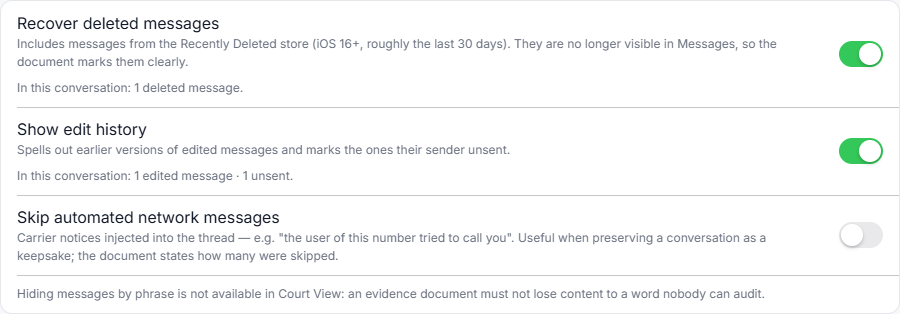
A conversation read out of an Apple backup carries a timestamp on every single message, to the second, whether or not the screen displayed one. It carries the raw phone number or Apple ID beside the contact name, so the identity does not rest on your address book. It carries delivery and read receipts where iOS recorded them, reactions, threaded replies, edited messages with their history, and unsent markers where somebody withdrew a message. It carries attachments in the positions they were sent, with their file metadata. And because it is a document rather than a pile of images, it can be numbered, so a specific line becomes “#412” instead of “the third picture, near the bottom”.
The blue and green bubbles arrive together, because iMessage, SMS and MMS live in the same database, so a conversation that drifted between them over the years stays one unbroken thread. What a reaction, an edit or an unsent message looks like once it is printed is iMessage to PDF without screenshots.
That is the entire difference. Not fidelity: a screenshot is a perfectly accurate picture of the screen. What the screen never had.
What do the two paid phone apps change?
Less than their price suggests: one reads screenshots, the other no longer does but sends the conversation to its servers, and both vendors say so.
This is the part of the comparison that surprises people who assume paying money means getting a different kind of artifact. Two of the eleven programs in the best iPhone message export software of 2026 run on the phone rather than on a computer, and neither of them can read the message database: an app on the iPhone is not allowed to, which is a limit Apple imposes and not a shortcut anybody chose, so an on-phone product has to work from something else. What that something else is has turned out to move, so both readings below carry their date.
TextKeep, re-read 4 October 2026, reads screenshots, at 8.99 USD a week, 19.99 a month or 59.99 a year, and processes the images on its own servers. Its listing says so, and says they are deleted after the export.
TextPort, re-read 4 October 2026, no longer describes a recording anywhere, and the vendor dates the change itself. Its developer’s reply on the App Store listing reads: “As of September 2026, TextPort reads an iMessage or SMS conversation directly through Apple’s Shortcuts app, so a months-long thread needs no screenshots and no computer.” Its site says the iPhone app “pulls it straight out of iMessage” and its safety page says the export is built with “secure cloud processing”. So for that app the question is no longer whether a picture was read, it is that the conversation leaves the phone for somebody else’s servers in order to become a document. Its prices and what its desktop app says about itself are in a TextPort alternative that reads the backup on your own PC, and TextPort against iMazing sets the two side by side.
So the honest framing of that part of the market is: a subscription, which TextPort starts after “your first three conversations for free” (read 15 October 2026), and somebody else’s servers in the middle. For a lot of purposes that is genuinely convenient, and if a phone is the only computer you have, it may be the only thing available. The price does not change where the conversation goes.
When are screenshots the right answer?
Often, and a page that pretended otherwise would be lying to sell something.
If you want to keep a message because it made you laugh, screenshot it. If you need to show a colleague what an error said, screenshot it. If the conversation is four messages long and nobody is going to dispute it, screenshot it and get on with your day. Installing software to preserve a short exchange nobody contests is a waste of an afternoon.
The threshold is not sentiment, it is contest. The moment a conversation might be read by someone whose interests run against yours, the properties in the second section start to matter, and they cannot be added afterwards.
There is also a threshold of size, and it is lower than people expect. The arithmetic for a few hundred messages, in hours of your evening rather than in pounds, is done properly in the free methods and what they cost in time. That page is the one to read before deciding that free is cheaper.
Frequently asked questions
If I already have a folder of screenshots, was that wasted?
No. Keep them. They are contemporaneous and they cost you nothing to hold on to. What an export adds is a complete, dated, searchable version of the same conversation, and having both is strictly better than having either. If the screenshots came from a phone you still hold and the messages have not been deleted, an export will contain everything in them anyway, plus the parts that were above and below the frame. One check before relying on that: with Messages in iCloud switched on, Apple documents computer backups as not including messages already stored in iCloud, so confirm the oldest messages you need actually reached the export.
Does an exported document prove the messages are real?
No, and any program claiming that is worth treating carefully. What it does is remove the specific objections screenshots invite: it shows the whole thread rather than a selection, dates every message rather than some, prints numbers rather than nicknames, and carries a checksum so the file can be shown not to have changed since it was made. Whether a particular court accepts a particular document is a question for a lawyer, and exporting iPhone messages for court sets out what the document actually carries without promising what a judge will do with it.
Can I export just the important part?
You can, and for anything contested you probably should not. A thread with the awkward parts left in is harder to attack than a curated one, and pointing a reader at page 19 costs nothing.
What does this program cost, compared to free?
The download is a free trial that reads any backup and previews any conversation in full, then watermarks a trial export and stops after the 50 most recent messages. A one time licence lifts both and is on sale now, with no subscription ever. Against screenshots the comparison is not really price, it is whether an evening of your time and a weaker record are a good trade.
The quickest way to settle this for yourself is to look at both artifacts side by side. The sample exports are real output from this program over an invented custody dispute: open one, then open a screenshot of a conversation on your own phone, and the difference stops being an argument.