iMessage to PDF without screenshots, and what a picture of the screen leaves behind
To turn an iMessage conversation into a PDF without screenshotting it, you export it from a local backup instead of photographing the screen, using a tool that reads the message database, such as ChatExport on Windows. The words come out the same either way. Everything else does not, and the gap is wider than most people expect, because the screen was never showing most of what iOS recorded.
Before anything else, so it does not surprise you at the end: the free download writes the 50 most recent messages and watermarks every page. Opening the backup, reading the whole thread and checking it costs nothing, and producing the finished document needs the one time licence.
What does a screenshot of an iMessage thread actually lose?
Six things, and only the first one is obvious.
| What you see on the phone | What the backup holds |
|---|---|
| One clock reading above a group of messages | A timestamp on every message, to the second, with the UTC offset |
| A contact name you assigned | The raw phone number or Apple ID underneath that name |
| A tapback as a small icon on a bubble | Which reaction it was, and which participant left it |
| “Edited” under a message | The earlier wordings, each with the time it was replaced |
| Nothing, where a message was unsent | A record that a message stood there and was withdrawn |
| Blue and green bubbles, looking like two things | One thread, because iMessage, SMS and MMS share a database |
None of that makes a screenshot dishonest. It makes it a photograph of a rendering, and a rendering is a summary. Whether that difference is worth paying to close is argued separately in screenshots versus an exported document; this page is about what the export does with the difference once you have decided.
What does a reaction look like on paper?
This is the question nobody answers, and it decides whether the document reads as a transcript or as a puzzle, so it is worth being exact.
A reaction prints as an emoji badge sitting on the corner of the message it belongs to, which is the closest paper gets to the phone’s own behaviour. When the document is set to print handles beside names, the badge is replaced by a line inside the bubble naming who reacted, in the form “emoji, then the person”. The badge has no room for an attribution, and in a document where identity matters, knowing that somebody laughed at a message is worth less than knowing which of the two people did.
An edited message carries “(edited)” in its meta line, beside the timestamp, exactly as the phone marks it. Turn on edit history and the superseded wordings print underneath the current one, each labelled as an earlier version and stamped with the time it was replaced. That is the part a screenshot cannot reach at all: the phone will show you an edit history if you tap it, but a picture of a bubble shows one state, and the state it shows is the one the sender chose last.
An unsent message prints a placeholder saying so, in the place the message occupied, rather than closing the gap. It only enters the document at all when the edit history switch described below is on, because it changes what the export contains rather than how it looks. A thread that silently heals over a withdrawn message is a thread that misrepresents itself.
A recovered message, one read back from the recently deleted store, prints its own text and never the placeholder. That rule is worth stating plainly because the alternative is worse than useless: a document that says “message deleted” while holding the wording is hiding the only thing anybody wanted. How long that store holds anything, and what else is deleting the thread on a schedule, is how to save an iMessage conversation before it disappears.
A reply prints a reference line above the bubble showing what it answered, so a conversation that branched on the phone still reads in order on paper.
Delivery and read receipts, where iOS recorded them and the switch is on, print in the same meta line as the timestamp, beside the message they describe rather than in a legend somewhere at the back.
A photo sent on its own has no bubble to hang a timestamp on, so its meta line and any reactions attach under the last picture instead. The time travels with the thing it describes, which matters the moment a page is torn out of a bundle and read alone. With more than two people in the thread the document changes in ways worth knowing in advance, which is group iMessage conversations in an export.
Message numbers, where they are switched on, sit in the paper margin beside the bubbles rather than in the text, so a specific line can be cited as “#143” while the transcript still reads as a conversation.
Which switches decide how much of that reaches the page?
Six per-message switches, and one shortcut that turns all six on at once.
The switches cover full timestamps with seconds and offset, repeating the date on every message rather than once a day, the raw handle beside each contact name, delivery and read receipts where iOS recorded them, sequential message numbers, and the original file name and size under each photo. They are off by default, because a keepsake of a family thread does not want six extra pieces of apparatus on every line. Selecting Court View turns all six on, on the principle that a document headed for a court should carry every verifiable detail it can.
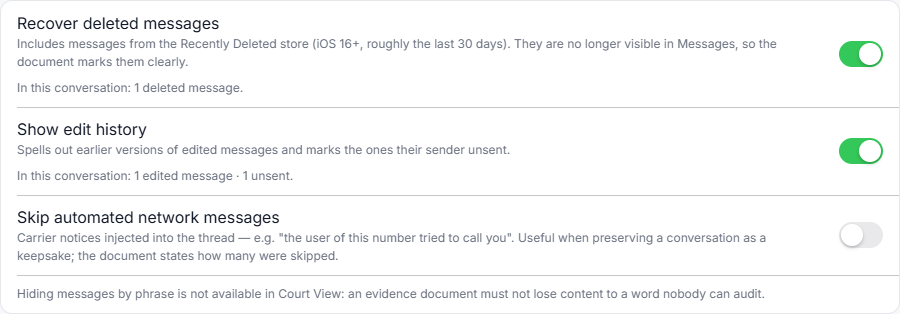
Two switches sit outside that group, and both change which messages exist rather than how much each one shows. Recovering recently deleted messages, which on iOS 16 and later means roughly a thirty day window, is off by default: those rows are not part of the conversation as the phone displays it today, so including them without being asked would misrepresent the thread. Edit history is the other, and it doubles as the switch that surfaces unsent messages.
Three details in that design are worth knowing before you trust the output, because they are the kind of thing a tool can quietly get wrong:
- The highlights index, which lists messages matching keyword lists, is deliberately not part of the Court View set. It reflects our word lists rather than anything in the backup, so it stays an explicit choice rather than arriving with a theme.
- A list of phrases to hide, which exists mainly so a memorial archive does not end on a page of carrier boilerplate, is ignored outright in Court View. Everywhere else, the document names on its integrity page what was on that list.
- Skipping automated carrier notices is off by default too, and when it is on, the integrity page states how many were removed.
The pattern is one rule applied three times: the document is allowed to leave things out, and it is never allowed to leave them out quietly.
So how do you actually make the file?
Back the phone up locally with Apple’s own software, open that backup, find the thread, and export it. The backup is the only slow step, typically 10 to 50 minutes and only once; the export itself runs with a live progress bar, and its time depends on how many photos the thread carries rather than on the message count. The full walkthrough with a screenshot at every stage is the complete guide to exporting iPhone messages to PDF, and making the backup itself, including doing it with no iCloud involved, is how to back up iPhone text messages to a PC without iCloud.
One check belongs in the middle of that, and it costs a minute. With Messages in iCloud switched on, Apple documents computer backups as not including messages already stored in iCloud. The check is the export itself: open the conversation and confirm the oldest messages you need are actually there. If the thread starts later than it should, that switch is the first suspect. What else can quietly shorten a thread before any backup exists, including a phone set to keep messages for 30 days rather than forever, is covered in how to export an entire iMessage conversation.
The preview inside the program shows the most recent three hundred or so messages so the list stays instant. That cap belongs to the preview, not to the export.
Is a Mac different?
Yes, and if you have one the honest answer may be that you do not need this.
A Mac signed into the same Apple ID, with message syncing on, already has the conversation in the Messages app and can print it to PDF from there. What you get is what the app draws, so the six losses in the first table still apply, and long threads have to be scrolled into view before they print. The comparison of that route against an export, including where it breaks, is in the complete guide to exporting iPhone messages to PDF. ChatExport itself is Windows only, which is a real gap rather than a coming soon.
Frequently asked questions
Are green bubble messages included, or only iMessages?
Both, in one document. SMS, MMS and iMessage live in the same database on the phone, so a thread that drifted between networks over the years exports as one unbroken conversation rather than as two files you have to interleave by hand.
Can I do this from the iPhone alone, with no computer?
Not by this route. The document is built from a local backup, and a local backup needs somewhere to land. Apps that work on the phone alone exist and they rebuild the conversation from a recording of your screen, which is the same artifact as a screenshot with more steps, as screenshots versus an exported document sets out.
Will the PDF show that a message was edited?
Yes, and by default it shows only that. The message carries “(edited)” beside its timestamp, the way the phone marks it. Switching on edit history adds the earlier wordings underneath, each with the time it was replaced, which is the version to use when the change itself is the point.
Can the document be produced in a language other than English?
Yes, in any of fourteen, chosen at export time and independently of the language the program’s own interface is running in. The title page, the integrity statement, the dates and the labels follow that choice, and the messages themselves are never touched. The interface itself is English and Polish only.
What does it cost?
The download is a free trial: it opens any backup, previews any conversation and exports in every format, but a trial export watermarks each page and stops after the 50 most recent messages. A one time licence lifts both and is on sale now. There will never be a subscription.
If the conversation is heading somewhere it will be questioned, the neighbouring pages are what a court asks of a printed message thread and how to verify a PDF with SHA256 in 30 seconds, which covers the checksum the success screen shows when the export finishes.