How to save an iMessage conversation before it disappears, and which clocks are already running
To save an iMessage conversation before it disappears, get it off the phone: back the iPhone up to a computer, then export the thread from that backup into a finished document, with a checksum beside it so the file can be shown later not to have changed since it was made. There is no setting on the phone that makes a conversation permanent, and that is the part worth understanding, because several things are already deleting it on schedules you did not choose.
The free download writes the 50 most recent messages and watermarks every page, so it will show you the thread and not save it. Reading and checking cost nothing; the finished document needs the one time licence.
What actually makes an iMessage conversation disappear?
Six things, each on its own clock, and only two of them involve anybody deciding to delete anything.
| What removes it | What goes | The clock | What still gets it back |
|---|---|---|---|
| Keep Messages set to 30 Days or 1 Year in Settings, Messages | Everything older than the window, from the phone itself | Rolling, and silent once set | Only a backup made before the cutoff passed |
| Deleting a thread, by you or by accident | The conversation, into Recently Deleted | Roughly thirty days on iOS 16 and later, then permanently | Recovering it on the phone, or an export with the recovery switch on |
| The other person unsending a message | That message, from both sides | Apple’s short window after sending | A backup made before they did it |
| Messages in iCloud on, and a delete on any device | The thread, everywhere at once | Immediate | An older local backup made before the delete |
| Trade-in, reset, theft, a phone that will not turn on | All of it | Whenever it happens | Whatever backup already exists |
| Backing up again | Nothing visible, and this is the trap | Every backup | A copy of the backup folder taken beforehand |
The last row is the one people are surprised by, so it is worth stating plainly: each device has one backup folder under each of Apple’s two locations, so what sits on your disk is the state of the most recent backup, not a history of them. If a message was on the phone in March, was deleted in April, and you back up in June, past the thirty day recovery window, the June backup is simply a backup without it. What where Windows stores iPhone backups describes as the device folder is the thing to copy elsewhere if you want a moment kept.
Does a backup stop any of those clocks?
No, and it is worth being precise about that, because it changes what you should do today rather than eventually.
A backup does not pause deletion, prevent an unsend or override Keep Messages. It does one thing: it puts a copy of the conversation outside the phone, beyond the reach of the five clocks running there. The sixth row is the one a backup does not escape, because the copy lives in the single folder your own next backup updates, which is why the table’s answer to that row is a copy of the folder, and why the export below is the step that ends the exposure entirely. A backup works only for messages still on the phone when it runs, so every hour the thread stays only on the phone is an hour of exposure to a row in that table.
An export goes one step further than the backup, and the difference matters if the conversation is going to be read by anyone else. A backup is a working copy that your next backup replaces; an exported PDF is a finished document, with a SHA256 checksum written beside it so it can be shown later not to have changed since it was made, which one command re-checks any time.
What is the fastest thing you can do today?
Back the phone up locally with Apple’s own software, open the backup, and export the thread. The backup is the slow step, typically 10 to 50 minutes and only once; the export itself runs with a live progress bar, and its time depends on how many photos the thread carries rather than on the message count. The walkthrough with a screenshot at each stage is the complete guide to exporting iPhone messages to PDF, and making the backup without iCloud anywhere in the picture is how to back up iPhone text messages to a PC without iCloud.
Two checks belong in the middle of that, and both take a minute.
Check Keep Messages first, in Settings, Messages, before making the backup. If it says 30 Days or 1 Year, the phone has already been deleting the old end of every conversation, and no backup made afterwards can bring those back. Setting it to Forever stops the deletion from continuing; it does not undo what already happened.
Then check the export itself. With Messages in iCloud switched on, Apple documents computer backups as not including messages already stored in iCloud, so open the conversation and confirm the oldest messages you need are actually there. If the thread starts later than it should, that switch is the first suspect.
What if the messages are already gone?
That depends on which row of the table took them, and the honest answer for one of them is nothing.
If the thread was deleted recently, iOS 16 and later hold it for roughly thirty days, and an export can read that store: it is a switch, off by default, because those messages are not part of the conversation as the phone shows it today and including them silently would misrepresent the thread. A recovered message prints its own text in the document rather than a “deleted” placeholder, which is the only useful behaviour when the wording is the reason you are looking.
If somebody unsent a message, the text is not on your phone any more, and no export invents it. What the document can show, with the edit history switch on, is that a message stood there and was withdrawn: the record does not close the gap silently. The same switch covers edits, where a message carries its “(edited)” mark either way, and the earlier wordings print underneath with the time each was replaced. iMessage to PDF without screenshots covers what each of those looks like on the page.
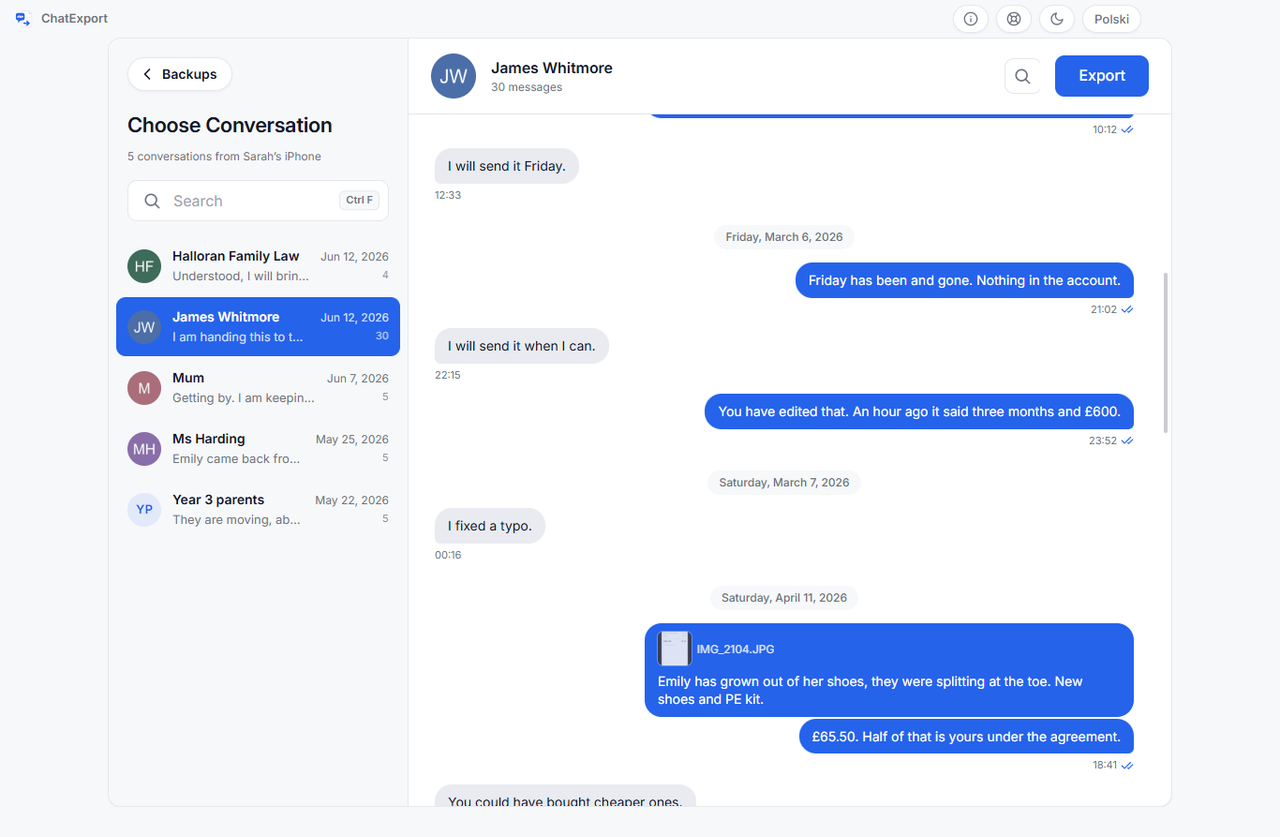
And if the messages went before any backup ever existed, past the recovery window, they are gone. No program reads what is not in the file, and one promising otherwise is selling something it cannot deliver. Where that boundary sits exactly is how to export an entire iMessage conversation.
Is a screenshot good enough as a stopgap?
As a stopgap taken right now, yes, and it beats losing the thread while you find a cable.
If a message might vanish in the next hour, screenshot it. Then do the export properly, because the screenshot keeps the words and drops the timestamps on every individual message, the number behind the contact name, the receipts and the reactions, which screenshots versus an exported document sets out in full. The two are not competitors here. One is what you do in the next thirty seconds and the other is what you do this evening.
Frequently asked questions
If I delete a message on my iPhone, does it vanish from the other person’s phone too?
No. Deleting removes it from your device, and with Messages in iCloud on, from your other devices signed into the same account. The other person’s copy is theirs. Unsending is the one action that reaches across, and only inside Apple’s window after sending, which is why an unsent message is a different problem from a deleted one.
Can an export recover messages the other person deleted on their phone?
No. An export reads your backup, so it holds what your phone held when the backup was made. It cannot reach another device, another account or anybody’s iCloud, and no software that runs on your computer can.
How long do I have to save a conversation I just deleted?
Roughly thirty days, on iOS 16 and later, while it sits in Recently Deleted. Recovering it on the phone puts it back in the thread, and an export can read that store directly through a switch that is off by default. After that window the rows are gone from the database, and only a backup made earlier still has them.
I am trading in my iPhone next week. What should I do first?
Back it up to the computer before the phone leaves your hands, and keep the backup folder rather than only the phone’s word that a backup exists. Then export the conversations that matter, so what you keep is a document you can open in ten years rather than a folder that only one program understands. The order matters: once the phone is wiped, the backup is the only copy.
What does it cost?
The download is a free trial: it opens any backup, previews any conversation and exports in every format, but a trial export watermarks each page and stops after the 50 most recent messages. A one time licence lifts both and is on sale now. There will never be a subscription.
The two neighbouring pages in this cluster are how to export an entire iMessage conversation, for where a thread’s boundaries actually sit, and iMessage to PDF without screenshots, for what the finished document keeps that the screen never showed.