How to export an entire iMessage conversation
To export an entire iMessage conversation, back the iPhone up to a computer, then export the thread from that backup with a tool that reads the message database, such as ChatExport, which runs on Windows. An export made this way carries the conversation’s full history as the backup holds it, from the first message to the last, no matter how little of it any screen was showing. The backup is the slow step and it happens once, taking longer the more there is on the phone.
One thing to know before you start, because it decides whether the document is usable: the free download writes only the 50 most recent messages and watermarks every page. Reading the whole thread, previewing it and checking it costs nothing; producing the entire document needs the one time licence.
Why is entire the part that usually fails?
Every route that works without a backup caps out somewhere below entire, and the longer the thread, the earlier that happens. This is worth seeing plainly before choosing a method, because the failure is invisible at the start and expensive at the end:
| Route | What actually ends up in the document |
|---|---|
| Screenshots | The frames you captured, roughly three messages each by the estimate in the free methods and what they cost in time, so a 5,000 message year is about 1,700 images |
| Print from Messages on a Mac | Whatever you scrolled into view first, and scrolling a years-long thread can stall |
| Forwarding to email | The messages you ticked one by one, stripped of their dates |
| A carrier records request | Metadata only, no message content at all |
| Export from a local backup | Every message the backup holds, first to last |
The backup route is the only one where entire is the default rather than the reward for patience. The export does not care what was scrolled, previewed or selected: it reads the thread out of the database whole.
What does an entire conversation include?
Exported from a backup, the conversation arrives with everything iOS recorded in the thread: a timestamp to the second on every message, reactions and tapbacks, threaded replies, edited messages with their history, unsent markers, delivery and read receipts where they exist, and the photos and attachments sitting in the places they were sent. Blue and green bubbles come together, because iMessage, SMS and MMS live in the same database, so a conversation that drifted between the two over the years stays one unbroken thread. What each of those looks like once it is on paper, and which switches decide whether it appears at all, is iMessage to PDF without screenshots.
Two of those carry enough detail to be worth their own page. Edited and unsent messages in an export covers what survives when somebody rewrites or withdraws a message, including the one switch that decides whether the earlier wordings are printed at all. And a conversation with more than two people in it behaves differently from a thread of two, with every participant named and the grey system lines absent, which is group iMessage conversations in an export.
One detail that reassures people once they know it: ChatExport’s preview shows the most recent three hundred or so messages, so the list stays instant. That cap is the preview’s, not the export’s. The document always contains the full history.
Where does entire stop?
Entire means the thread as the backup holds it, and three things sit outside that.
The first is a setting. With Messages in iCloud switched on, Apple documents computer backups as not including messages already stored in iCloud, in Backup methods for iPhone or iPad. Whether that touches your phone is checked in a minute, and the check is the export itself: open the backup, find the conversation, and confirm the oldest messages are there. If the thread starts later than it should, that switch is the first suspect, and the complete guide to exporting iPhone messages to PDF covers what to do about it.
The second is deletion. A backup is a copy of a moment, so messages deleted before it was made are not in it, and only an older backup that predates the deletion still has them. iOS 16 and later keep recently deleted messages recoverable for about thirty days, and reading those into an export is a deliberate switch, off by default, so that entire means the thread as it stands rather than everything that ever passed through it.
The third is scope. An iMessage export covers the Messages app, which is where iMessage, SMS and MMS live. Signal, Messenger and Telegram sit outside it: whatever each of those apps offers on its own, ChatExport does not read their files. WhatsApp is the one exception, because it writes an export file this program does read, which is how to export a WhatsApp chat to PDF.
There is a fourth thing, and it is the one that surprises people, because it removes messages before any backup is made. In Settings, Messages, Keep Messages can be set to 30 Days or 1 Year instead of Forever. On a phone set that way the older messages are already gone from the database, so no backup and no export can bring them back. Checking that setting before making the backup costs a few seconds and is the difference between an entire thread and a recent one. That setting is one of six things deleting conversations on a schedule nobody chose, each with its own deadline, listed in how to save an iMessage conversation before it disappears.
How do you export the whole thread?
Four steps, and only the first one takes real time. The walkthrough in full, with screenshots of every stage, is in the complete guide to exporting iPhone messages to PDF.
1. Back the phone up to the computer
Use Apple’s own software. Making that backup, including doing it entirely without iCloud, is its own subject, covered in how to back up iPhone text messages to a PC without iCloud.
2. Open the backup in ChatExport
It lists every backup on the disk with the device name, the date it was made and the iOS version, which is how you tell two phones apart.
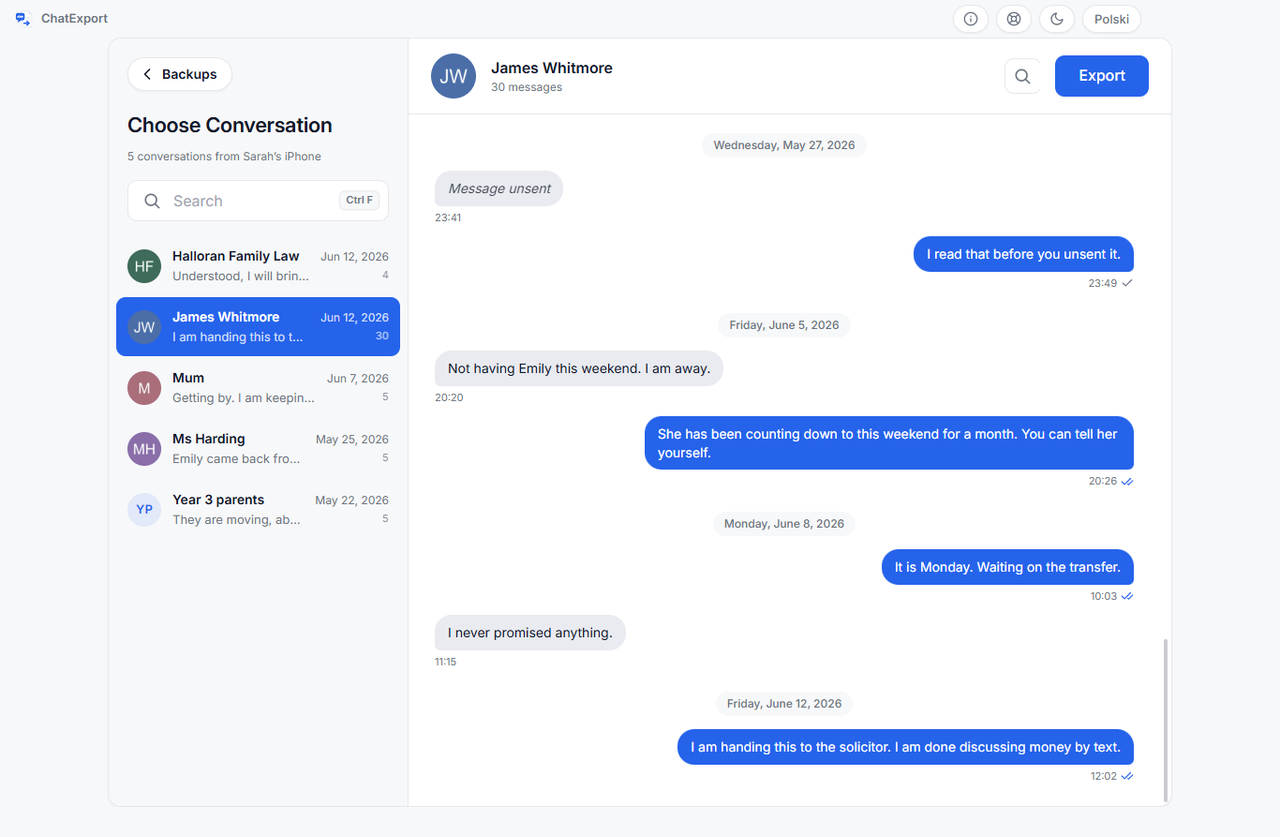
3. Find the conversation
Search matches contact names, numbers and message content, and the preview confirms it is the right thread before you spend anything on exporting it.
4. Export with the date range left at everything
That is the default, and for an entire conversation it is the whole point. The success screen shows a SHA256 fingerprint of the file, and one command re-checks it any time.
What happens with tens of thousands of messages?
Length changes the file, not the method. Rendering happens in batches aligned to month boundaries, so memory stays flat and the progress bar and cancel button keep working on threads of a hundred thousand messages and more. What length does change is the size of the result, and the arithmetic is worth seeing before you export rather than after:
| Thread | Text only, as arithmetic rather than a measurement |
|---|---|
| 5,000 messages | Roughly 150 to 250 pages |
| 20,000 messages | Roughly 600 to 1,000 pages |
| 50,000 messages | Roughly 1,500 to 2,500 pages |
Photos add pages and usually dominate the file size. A document that long stays usable because of the table of contents and the month by month bookmarks, and if it is headed for a printer, exporting a year at a time with the date range gives a shelf of volumes instead of one brick. Which routes survive a thread that long once paper is involved is how to print an entire text conversation from an iPhone. For analysis rather than reading, the same thread exports to CSV in seconds, a route compared properly in convert text messages to PDF.
Frequently asked questions
Are the green bubble messages part of the export?
Yes. SMS, MMS and iMessage live in the same database on the phone, so the export carries the whole conversation regardless of which network each message travelled over, and RCS is included where iOS stores it locally, which means iOS 18 and later.
Can I export only part of the conversation instead?
Yes, the date range settings take a From and a To date. For anything that might be questioned later, the entire thread is the stronger document, and pointing a reader at one page costs nothing.
How long does a 20,000 message export take?
The backup is the slow part and it happens once, taking longer the more there is on the phone. The export itself runs in batches with a live progress bar and a cancel button, stays responsive at a hundred thousand messages, and its time is dominated by how many photos the thread carries rather than by the message count.
What does it cost?
The download is a free trial that reads any backup, opens any conversation and previews it in full, in every format. What it does not do is produce the finished document: a trial export watermarks every page and stops after the 50 most recent messages. A one time licence lifts both limits and is on sale now, and there will never be a subscription.
Where to go next
- The complete walkthrough, method comparison and troubleshooting: how to export iPhone messages to PDF.
- Keeping the conversation for good, including where to store the file: how to save text messages as PDF from an iPhone.
- What happens to the photos, voice notes and other attachments: export iPhone messages with photos and attachments.