How to print an entire text conversation from an iPhone, and how much paper that is
To print an entire text conversation from an iPhone, back the phone up to a computer, export the whole thread from that backup as a PDF, and print the PDF or hand over the file. Every route that works from the phone alone stops somewhere short of entire, and the one route that does not need a backup, a Mac that already holds the thread, prints only as much history as Messages will load. Two numbers are worth having before you start: how many pages the conversation becomes, and whether “entire” is true of the backup you are printing from. The program this page uses, ChatExport, runs on Windows; its free download exports the 50 most recent messages with a watermark on every page, which shows what the document looks like, while the whole document needs the one-time licence.
Which routes survive a long conversation?
The backup route at any length, and the Mac route for as long as Messages will load the history. The others do not fail loudly. They cost more per message until nobody finishes, which is why the hub’s comparison of the routes for printing text messages from an iPhone is worth reading for a short thread and this page for a long one.
| Route | 40 messages | 400 messages | 5,000 messages |
|---|---|---|---|
| Screenshots, printed from Photos | About 13 images and one trip to the printer | About 130 images | About 1,700 images |
| Print from Messages on a Mac | Works, if the thread is on the Mac | Works, if the thread is on the Mac | Loading the history can stall, and it prints only what loaded |
| Forward or copy and paste | One tap per message, no dates | One tap per message, no dates | One tap per message, no dates |
| Export from a local backup | Whole | Whole | Whole, rendered in batches |
The screenshot counts rest on the free guide’s estimate of about three messages per capture, which it tells you to check against your own screen; halve the numbers if six fit. The same guide times the work at about 20 seconds a capture and 25 seconds placing each image in a document, which is where its figure of roughly 2.5 to 3 hours for 400 messages comes from, and the arithmetic of doing 400 messages by hand is there step by step. The Mac row has a condition: the thread is on the Mac only if Messages in iCloud has been syncing it, and the print carries only the timestamps the window was showing. And the last row is the one route that costs money and needs a Windows PC, which the rest of this page is about.
How many pages does an entire conversation become?
Between about 4 and 33 messages a page, and the spread is the honest answer, because it depends on how the thread clumps. The only measured figure on this page is the sample Court View export: 31 messages with 3 photos, spread over twelve days, come to sixteen pages, of which eight are apparatus (a title page, a summary, two pages of integrity statement, a statistics page, a table of contents, an attachment index and a closing page) and eight carry the messages. That is about 4 messages a page, because every day gets a separator, every message gets a header line with its number and time, and the messages are short and far apart. A long thread is the opposite shape: hundreds of short messages a day, few separators, and the rule of thumb the PDF guide uses for dense text-only stretches is 500 messages to roughly 15 to 25 pages, which is 20 to 33 a page.
The table below uses that dense figure, because a thread long enough to worry about is a dense one. Treat it as arithmetic, not as a measurement of your conversation:
| Messages, text only | Pages at 20 to 33 a page |
|---|---|
| 400 | Roughly 12 to 20 |
| 5,000 | Roughly 150 to 250 |
| 10,000 | Roughly 300 to 500, which is two thirds of a ream to a full ream single-sided |
| 50,000 | Roughly 1,500 to 2,500; print a year at a time, or do not print |
Photos add about one page per two photos at medium size, and a thread of holiday pictures follows its photos rather than its messages. The PDF layouts differ too: Court View, the plain transcript with the sender named on every line, fits more messages on a page than Chat View, which draws the conversation as bubbles and spends paper on whitespace.
How do you print the whole thread from a backup?
Four steps, and the phone is needed only for the first.
1. Back the phone up to the computer
Install the Apple Devices app from the Microsoft Store on Windows 10 or 11, or use iTunes; if the Store refuses to install Apple Devices on an older Windows 10 build, iTunes still works. Connect the iPhone with a cable, tap Trust on the phone, and choose Back up all of the data on your iPhone to this computer. Tick Encrypt local backup if you want the backup to carry your saved passwords, Health data and call history and to be unreadable to anyone who copies the folder; the messages are in the backup either way. If you do, choose a password you will not lose, because Apple’s page on encrypted backups says there is no way to recover it and earlier encrypted backups become unusable without it, and the program in step 2 will ask for it. The first backup takes 10 to 50 minutes as a rule of thumb and later ones are incremental. Every label and the disk-space arithmetic are in how to back up iPhone text messages to a PC without iCloud.
2. Open the backup and pick the conversation
Launch ChatExport on the Windows PC and it lists the backups it found, then the conversations inside by contact name, group chats included, with every message in a group attributed to its sender. It asks for the backup password if there is one. The preview shows the newest 300 messages, and Show all messages loads the rest; searching covers the whole thread either way.
3. Set the range to everything and pick a layout
The export screen states the span the backup holds for this conversation, from its oldest message to its newest, in a sentence under the date range. Leave both dates empty, or press Everything, and the document covers that whole span. Then choose Court View for the plain transcript or Chat View for the way the conversation looked on the phone.
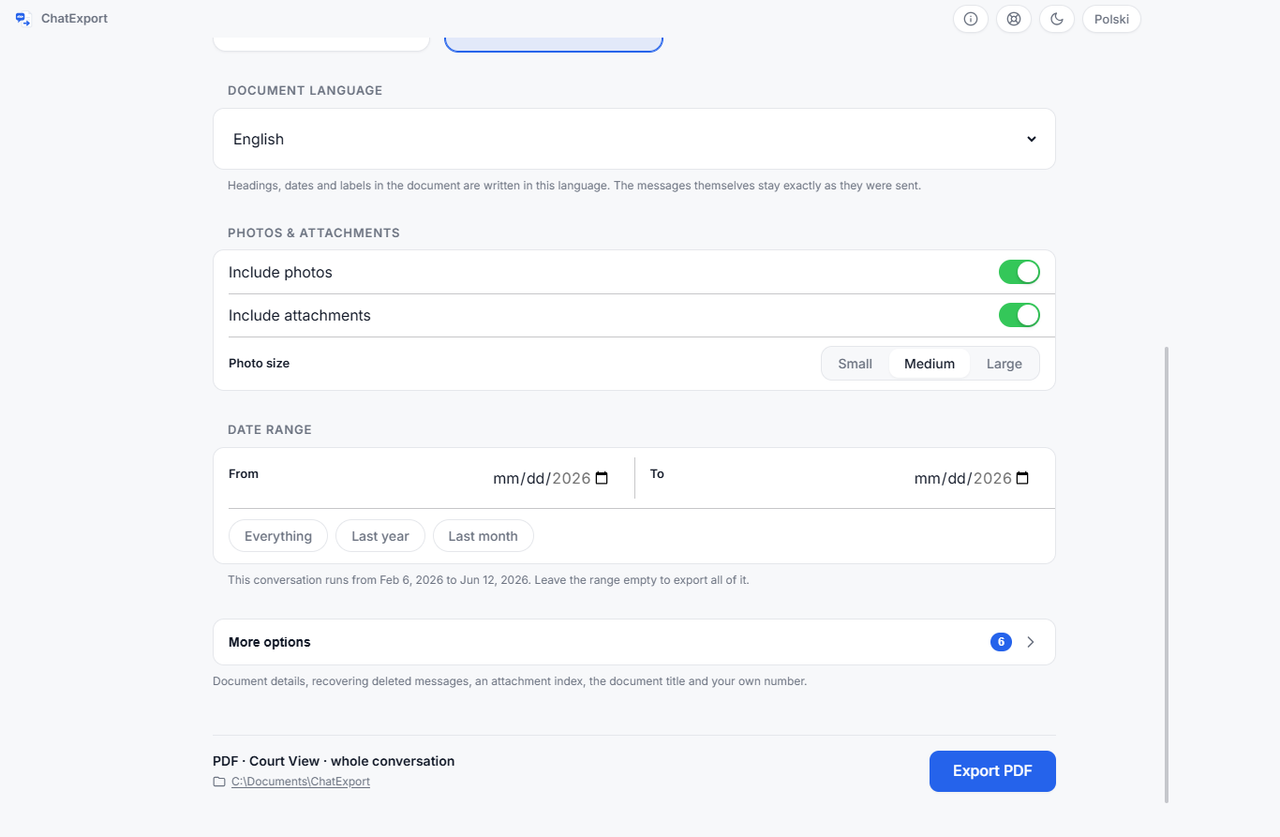
4. Export, then print the PDF or split it
The export renders in batches of up to 2,000 messages, so a thread of tens of thousands does not have to fit in memory at once, and the progress bar and Cancel keep working throughout. Any PDF viewer prints the result; for Letter paper, see the FAQ. For a document past a few hundred pages, print double-sided, or print a page range and hand over the file for the rest.
A small .sha256 file lands beside the PDF, a fingerprint taken as the document
was made. Keep it with the paper, and know what it does and does not do: a
checksum match shows the bytes have not changed since the fingerprint was
recorded, and a checksum sitting next to the file it describes proves that to
somebody else only if the value was also recorded somewhere independent, such
as in the letter that sent the file or in a filing. Whoever changes a PDF can
recompute a sidecar; they cannot change a figure already in somebody else’s
hands.
How do you know the printout is really the entire conversation?
By checking the span the export screen states against your own memory, and by knowing the two iPhone settings that shorten a backup without leaving a visible mark on the phone.
Messages in iCloud. Apple’s page on backup methods says a computer backup does not include “Data already synced and stored in iCloud, like iCloud Photos, iMessages, and text (SMS) and multimedia (MMS) messages”. Two things bring the history back into the backup. The documented route is switching Messages in iCloud off on the phone, which raises a dialog offering to keep the messages on the device; after that they are ordinary local data and the next backup carries them. The gentler route, which is practice rather than anything Apple documents, is to open the conversation on the phone and scroll back through the part you need, so the device fetches it, then back up again. Both, with the settings paths for each iOS version, are in are text messages saved in iCloud.
Keep Messages. Under Settings, Messages, or Settings, Apps, Messages on recent iOS, three choices, 30 Days, 1 Year or Forever, and Apple’s iPhone User Guide says that with anything other than Forever, conversations are removed automatically after the period. Messages removed that way are in no backup made afterwards. A backup made on a phone set to 1 Year holds one year, and the document says so honestly by starting where the backup starts.
The program reads two marks those settings leave in a backup: synced rows in the message database carry a cloud record id, and the Keep Messages horizon is recorded in the Messages app’s preferences file, which travels inside the backup. When it finds either, it says so on the export screen and names the cause before you export; on a backup with neither, nothing appears. It cannot count what is missing, because a backup carries no record of what it never held.
One more switch matters for “entire” in the other direction. On iOS 16 and later, messages deleted within the window Apple gives as 30 to 40 days sit in a Recently Deleted store, which the backup carries, and the export can include them, marked with the date they were deleted. That switch is off by default, because those messages are not part of the conversation as the phone shows it, and including them silently would misrepresent the thread.
When is printing all of it the wrong move?
When the reader needs to do more than read. Paper cannot be searched, so if a lawyer, an insurer or a relative will look for phrases, count messages or check a date, the PDF itself is the better deliverable: it is searchable, every page is numbered, and it carries a table of contents and bookmarks by month. Print the pages that matter and hand over the whole file with its checksum. If a spreadsheet is the destination, export CSV as well; if a law firm will load the thread into an eDiscovery platform, RSMF exists for exactly that; TXT and HTML come off the same screen, so all five formats are one export apart.
If the conversation is for a court, ask the lawyer how they want it before printing a ream; practice varies between a complete file with a printed excerpt and paper alone. What a court accepts is the court’s decision, and no program can make it for them. Exporting iPhone messages for court covers what the document should show when that is where it is going.
Frequently asked questions
Does the paper size matter?
Hardly. The document is laid out on A4, and on Letter paper the viewer’s fit-to-page option scales it: A4 is 210 by 297 millimetres and Letter is 216 by 279, so the page shrinks to 279 divided by 297, about 94 percent, with the layout unchanged.
How many pages is 10,000 text messages?
Roughly 300 to 500 pages text-only at the dense rate of 20 to 33 a page, which is between two thirds of a ream and a full ream single-sided, plus about one page per two photos at medium size. The figure is arithmetic, not a measurement of your thread, so treat it as a planning number.
Can I print only part of an entire conversation?
Yes. The date range in step 3 takes a From and a To date, and the print dialog takes a page range of the finished PDF. For anything that might be questioned later, exporting the whole thread and printing an excerpt keeps the complete file in existence, with its checksum, beside the pages you hand over.
Will the photos print too?
Photos print at the size you choose on the export screen, small, medium or large. A video, a voice message or a document sent in the thread cannot be printed, so the PDF puts a named card in its place with the file name and size; nothing is silently dropped.
Does every message get a date on the printout?
Not by default. Every message gets a time, in every layout, and every day gets a date separator; a switch repeats the full date on every row for documents whose pages get cited one at a time, and the title page states the time zone the times are in.
What does it cost?
The download is a free trial: it opens any backup in the folder Apple’s software uses, shows the whole thread on screen one click past the newest 300 messages, and exports in every format, with a watermark on every page and a stop after the 50 most recent messages until there is a licence. That stop is why a long thread cannot be page-counted before purchase, and why the sample is the honest yardstick. The one-time licence is on the pricing page, and there will never be a subscription.
Before printing anything, open a finished document. The sample exports are this program’s output over an invented custody dispute, so you can see the Court View layout, the page numbers and the integrity page, and count for yourself how the sixteen pages divide.