A TextPort alternative that reads an encrypted backup, and WhatsApp too
If you are comparing TextPort against anything else, start with the fact that it is now two products with two answers. Re-read on 15 October 2026, its desktop apps “are free and need no account”, and TextPort for Windows reads an iPhone backup already on your PC. Its iPhone app lets you “import your first three conversations for free” and then sells a subscription through the App Store. ChatExport runs on a Windows PC and reads the database inside the backup your iPhone already makes, so next to TextPort for Windows the difference is no longer where the conversation goes. This page is about what each of them costs, what working from pictures cannot carry, what TextPort does well, and when each answer is the right one.
Correction, 4 October 2026, and it is the first thing to read on this page. TextPort has changed what it says about itself, so the analysis below describes a route the vendor no longer claims to use. Every reading here is dated and was accurate when taken: on 4 August and again on 11 September 2026 both the App Store listing and the vendor’s site described recording the screen as you scroll. Re-read on 3 and 4 October 2026, no page of the vendor says that any more. The site now says the iPhone app “pulls it straight out of iMessage”, the safety page says the export is built with “secure cloud processing”, and the desktop app is described two different ways on two of the vendor’s own pages, as reading “a local backup of your iPhone on your own computer” on one and as connecting to the phone on the other.
What that leaves of the comparison is still a real difference, and it is the one to decide on: on the iPhone app the conversation leaves your phone and is built into a document on somebody else’s servers, while a program reading the backup on your own PC does not send it anywhere. The sections below are kept because the limits of working from pictures are still the limits anyone faces who works from pictures, including the product in this category that still does.
Update, 15 October 2026. The desktop question that correction left open now has an answer from the vendor, and it narrows the difference. TextPort’s site says its desktop apps “are free and need no account”, that TextPort for Windows “exports from an iPhone backup”, and that with it “your messages never leave your computer”. So against the Windows app, keeping the conversation on your own PC is no longer a difference at all. What is left is narrower and checkable. TextPort for Windows “reads unencrypted backups” and, if encryption is on, walks you through turning it off, while ChatExport reads the backup encrypted or not. The desktop apps cover iMessage and SMS, while ChatExport also reads WhatsApp. And there is the document itself, which for ChatExport is described further down.
What does TextPort cost in 2026?
On a computer, nothing: re-read on 15 October 2026, its desktop apps “are free and need no account”. On the iPhone, seven prices, checked on the App Store listing on 11 September 2026, all in USD and all subscriptions: a week is 4.99, 6.99, 7.99 or 8.99, a month is 14.99, and a year is 49.99 or 59.99. Several of those appear in the list more than once. Before any of them, the vendor’s site says you can “import your first three conversations for free”.
Two things follow from that list. Four different weekly prices at the same time is price testing rather than a price list, so the figure you are shown is a fact about the experiment you landed in, not about the product. And the shape of the offer says how it expects to be used: a week is for one export in a hurry, and a subscription that is not cancelled keeps billing after the document has been filed.
For comparison, ChatExport is bought once, for 34.99 USD, and the copy you have keeps working. The download is a free trial with no clock on it, and the pricing page has the whole figure in one line.
How does TextPort get the messages?
Two answers, and the date decides which one you get.
As the vendor describes it today, re-read on 3 and 4 October 2026: the iPhone app “pulls it straight out of iMessage”, and the safety page adds that it “uses secure cloud processing to build the clean, timestamped export”. So the reading happens on your phone and the document is assembled elsewhere. Of the desktop apps the vendor now gives one answer per platform, re-read on 15 October 2026: “TextPort for Mac exports the Messages on your Mac, and TextPort for Windows exports from an iPhone backup”, and the Windows one reads only unencrypted backups.
As the vendor described it on 11 September 2026, which is what the rest of this section analyses: the App Store listing walked through the process in four sentences, “Open TextPort and tap record, or import screenshots. Switch to your chat app and scroll through the conversation. Return to TextPort. It rebuilds the thread with each message’s sender, wording, and any visible dates and times.” The site said the same from the other side: “Record your conversation as you scroll, and TextPort produces a paginated, timestamped export as PDF, CSV, or plain text in minutes.”
That second reading is kept rather than deleted, because the limits it describes belong to the route and not to the brand.
Read the phrase “any visible dates and times” slowly, because it is exact. Messages on an iPhone screen carry a time only where the app chose to show one, and an iPhone shows a timestamp at the start of a group of messages, not on every bubble. What was not on the screen is not in the recording, and what is not in the recording is not in the document. That was never a flaw in TextPort: it is the limit of the route, for anybody who takes it.
What does a screen recording leave out?
The parts of a conversation that a reader is most likely to ask about, because they are the parts the phone keeps in the database and shows only sometimes.
- A time on every message. The backup stores when each message was sent, delivered and read, to the second. A recording carries the few timestamps iOS chose to display.
- Which message answered which. Replies, reactions and edited messages are records in the database. On screen they are a layout.
- The messages that were not on screen. A conversation of ten thousand messages is ten thousand things to scroll past. A backup already holds all of them.
- A way to check it later. A recording is a video of a phone. The text rebuilt from it cannot be tied back to anything, because there is nothing underneath it to tie to.
That last point is the one that matters most for the reader this site is written for. A document built from the backup can name the source: ChatExport’s Document Integrity page prints the SHA-256 of the message database exactly as it is stored in the backup, and anyone holding the same backup can recompute it. The finished file gets its own checksum in a small file beside it. Neither step proves what the conversation means. Both let somebody else confirm that the document and the source are the ones they were told they are, which is the question the other side asks first. The longer version of this argument, with the settings that decide whether a backup holds your whole history, is in ChatExport versus screenshots.
Which fields exist on each route?
The ones the database keeps as records, against the ones a picture of the screen can show. This is the same conversation read two ways, so the gap is not a matter of quality but of which fields exist at all.
| Screen recording and OCR | Reading the backup database | |
|---|---|---|
| Where the text comes from | Characters recognised from pixels | The message row itself |
| Message transport | The colour of the bubble | Recorded per message as iMessage, SMS or RCS |
| Edited messages | The wording shown at the moment of filming | Flagged, with the superseded wording, and the time where the source recorded one |
| Unsent messages | Not visible, so not present | Flagged as retracted |
| Reactions | Whatever the screen displayed | Each one with its kind and its sender |
| Attachments | Thumbnails as they appeared | Filenames, and the files themselves |
| Verification | The recording is the evidence of itself | SHA-256 of the source files, recomputable by anybody |
None of that makes a document built from a recording worthless. For reading a conversation back, or for a dispute nobody is going to contest, a paginated timestamped file is a perfectly reasonable thing to have and it beats a folder of screenshots. It matters on the day somebody has a reason to question the document, because then the question is what the file can answer about itself.
Why the colour of the bubble stopped being the answer
Because since iOS 18 a green bubble may be RCS rather than SMS, and those are different systems. Anything reading the screen has only the colour to go on, so the best it can do is guess, and the guess is now wrong some of the time. Reading the database gives the transport the phone actually recorded, message by message, and leaves the field alone where the phone recorded nothing rather than filling it with an assumption. What the change looks like from the reader’s side is in RCS messages on an iPhone.
What does TextPort do better?
Plenty, and pretending otherwise would make this page an advert.
TextPort runs on the phone. There is no computer in the process, no cable and no backup to make first, which for somebody who needs a page out of one short conversation tonight is the shorter road by a distance. Its iPhone app also reaches past Messages, in the vendor’s own words: “Need WhatsApp, Instagram, or Messenger? Use TextPort for iPhone.” Its listing carries 4.4 stars from about 1,200 ratings, which is a real number of people who got what they came for.
On a computer it costs nothing. Re-read on 15 October 2026, the desktop apps “are free and need no account”, and TextPort for Windows reads a backup Apple Devices or iTunes already made, “without making a new one”. If your backup is not encrypted and the conversation is iMessage or SMS, that is a free way into the same source this program reads. How the rest of the category stands is in the comparison of the whole category.
If what you need is one short conversation as a PDF, tonight, from the phone in your hand, TextPort is a reasonable way to get it. This page will not pretend otherwise.
What is this program, next to it?
One job, from the file the phone already wrote, sold once, on Windows.
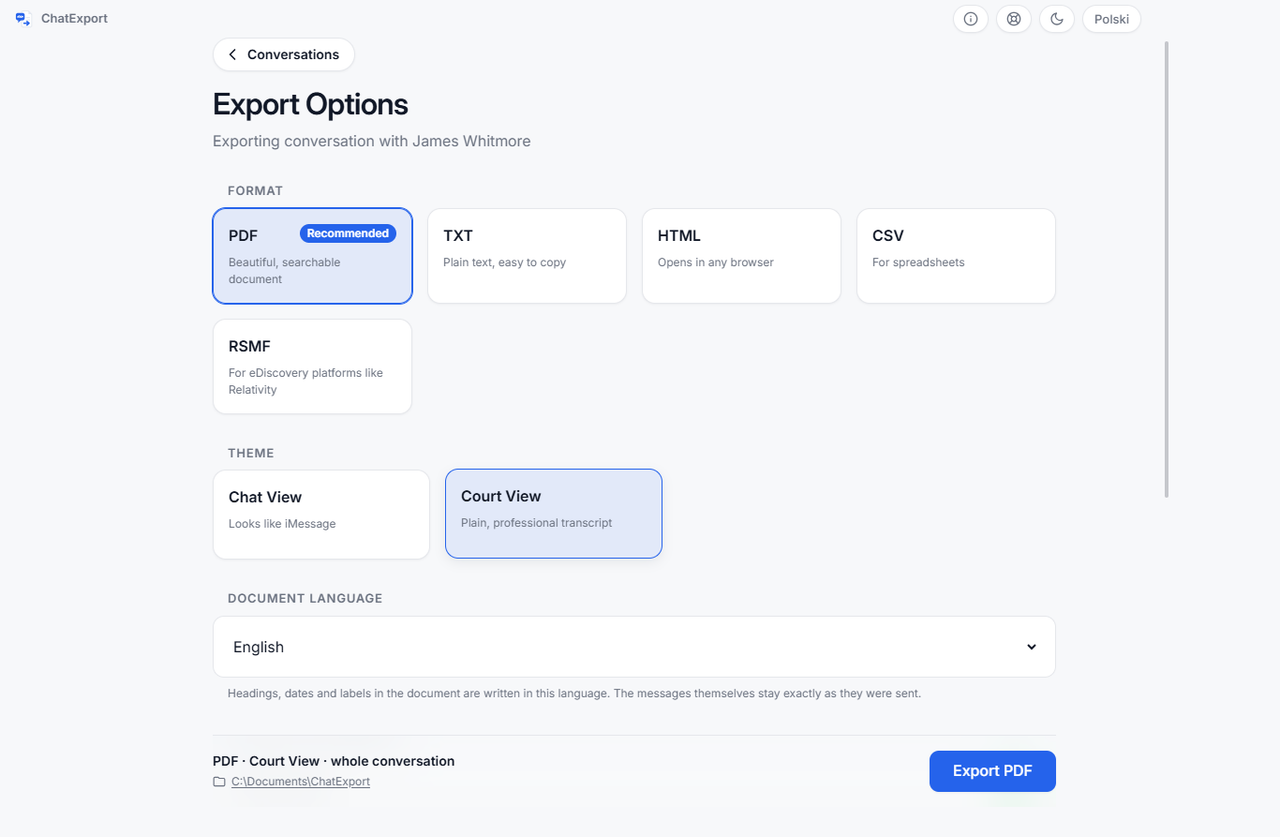
ChatExport reads the backup Apple’s own software made on your PC, encrypted or not, finds the message database and turns one conversation into a document. Nothing is recorded, nothing is typed out, and the phone is not in the process after the backup exists. The narrowness is spent on the document:
- Every message, with its own time. Sent, delivered and read, from the record rather than from whatever was on screen. Replies, reactions and edits come with the message they belong to.
- Court View, the formal layout meant to be filed: no chat bubbles, message numbering so a line can be cited, full timestamps with seconds, raw numbers beside contact names.
- A source that can be named. The Document Integrity page states the device, the iOS version, the backup date, and the SHA-256 of the message database as it sits in the backup. The finished file gets a checksum of its own beside it.
- A warning when the backup is not the whole story. Two iPhone settings, Messages in iCloud and Keep Messages, can keep older messages out of a backup without leaving a trace. ChatExport reads both and says so before you export anything.
- Recently deleted messages on iOS 16 and later, within Apple’s roughly thirty day window, as a switch that is off by default.
- Five formats: PDF in three styles, TXT, HTML, CSV and RSMF.
It also reads WhatsApp, from the file WhatsApp itself exports, which works from an Android phone too. And one payment, with no subscription ever.
What does the free version of each let you check?
Both let you look before paying, differently shaped:
| Program | What you get without paying | Checked |
|---|---|---|
| TextPort | Desktop apps free, no account (Windows: unencrypted backups only); on iPhone, the first three conversations imported free, then a subscription | 15 Oct 2026 |
| ChatExport | 50 messages, every page watermarked; the whole thread readable on screen first, one click past the newest 300 | src, 11 Sep 2026 |
The first row said “not published” when this page was written, because neither the App Store listing nor textport.com said then what the app does before a subscription starts. Re-read on 15 October 2026, the vendor states both halves. The trial here has no clock on it, because a person whose hearing is in six weeks should not be racing the software.
When should you stay with TextPort?
Three cases, none of them rare.
There is no computer in the picture. ChatExport runs on Windows and needs the backup on that PC. If the phone is all you have, a program on the phone is the only kind that helps.
The backup is not encrypted and the conversation is iMessage or SMS. TextPort for Windows reads that backup for free, with no account. ChatExport’s free trial stops at 50 messages, so here the case for paying is the document rather than the access.
The messages are not in Messages or WhatsApp. ChatExport reads two things: the iPhone backup and WhatsApp’s export file. A thread in any other app is outside it, while the vendor points readers with Instagram or Messenger to TextPort for iPhone.
What is left is the reader with a Windows PC, a backup of the phone, and one conversation that has to survive being questioned. For that reader the difference sits in three places: whether the backup is encrypted, whether the conversation is in WhatsApp, and what the finished document says about its own source.
Frequently asked questions
Does TextPort read the messages or record the screen?
Neither answer stays still, so take the date with it. Re-read on 3 and 4 October 2026, the vendor says the iPhone app pulls the conversation straight out of iMessage and builds the export with cloud processing, and says nothing anywhere about a recording. Read on 11 September 2026, the same listing walked through recording the screen as you scroll. The practical question underneath has not changed: an app on the iPhone cannot read the message database, so whatever it reads, the iPhone app’s document gets assembled somewhere other than on your own machine. TextPort for Windows is a different case: re-read on 15 October 2026, it reads an iPhone backup on your PC, only an unencrypted one, and the vendor says “your messages never leave your computer”.
Is TextPort a subscription?
On the iPhone, yes, after the first three conversations; on a computer, no. Checked 11 September 2026, the App Store listing sells it by the week at 4.99, 6.99, 7.99 or 8.99 USD, by the month at 14.99, and by the year at 49.99 or 59.99, with several of those prices listed more than once, and no one-time purchase in the list. Re-read on 15 October 2026, the vendor’s site says you can import your first three conversations for free before that, and that the desktop apps for Mac and Windows are free and need no account.
Can a document made from a screen recording be checked later?
Not against anything underneath it. The text was rebuilt from a picture, so the only thing to compare it with is the picture, and the picture is a recording of whatever was on the screen at the time. A document read from the backup can state the checksum of the database it came from, and anyone with the same backup can recompute that figure. Whether either document is accepted anywhere is a decision for whoever receives it, and no program can make it for them.
What about WhatsApp?
TextPort handles WhatsApp in its iPhone app only: its site says the desktop apps “cover iMessage and SMS”. ChatExport reads the export file WhatsApp writes when you choose Export chat, which takes a few more taps, works from an Android phone as well, and carries the file’s own checksum into the document. Neither route needs the other person’s phone.
The comparison across the whole category, including the desktop programs that read the backup, is in the best iPhone message export software of 2026.
Before spending anything with anyone, open a finished document. The sample exports are this program’s real output over an invented custody dispute, so you can see the Court View layout, the timestamps and the checksum page without installing a thing.