Decipher TextMessage vs TouchCopy: forty dollars apart, and both are yours to keep
If you are comparing these two, you have probably already decided the thing that matters most: not to rent. Since iMazing discontinued its device licence in June 2025, buying outright is the exception in this category rather than the rule, and both of these still offer it. Decipher TextMessage is 29.99 USD and does messages. TouchCopy is 70 USD, covers two computers, and does more than messages. The gap is forty dollars and a question about scope.
What does each purchase include?
| Decipher TextMessage | TouchCopy | |
|---|---|---|
| Price | 29.99 USD, checked 4 Aug 2026 | 70 USD, or 40 USD for 12 months and 30 for 6, from the vendor’s checkout, 15 Oct 2026 |
| Counted in | two device activations, computers unlimited | two computers |
| Renews itself | no | no, the purchase page says so |
| What it is | message exporter | device manager, messages included |
| Where messages come from | an iTunes or Finder backup | a backup |
| Encrypted backups | yes | yes |
| no, a separate product | yes | |
| Free version | “a few messages from each contact”, no number published | the first five or six messages of each conversation |
| Runs on | Windows, macOS | Windows, macOS |
Two rows carry the decision. WhatsApp, because Decipher’s answer is a second purchase rather than a setting. And what each program is: one is an exporter and the other is a manager that also exports, so the 40 dollar difference buys capability you may have no use for.
The free tiers are the weakest part of both products. Neither gives you a finished document, and Decipher does not publish where its limit falls at all, so how much of a conversation you will see before paying is not something you can know in advance.
Are they reading the same messages?
Yes, and that is worth saying because it removes a question people spend time on.
Both open an Apple backup and read the message database inside it. Both open an encrypted backup with the password. Neither reconstructs anything from a screenshot, which TextKeep does, and which changes what an export can carry. So between these two, the messages are the same messages and the difference is entirely in the surrounding product.
Where does this program stand?
On the same side of the licence question as both, narrower than TouchCopy, similar in scope to Decipher, and different from either in what it optimises the document for.
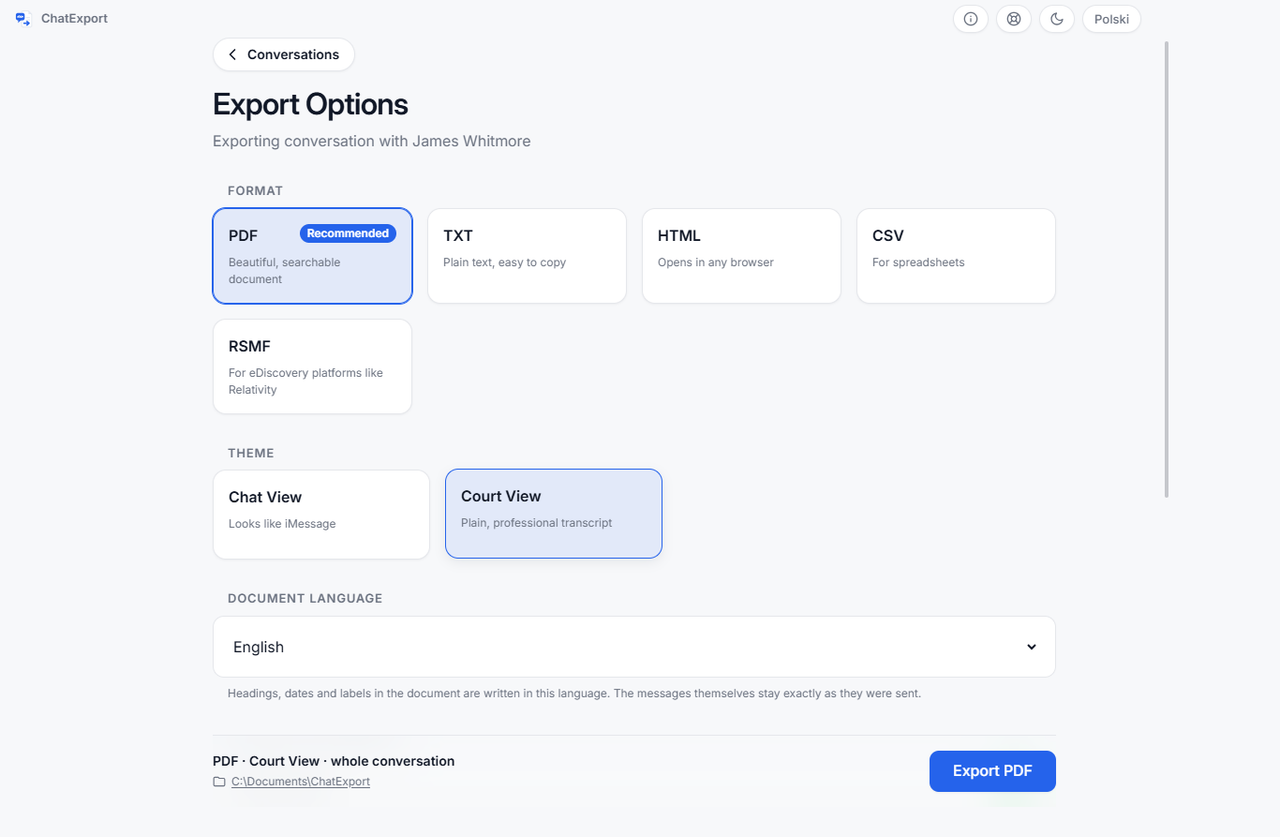
ChatExport reads an Apple backup, finds the message database and turns one conversation into a document. It manages no devices and restores nothing.
- Court View, a formal layout chosen at export: message numbering down the margin so a specific line can be cited, timestamps to the second, raw phone numbers beside contact names.
- A SHA256 checksum written beside the finished file, so the document can be re-checked by anyone later: how to verify a PDF with SHA256 in 30 seconds.
- Encrypted backups read directly, the password asked at the backup and never written to disk.
- Recently deleted messages on iOS 16 and later, inside Apple’s roughly thirty day window, off by default.
- Five formats: PDF in three styles, TXT, HTML, CSV and RSMF.
- WhatsApp from WhatsApp’s own export file, which works from an Android handset as well.
- 34.99 USD, once.
Between the two prices above, and with a trial that lets the whole conversation be read on screen before anything is paid for, then watermarks and stops at the 50 most recent messages if you export without a licence.
Which of the three?
Decipher TextMessage if the budget is the deciding factor, the job is messages, and WhatsApp is not part of it. At 29.99 USD it is the cheapest purchase here, and a Decipher TextMessage alternative, compared on what you can check goes through that decision in detail, including where the answer is to stay with it.
TouchCopy if you want more than messages off the phone, or you work across two computers, and you want to own it. A TouchCopy alternative for Windows turns on the same question from the other side.
This one if you are on Windows, the conversation is going somewhere that will ask about its origin, and you want WhatsApp covered without a second purchase. The trade is real and it runs the other way too: neither device management nor macOS is here, and neither is planned.
What this page does not settle
Whether any export is accepted anywhere. Courts, tribunals and employers decide that on their own rules, and software cannot promise it.
How TouchCopy performs at everything beyond messages. Its device management was not surveyed. The comparison here is licence, source, encrypted backups, WhatsApp and free tier.
Where Decipher’s free version stops. The vendor publishes no number, and this page will not invent one.
Today’s prices. Decipher’s was checked on 4 August 2026 and TouchCopy’s were read from its checkout on 15 October 2026, and both vendors can change them. TouchCopy’s term licences, 30 USD for six months and 40 for twelve, change the arithmetic for a short job. Every price in the category, with the date beside each one, is in what iPhone message export software costs.
Frequently asked questions
Are these the only two you can still buy outright?
No, and the honest list is longer than this page. CopyTrans Contacts at 19.99 USD and iExplorer at 39.99 are one time purchases too, covered in the CopyTrans Contacts alternative for the day the phone is not in your hand and the iExplorer alternative for Windows. AnyTrans also sells a lifetime licence alongside its yearly one, but it cannot read an encrypted backup, and its guide tells you to switch the protection off: an AnyTrans alternative that asks for your backup password instead.
Does Decipher TextMessage handle WhatsApp?
Not in this product. Its vendor sells a separate one for WhatsApp, so it is another purchase decision rather than a checkbox. TouchCopy covers WhatsApp in the same licence.
Can both open an encrypted iPhone backup?
Both can, with the password. That puts them with iMazing and this program, and apart from AnyTrans and TextPort’s Windows app, which read only unencrypted backups and ask you to turn the encryption off first.
Which one is better for a conversation going to a lawyer?
That depends on what the document has to carry rather than on which program reads the backup, since both read the same one. The things worth checking in any of them are whether each message has its own timestamp, whether the export names the file it came from, and whether anything lets a reader confirm the document has not changed since. What courts have actually asked for is set out in exporting iPhone messages for court.
Do I need the iPhone in front of me?
No, as long as a backup already exists on the computer. All three programs here read a backup rather than the connected phone, which is the whole reason this can be done without the handset: the CopyTrans Contacts alternative for the day the phone is not in your hand.
The full category, eleven programs with prices, sources and free tiers, is in the best iPhone message export software of 2026.
Before paying anyone, open a finished document. The sample exports are this program’s real output over an invented custody dispute, so the layout, the timestamps and the checksum page can all be read without installing anything.