A TouchCopy alternative for Windows, when messages are the only thing you need off the phone
TouchCopy is a device manager. It copies music, photos, contacts, call logs, notes, calendars, books and messages off an iPhone. Messages are one section in that list.
If messages are the only reason you are here, that is the whole comparison in one line: you would be buying a nine room house for the kitchen.
What does TouchCopy cost, and what is the licence?
Three options. The lifetime licence is 70 USD and covers two PCs. Beside it sit a twelve month licence at 40 USD and a six month licence at 30 USD, each for one PC. The three amounts come from the vendor’s own checkout catalogue, read on 15 October 2026, rather than from the text of the purchase page, which describes the licences in words and renders the figures with a script. Open the purchase page for the current figures, and for how that compares with the rest of the category see what iPhone message export software costs. What the page does state in words is that there are “no subscriptions or auto-renewals”.
That deserves credit rather than a shrug. In a category where the best known product moved to subscription only in June 2025, a vendor selling a term licence that simply expires instead of quietly recharging your card is behaving well, and their lifetime option is still there for anyone who wants it.
Where do TouchCopy’s messages come from?
From a backup, the same as here. Their tutorial says it directly:
For other sections like Messages, Call Logs and Contacts, TouchCopy will need to read that content from a backup.
This matters more than any feature comparison, because it puts both products on the correct side of the only line in this category that changes what your document is worth. Both read Apple’s message database. Neither reconstructs your conversation from screenshots, which is what TextKeep, one of the eleven programs in the best iPhone message export software of 2026, actually does.
So the messages are the same messages. What differs is the document they end up in.
What is different about the document?
TouchCopy exports messages to PDF, HTML, CSV and plain text, which covers most needs, and it handles WhatsApp and LINE as well as SMS, RCS and iMessage.
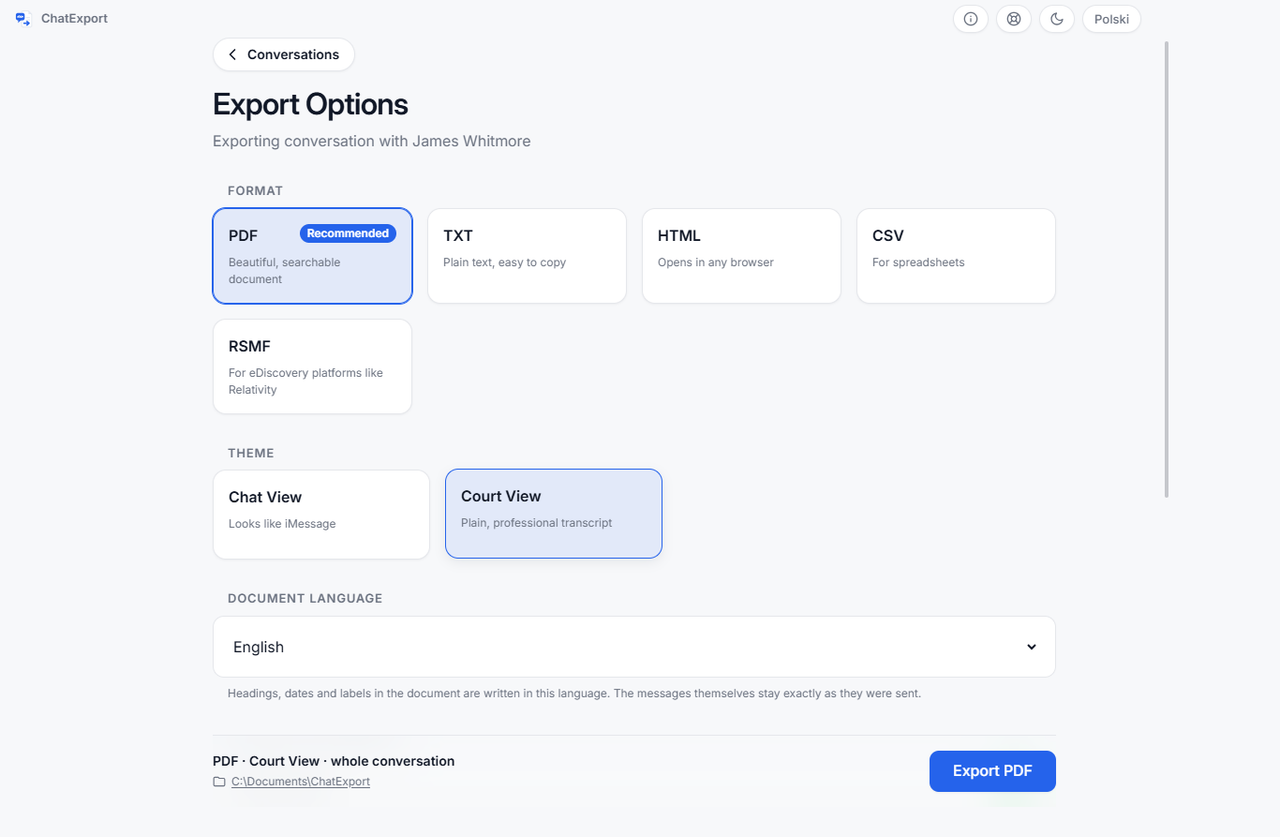
What this program adds is aimed at one situation: a document somebody else is going to argue with.
- Court View, a formal layout rather than a screenshot of a chat, chosen at export: numbered messages so a line can be cited as “#412”, full timestamps to the second, raw phone numbers beside contact names. An attachment index at the back is a separate switch, not part of the layout.
- A SHA256 checksum of the finished file, shown when the export completes and written beside it, so anyone can confirm later that the document has not changed. What that proves, and what it does not, is in how to verify a PDF with SHA256 in 30 seconds.
- A document written in the reader’s language, chosen at export time from fourteen, with the messages themselves untouched.
- Recently deleted messages on iOS 16 and later, within Apple’s roughly thirty day window, as a switch that is off by default.
None of that helps if you are archiving a family group chat for yourself. All of it helps if the file is going to a solicitor.
What do the trials give you?
TouchCopy shows the first five or six messages of each conversation. This program writes the 50 most recent messages with a watermark on every page, and lets you read the whole thread on screen before deciding.
Neither is enough to produce a document, which is normal here and worth saying plainly rather than discovering after the download.
When is TouchCopy the better buy?
You want the rest of the phone too. Music, photos, a call log of its own, notes, books. This program does none of that and never will. The one overlap is narrow: from an encrypted backup it can place the calls with one person between the messages of that conversation.
You are on a Mac. TouchCopy has a Mac version. This one is Windows only, and that is a real gap rather than a coming-soon.
You need two computers covered by one purchase. Their lifetime licence covers two PCs. The licence here has one published figure, on the pricing page, and there is no two machine bundle to buy.
Two head to heads cover that same ground from TouchCopy’s side: TouchCopy against iMazing is two computers owned against five devices rented, and TouchCopy against Decipher TextMessage is forty dollars between two licences you keep.
Frequently asked questions
Does TouchCopy read encrypted backups?
Yes, when you supply the encryption password, according to their own support article, checked 4 August 2026. So does this program, which asks for the password at the backup and never writes it to disk. AnyTrans and TextPort’s Windows app read only unencrypted backups and ask you to switch encryption off instead, which the wider comparison covers in the best iPhone message export software of 2026.
Do I need the phone connected the whole time?
For the message sections, no. Both programs work from the backup once it exists, so the phone can go back in your pocket. Making that backup in the first place, without involving iCloud, is how to back up iPhone text messages to a PC without iCloud.
Which one exports a whole conversation rather than a selection?
Both, and that is the right default for anything contested: a thread with the awkward parts left in is harder to attack than a curated one. How to export an entire iMessage conversation covers the settings that quietly shrink a thread before you notice, including one on the phone that deletes messages before any backup is ever made.
What does ChatExport cost?
A free trial today, with the one time licence on sale now, and never a subscription. The figure is on the pricing page, in one price with no tiers to decode.
The fastest way to decide between two programs that read the same database is to look at what each one hands you at the end. The sample exports on this site are real output from this program over an invented custody dispute, so you can open a finished Court View PDF and compare it against a TouchCopy trial before paying either of us.