iMazing vs TouchCopy: renting five devices, or buying two computers
These two are both device managers, they both read an iPhone backup, and their prices cannot be compared as written, because they are counted in different things. iMazing is 49.99 USD a year for five devices. TouchCopy is 70 USD once for two computers. Which is cheaper depends entirely on how long you keep it, and after about eighteen months the answer stops changing. The same arithmetic across the whole category, five programs rather than two, is in what iPhone message export software costs.
What does each licence actually cover?
| iMazing | TouchCopy | |
|---|---|---|
| Price, checked 4 Aug 2026 | 49.99 USD/year, or 29.99 for one device (15 Oct 2026) | 70 USD once, or 40 USD for 12 months and 30 for 6, from the vendor’s checkout (15 Oct 2026) |
| Counted in | devices, five of them | computers, two of them |
| Model | subscription only, since June 2025 | purchase, or a term |
| Auto-renewal | yes, it is a subscription | the vendor’s purchase page says there are none |
| Cost over three years | about 150 USD, or about 90 for one device | 70 USD |
| Encrypted backups | yes | yes |
| Free version | 25 messages, and 25 WhatsApp messages | the first five or six messages of each conversation |
| Runs on | Windows, macOS | Windows, macOS |
The unit is the part people get wrong. iMazing counts the phones and tablets you point it at; TouchCopy counts the computers you install it on. A household with three iPhones and one PC is a single TouchCopy licence and well inside an iMazing Personal one. A consultant with one phone and four machines is the reverse.
iMazing’s model is not open to interpretation, since the vendor published it:
In June 2025, we discontinued the device license and now only offer subscriptions
That is why the third row of the table matters more than the first. At one year, iMazing is cheaper. Somewhere in the second year TouchCopy overtakes it and never gives the lead back, because one of the two prices has stopped growing. On iMazing’s one-device tier, at 29.99 a year, the same crossing comes in the third year instead.
Are you buying the same thing?
Nearly, and where they differ is not the messages.
Both read an Apple backup rather than the live phone for message data, both open an encrypted backup with the password, and both export conversations to a document. Both also handle WhatsApp. Neither reaches something the other cannot.
The real differences are two:
How much phone management you are paying for. iMazing’s own pages describe a wide manager: device backup and restore, app data, photo libraries, voicemail, phone to phone transfer, fleet supervision, and for a lot of readers that list is the entire justification for the yearly cost. TouchCopy is a manager too; how the two compare feature by feature was not surveyed for this page, so no ranking between them is offered here.
Whether the cost ever ends. TouchCopy’s purchase page says plainly that there are no subscriptions or auto-renewals. That sentence is now unusual in this category and it is the reason the pair is worth comparing at all.
The free tiers deserve one line together, because both stop in the same unhelpful place. TouchCopy shows the first five or six messages of every conversation; iMazing gives twenty five messages. Either tells you the software runs. Neither gives you a document.
Where does this program sit next to the two of them?
Narrower than both, priced like TouchCopy, and built around the part neither of them treats as the product: what the finished document has to survive.
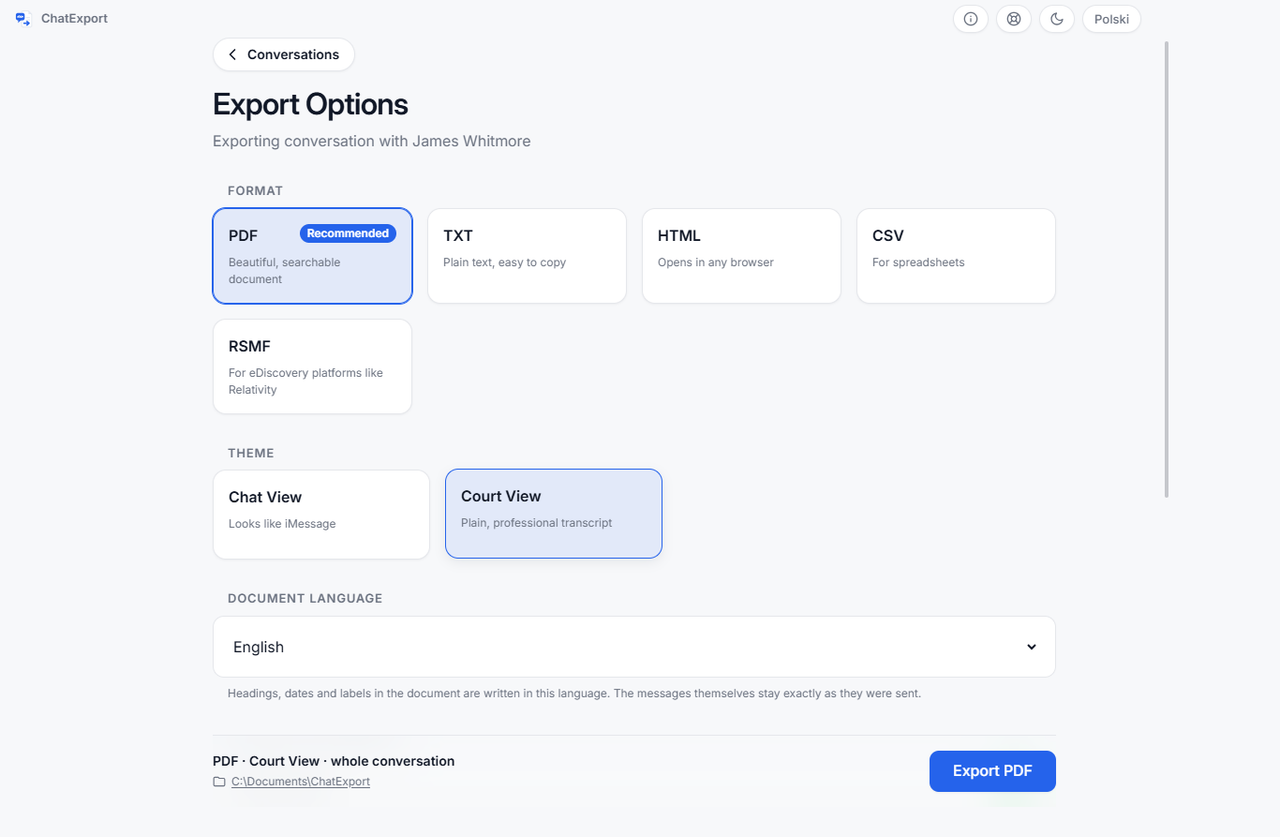
ChatExport reads an Apple backup, finds the message database and turns one conversation into a document. It does not back up a phone, restore one or move a photo library, and both programs above do all of that.
- Court View, chosen at export: numbered messages down the margin so a line can be cited by number, timestamps to the second, raw phone numbers printed beside contact names.
- A SHA256 checksum written beside the finished file, so anyone can re-check the document later: how to verify a PDF with SHA256 in 30 seconds.
- Encrypted backups read directly, with the password asked at the backup and never written to disk.
- Five formats: PDF in three styles, TXT, HTML, CSV and RSMF, where iMazing sells RSMF only in the Business tier, from 89 USD a year on 15 October 2026.
- 34.99 USD, once, and no subscription ever.
The trial watermarks every page and stops after the 50 most recent messages, with the whole thread readable on screen first, which is more than either free tier above gives you.
Which one is right for you?
Take iMazing if you want the phone managed rather than read, you are on a Mac, or you have several devices and one computer. Its feature list is the reason the yearly price exists, and nothing on this page argues you out of it.
Take TouchCopy if you want a manager you own outright, you work on two computers, and the absence of auto-renewal is worth more to you than the extra features iMazing carries. A TouchCopy alternative for Windows takes that purchase apart on the one question it turns on, which is whether messages are the only thing you actually need off the phone.
Take this one if the answer to that question is yes, you are on Windows, and the export is going somewhere that will ask where it came from.
What this comparison leaves open
Whether any export is accepted anywhere. Courts, tribunals and employers decide that on their own rules, and no program can promise it.
How the two compare as phone managers. Only the licence, the source of the messages, the encrypted-backup answer and the free tier were compared here. Device management features were not surveyed on either side.
Today’s prices, and TouchCopy’s term option. Both headline figures carry a check date of 4 August 2026, and TouchCopy sells 6 and 12 month licences for one PC alongside the lifetime one, which changes the arithmetic for anyone who only needs a few months. Their amounts, 40 USD for 12 months and 30 for 6, come from the product catalogue the vendor’s checkout loads, read on 15 October 2026, and are not printed in the text of the purchase page itself.
Speed. No timings were measured for either program, so none are claimed.
Frequently asked questions
Is TouchCopy a subscription?
Its purchase page states there are no subscriptions or auto-renewals, and the 70 USD figure covers two computers. It also sells six and twelve month licences for one PC, for people who need it briefly, at 30 and 40 USD in the vendor’s checkout catalogue on 15 October 2026. Both models exist there, and neither renews itself.
Does iMazing still sell a perpetual licence?
No. The store had Personal from 29.99 USD a year for one device (49.99 for five), Family at 89.99 and Business from 89 when read on 15 October 2026, all of them subscriptions, and the vendor’s licensing page says the device licence was discontinued in June 2025. The iMazing alternative for Windows covers what that changed for a job most people do once.
Do both of them read an encrypted iPhone backup?
Yes, both do, with the password. One program in this category does not, and its own guide asks you to switch encryption off first, which is a bad trade for anyone assembling material about a dispute: an AnyTrans alternative that asks for your backup password instead.
Which is better if I have several iPhones?
iMazing, on the licence alone: it counts five devices in the Personal tier, while TouchCopy counts computers. If the phones outnumber the machines, that row decides it before any feature does.
Do I need the phone connected?
Not if a backup already exists on the computer. All three programs here take messages out of a backup, which is what makes it possible to do this when the handset is not available: the CopyTrans Contacts alternative for the day the phone is not in your hand.
The eleven programs in this category side by side, with prices, sources and free tiers, are in the best iPhone message export software of 2026.
Before paying anyone, open a finished document: the sample exports are this program’s real output over an invented custody dispute.