An AnyTrans alternative that asks for your backup password instead of telling you to remove it
If you are comparing AnyTrans against anything else, one sentence from its own manual should be in front of you first. It is from the vendor’s guide to restoring a backup, re-read on 22 August 2026:
Apple will not let the third-party software detect the encrypted backup for protecting users’ privacy, so please kindly uncheck encrypted backup first
Other programs in this category ask you for the password. AnyTrans cannot open an encrypted backup at all, and its documented advice is to switch the encryption off. It is not alone in that: TextPort’s free Windows app says it “reads unencrypted backups” and, if encryption is on, walks you through turning it off. This page is about what that trade actually costs, what AnyTrans still does well, and when each answer is the right one.
That same sentence decides the head to head most people actually run, which is iMazing against AnyTrans on encrypted backups: one of them asks you for the password, the other asks you to take the protection off first.
What does AnyTrans cost in 2026?
Four prices, checked on the vendor’s purchase page on 22 August 2026, all in USD and all marked as promotions against a higher crossed-out figure: a month is 35.99, a year is 39.99, a one-time purchase for one computer is 59.99, and a family plan for five computers is 79.99. Every tier covers unlimited iOS devices; the licence counts computers.
Two of those numbers deserve a second look. A month costs almost as much as a year, 35.99 against 39.99, which tells you how the vendor expects the monthly plan to be used: once, in a hurry, and forgotten before renewal. And the one-time purchase is real, which in 2026 deserves credit: iMazing, the best known generalist in this category, dropped its perpetual licence in June 2025, and AnyTrans kept its own.
That is exactly why the encryption sentence above matters so much here. The argument for AnyTrans cannot be undone by its pricing, which is fair. It is undone, for one specific kind of buyer, by what the program does before the price is even relevant.
Why does the encryption advice matter?
Because an encrypted local backup is the only kind that carries your Health data, your saved passwords and your call history, and it is also the only kind that is unreadable to anyone who copies the folder off your disk. Following the vendor’s instruction means your next backup, the complete archive of every message you have ever sent, sits on the computer unprotected.
For moving music or photos to a new phone, that may be a trade you shrug at. The people this site is written for are usually doing something else: getting a conversation into a document because of a dispute, a hearing or a relationship ending. For that reader the advice points exactly the wrong way. The conversations are the sensitive thing, the family computer is often the shared thing, and the moment you need the archive protected is the moment a guide tells you to unprotect it.
There is no technical reason the password approach cannot work, and the rest of the category proves it: this program and others open encrypted backups by asking for the password you set. What happens when you type it, and why it is used for the run and never written anywhere, is in how to read an encrypted iPhone backup on Windows.
What does AnyTrans do better?
Plenty, and pretending otherwise would make this page an advert.
AnyTrans is sold as a manager for the whole phone rather than a reader of one database: moving content between devices, backups, media, apps. It runs on macOS as well as Windows, and this program does not, which alone decides the question for a Mac owner. It handles WhatsApp from the phone side. And it still offers a licence you buy once, which its best known generalist competitor no longer does.
If what you want is one program that does everything an iPhone might need from a computer, and your backups are not encrypted or you are comfortable switching that off, AnyTrans is a reasonable buy at a fair price. This page will not pretend otherwise.
What is this program, next to it?
One job, from the file AnyTrans cannot open, sold once.
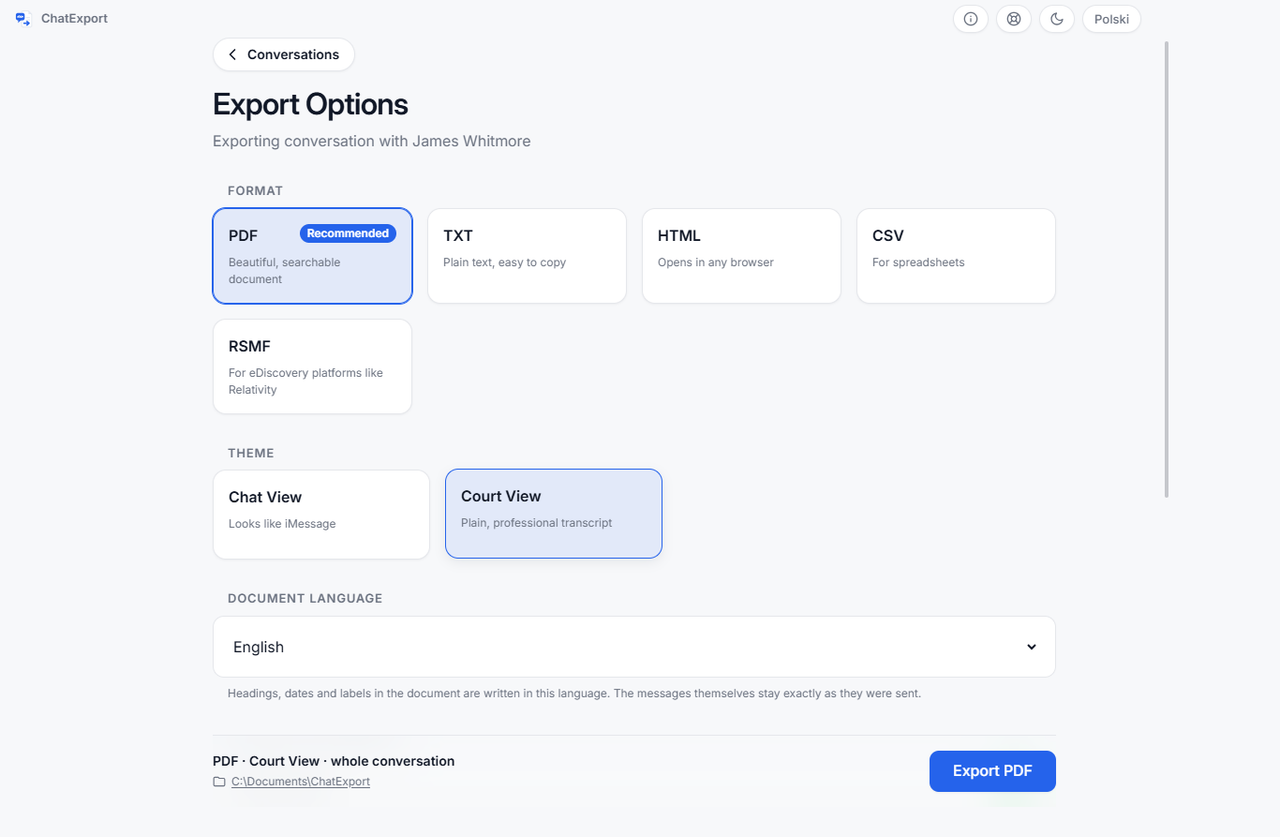
ChatExport reads the backup Apple’s software made, encrypted or not, finds the message database and turns one conversation into a document. The narrowness is spent on the document:
- Encrypted backups opened by password. Asked for at the backup, used for the run, never saved. A wrong password gets its own message, not a crash.
- Court View, the formal layout meant to be filed: no chat bubbles, message numbering so a line can be cited, full timestamps with seconds, raw numbers beside contact names.
- A SHA256 checksum of the finished file, on screen and in a small file beside the export, so anyone can re-check the document later. Since 0.5.1 the Document Integrity page also names the message database itself by its SHA-256, exactly as the backup stores it, so the document can be tied back to the backup it came from.
- Recently deleted messages on iOS 16 and later, within Apple’s roughly thirty day window, as a switch that is off by default.
- Five formats: PDF in three styles, TXT, HTML, CSV and RSMF.
And one payment, with no subscription ever. The download today is a free trial; what the licence costs is on the pricing page, in one figure with no tiers to decode.
What does the free version of each let you check?
Both programs let you look before paying, differently shaped:
| Program | What you get without paying | Checked |
|---|---|---|
| AnyTrans | 30 items per data type, during the first three days | 4 Aug 2026 |
| ChatExport | 50 messages, every page watermarked; the whole thread readable on screen first, one click past the newest 300 | src, 23 Aug 2026 |
The three day clock is the part to plan around. If your dispute moves slowly, an AnyTrans trial started today is over before the next document is needed. The trial here has no clock, because a person whose hearing is in six weeks should not be racing the software.
One AnyTrans figure is deliberately missing from that table: how much WhatsApp data the trial passes. The vendor does not publish it, so this page does not guess it.
When should you stay with AnyTrans?
Three cases, none of them rare.
You are on a Mac. This program is Windows only, and that is a real gap rather than a temporary one. AnyTrans runs on both.
You want the phone managed, not just read. Transfers, media, app data, a new phone set up from the old one: none of that is here, and none of it is planned.
Your backups are not encrypted, and the conversation is not evidence. If the job is moving your own history to a new machine and the folder’s protection does not worry you, the limitation this page is built around never touches you.
What is left is the reader with a Windows PC, an encrypted backup, and one conversation that has to survive being questioned. For that reader the two programs are not really competitors: one of them cannot open the file, and says so.
Frequently asked questions
Does AnyTrans open encrypted iPhone backups?
No. The vendor’s restore guide, checked on 22 August 2026, says Apple will not let third-party software detect an encrypted backup and asks the user to uncheck encrypted backup first. Note the wording: the sentence blames Apple, yet other programs in this category do read encrypted backups by asking for the password you set, so the limit belongs to the product, not to Windows or to Apple.
Is it safe to switch off backup encryption?
It costs you two things, and only one of them is obvious. The unprotected folder can be read by anyone with access to the disk, which matters on a shared or family computer. Less obviously, an unencrypted backup simply contains less: Apple stores Health data, saved passwords and call history only in encrypted backups. Switching encryption off to satisfy one program produces an archive that is both less private and less complete.
Does AnyTrans have a lifetime licence?
Yes. Checked 22 August 2026: a one-time purchase at 59.99 USD covers one computer and unlimited iOS devices, beside a 39.99 yearly plan, a 35.99 monthly plan and a 79.99 family plan for five computers. All four were marked as promotional prices at the time of checking.
What about WhatsApp?
Both handle it, by different roads. AnyTrans reads WhatsApp from the phone side. This program reads the export file WhatsApp itself writes, which takes a few more taps and works from an Android handset too, because the file comes from WhatsApp rather than from the phone. How much WhatsApp data the AnyTrans trial allows is not published, so compare finished output on your own conversation before paying either side.
The comparison across the whole category is in the best iPhone message export software of 2026.
Before spending anything with anyone, open a finished document. The sample exports are this program’s real output over an invented custody dispute, so you can see the Court View layout, the timestamps and the checksum page without installing a thing.