An iExplorer alternative for Windows, and the two questions to ask Macroplant first
iExplorer is one of the fair deals in this category: 39.99 USD, and a licence you buy once in a category where the best known generalist stopped selling one in June 2025. If you want a general purpose iPhone tool on that model, this page will not talk you out of it.
The reason to hesitate is not the price. It is two questions that decide whether iExplorer fits the job most readers of this site are actually doing, and neither question can be answered from the vendor’s own pages. Both were checked, most recently on 23 August 2026, and both are put here with dates so you can ask Macroplant directly instead of trusting either of us.
What does iExplorer cost, and what are you buying?
39.99 USD, and business and organisation packages with no figures beside them, both read off the vendor’s store page on 23 August 2026. That it is a licence you buy once rather than rent comes from the verification of 4 August 2026: the store page itself does not say either way, which is worth knowing if you are checking this after the price moves. It runs on Windows and on macOS 10.10 or later.
The store describes the product in its own words: “iExplorer lets you transfer music, text messages, app files, and more from any iPhone, iPad, or iPod to Mac or PC.” That sentence is worth reading the way it is written. Text messages are one item on a list, between music and app files, and the price buys the whole list. Whether that is a bargain or an overhead depends entirely on whether you want the list or the one item.
Where does iExplorer read messages from?
From either place: “iExplorer can load and export messages from a connected iPhone or from an existing iTunes backup”, per the vendor’s documentation, checked 4 August 2026. Message export lands in PDF, TXT and CSV.
That flexibility deserves credit, and it puts iExplorer on the right side of the one line in this category that changes what a document is worth: both of its roads end at Apple’s own message database. It reads your conversation, it does not photograph your screen and read the pixels back. The line, and all eleven programs on both sides of it, are in the best iPhone message export software of 2026.
The first question: does WhatsApp work?
Nobody outside Macroplant can currently tell you, and that is the finding, not a failure to look. Checked 4 August 2026 and again on 23 August: the product and feature pages do not mention WhatsApp at all, so it is not something iExplorer is sold on. But the support portal on the vendor’s own domain carries two articles whose titles say it plainly, “Exporting WhatsApp Messages Using iExplorer” and “Recover Deleted Messages from WhatsApp”. Their contents cannot be read by anything except a browser, and neither page has ever been archived.
So the honest description is unresolved: the feature existed or exists in some form the public record does not show. If WhatsApp is part of why you are paying, ask their support before the purchase, not after. And if you need the answer today, this program takes the export file WhatsApp itself writes, which also works from an Android handset, because the file comes from WhatsApp rather than from the phone: how to export a WhatsApp chat to PDF is the whole route.
The second question: where does the free version stop?
The vendor does not say. iExplorer offers a free download and invites you to “buy when you are ready for full use”, and no page states what the unpaid version will actually show you or export. It shares that silence with three other programs in the comparison table, which is worth knowing before any download in this category: a limit you cannot read in advance is one you meet in the middle of the job.
For contrast, and because a page that criticises a silence should not keep one: the trial here exports the 50 most recent messages with a watermark on every page, and the whole conversation is readable on screen before you pay anything, one click past the newest 300. Both figures are settings in this program’s source code rather than marketing copy, which is why they can be quoted exactly instead of approximately.
What do you get instead of the list?
One item off it, done in more detail than a general purpose tool has room for. ChatExport reads the backup Apple’s software made, finds the message database and turns one conversation into a document, and everything it does not do is spent on that document:
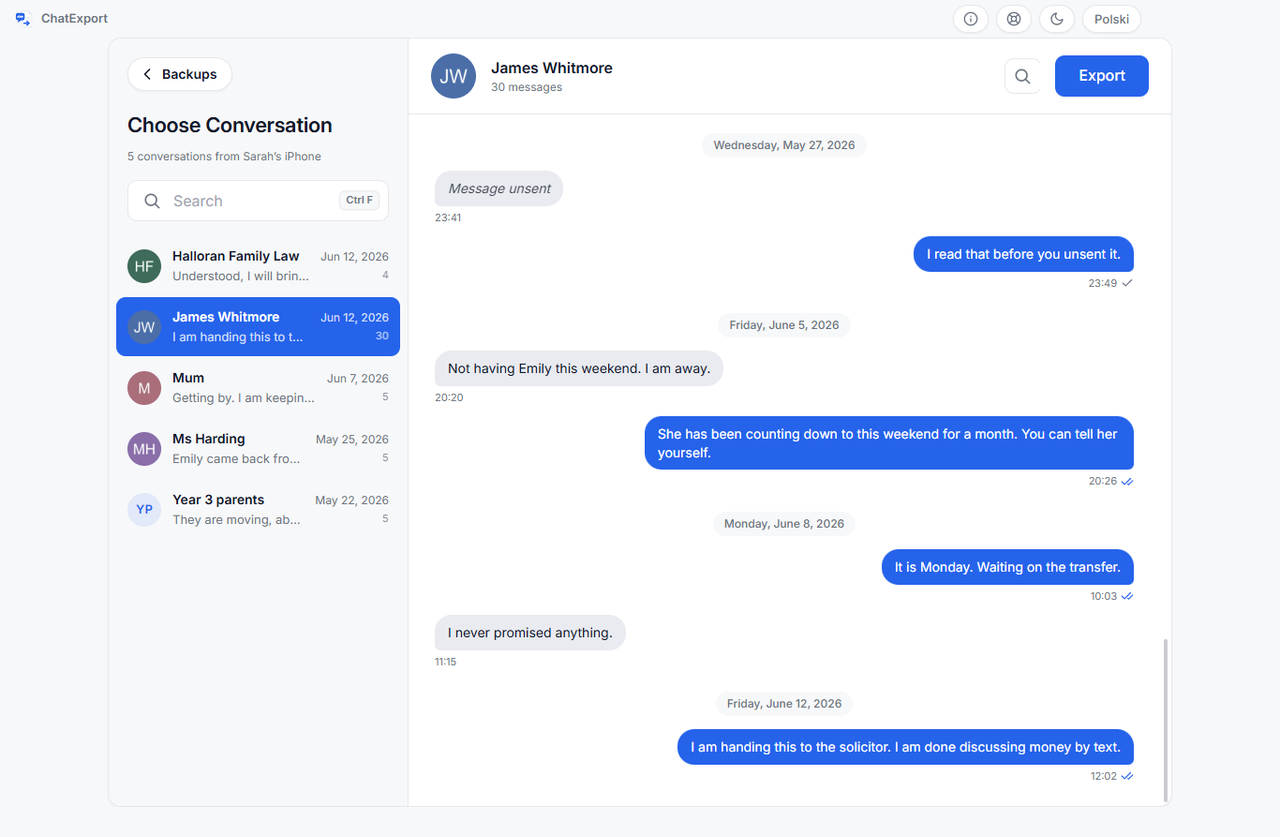
- Encrypted backups opened by password. Asked for at the backup, used for the run, never saved. A wrong password gets its own message, not a crash.
- Court View, if you choose it at export. The formal layout meant to be filed: message numbering so a line can be cited, full timestamps with seconds, raw numbers beside contact names. The default Chat View is the informal transcript and carries none of those marks, so for anything contested, pick Court View deliberately.
- A SHA256 checksum of the finished file, on screen and in a small file beside the export, and a Document Integrity page that names the message database itself by its SHA-256, so the document can be tied back to the backup it came from.
- Recently deleted messages on iOS 16 and later, within Apple’s roughly thirty day window, as a switch that is off by default.
- Five formats: PDF in three styles, TXT, HTML, CSV and RSMF.
And one payment, like iExplorer, with no subscription ever. The download today is a free trial; what the licence costs is on the pricing page, in one figure with no tiers to decode.
When is iExplorer the better buy?
You want the list, not the item. Music, app files, the general contents of the device: that is what the vendor’s own sentence sells, none of it exists here, and none of it is planned.
You are on a Mac. This program is Windows only, and that is a real gap rather than a temporary one. iExplorer runs on both. If the Mac program you are replacing is PhoneView rather than iExplorer, it has its own page: a PhoneView alternative for Windows.
The phone is in your hand and you want the direct road. iExplorer can read the connected handset without a backup existing first. For Messages, this program starts from the backup, which costs you one extra step with Apple’s own software on day one, and pays it back every day the folder outlives the phone. Its other source, WhatsApp’s own export file, needs no backup at all and works from an Android handset.
Frequently asked questions
Does iExplorer support WhatsApp?
Unresolved, and treat anyone who answers flatly with suspicion. Its sales pages do not mention WhatsApp; its own support portal has two article titles that do; the articles cannot be read by automated tools and were never archived. Checked 4 August 2026. Ask Macroplant before buying it for that job.
Do I need the phone connected, or is a backup enough?
For iExplorer, either works: it reads a connected iPhone or an existing iTunes backup. This program works from the backup alone, so the phone is needed only while Apple’s software makes it, and how to back up iPhone text messages to a PC without iCloud is that step from start to finish.
What does the iExplorer free version let you export?
The vendor publishes no limit, so this page will not invent one. Budget for finding out after the download, or ask before it. The trial here is stated above, with both numbers cited to the code they live in.
What does ChatExport cost?
The download is a free trial: it opens any backup, previews any conversation in full, and exports in every format, with a watermark and a 50 message cap until there is a licence. The one time licence is on the pricing page, and it can be bought there. There will never be a subscription.
Before paying anyone 39.99 USD or anything else, look at what the finished document is supposed to be. The sample exports are this program’s real output over an invented custody dispute, so you can open a Court View PDF, check the timestamps and the checksum page, and compare it against whatever an iExplorer trial hands you, once you find out what that is.