A TextPort alternative for Windows, and the difference between reading a database and filming a screen
Before comparing TextPort with anything, read the sentence its own developer wrote in reply to an App Store review. It was recorded on 4 August 2026:
Apple does not allow apps to access messages directly, so transcribing data from your screen is the best we can do
The product page says the same thing from the instruction side: record your conversation as you scroll, and TextPort produces a paginated, timestamped export.
That is not a criticism. It is an accurate description of what an app running on the phone is allowed to do, written honestly by the person who built it. But it decides what the resulting document is, and it is the one thing worth understanding before you file that document anywhere.
What does TextPort cost in 2026?
Checked on 4 August 2026: from 4.99 USD a week up to 59.99 USD a year, with several tiers offered at once, taken as a subscription inside the app rather than as a purchase.
Two things follow from that shape. A weekly tier is priced for somebody with one conversation to deal with this week, which is a fair reading of why most people arrive at this category at all. And a subscription taken inside an app is cancelled inside the phone’s subscription settings rather than on a website, which is worth knowing on the day you no longer need it.
These figures were not re-opened on the day this page was written. They are the ones recorded on 4 August 2026, and a product sold on several simultaneous tiers can move between then and now. Check the App Store listing before you make a decision on the number rather than on the argument.
What is the difference between recording a screen and reading a backup?
One produces a picture of a conversation. The other produces the conversation’s records. The gap shows up as fields that either exist or do not.
| Screen recording and OCR | Reading the backup database | |
|---|---|---|
| Where the text comes from | Characters recognised from pixels | The message row itself |
| Message transport | The colour of the bubble | Recorded per message as iMessage, SMS or RCS |
| Edited messages | The wording shown at the moment of filming | Flagged, with the time and the superseded wording |
| Unsent messages | Not visible, so not present | Flagged as retracted |
| Reactions | Whatever the screen displayed | Each one with its kind and its sender |
| Attachments | Thumbnails as they appeared | Filenames, and the files themselves |
| Verification | The recording is the evidence of itself | SHA-256 of the source files, recomputable by anybody |
None of that makes an OCR export worthless. For reading a conversation back, or for a dispute nobody is going to contest, a paginated timestamped document is a perfectly reasonable artefact and it is far better than a folder of screenshots.
It matters when somebody on the other side has a reason to question the document. A screen recording can only ever show what the phone displayed while it was being filmed, and the person holding the phone chose what to scroll past. That is not an accusation of anything; it is the reason the question gets asked, and a document that cannot answer it has to be defended by the person who made it rather than by its own contents.
The same argument, from the reader’s side rather than the vendor’s, is in what changes when you stop using screenshots.
Since iOS 18 the bubble colour is not the transport
This is the sharpest practical consequence, and it is new enough that most of the category has not caught up with it.
A green bubble used to mean SMS. Since iOS 18 it may be RCS instead, which is a different system. Anything reading the screen has only the colour available, so the best it can do is guess, and the guess is now wrong some of the time. Reading the database gives the transport the source actually recorded, per message, and leaves the field empty when the source recorded nothing rather than filling the gap with an assumption.
If you want that from the reader’s side, what RCS messages look like on an iPhone covers the change itself.
An old domain and a young product
Worth knowing when you are weighing how established something is, because the usual shortcut fails here.
Checked through RDAP and the Wayback Machine on 4 August 2026: textport.com has been continuously
registered since 14 September 2007, which makes it nearly two decades old and makes every
domain-age signal treat it accordingly. But from roughly 2013 until May 2025 the address held an
online SMS service, and the first snapshot of the present message-export product is from March
2026.
So: a very old domain and a very new product. That is not misconduct, and plenty of businesses change what they sell. It is simply that “this site has been around since 2007” and “this tool has been around since 2007” are different claims, and only the first one is true.
What the Windows alternative does differently
ChatExport is a Windows program. It does not run on the phone and there is no macOS build yet, which is the honest limit and the first thing to check against your own setup.
It reads an iPhone backup already sitting on the PC, from one of the two folders Apple’s own software writes to, and takes the messages out of the database rather than off a screen. What that buys is the column list above: transport per message, edit flags with the superseded wording, retraction flags, reactions with their senders, attachments by filename, and every timestamp as the source recorded it.
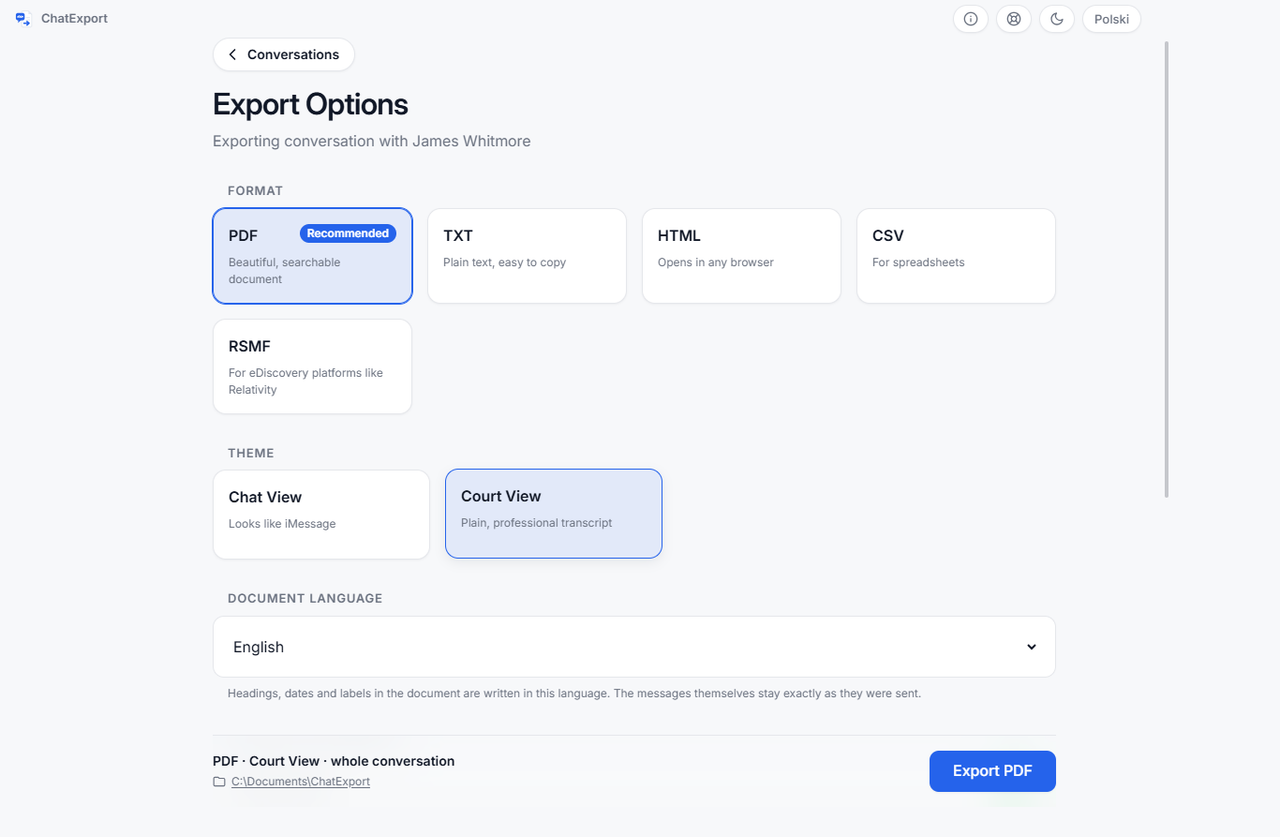
Five formats come out of it: PDF for reading and filing, CSV with fourteen columns for anything a machine has to process, HTML for sending somebody a searchable copy, TXT for the plainest possible archive, and RSMF for e-discovery platforms that expect it. The full field list is in what the fourteen CSV columns hold.
Every export is written with a SHA-256 beside it in a file certutil reads, and the document itself
carries an integrity page naming the device, the iOS version, the backup date and the digests of the
source files as they sit inside the backup. On an encrypted backup a third party can recompute those
digests without ever being given the password.
Encrypted backups are read by asking you for the password, which is used for that run and never written to disk. That matters more than it sounds, because the alternative some programs in this category recommend is turning the encryption off, and an encrypted backup is the only kind that carries saved passwords, Health data and call history.
It is paid once rather than by subscription. The trial exports the 50 most recent messages with a watermark on every page, deliberately, so the program can be judged in full while a trial document cannot be filed as if it were real.
Where TextPort still wins for a particular person: it runs on the phone, so it needs no computer at all, and if you have no Windows PC in the house then nothing on this page is available to you. That is a real answer and it is the honest one.
For the wider field rather than these two, the best iPhone message export software compared has the table with every program’s source of messages in its own column.
Questions people ask
Does TextPort work without a computer?
Yes, and that is its central advantage. It runs on the phone and records the conversation there, which is why it can serve somebody who has no PC. ChatExport needs a Windows machine with a backup on it, so the two answer different situations before they answer the same one.
Is an OCR export accepted by a court?
Nobody writing a web page can answer that, and anyone who does is guessing. A court decides what a court accepts, and it varies by jurisdiction and by what the other side does. What can be said is narrower: a document that carries verifiable digests of its own source gives you something to answer a challenge with, and a screen recording gives you your own testimony that the recording is honest. This page is not legal advice.
Can TextPort read an encrypted iPhone backup?
The question does not apply to it. It works from the phone’s screen rather than from a backup file, so backup encryption is not part of its path at all. Programs that do read backups split on this, and it is worth checking which side any of them is on before you buy.
Does either of them handle WhatsApp?
Both did as of 4 August 2026. ChatExport reads the file WhatsApp’s own Export Chat produces, which also works from an Android phone.
What happens to my subscription if I only need one conversation?
That is the case the weekly tier is priced for. The thing to remember is that an in-app subscription is cancelled in the phone’s own subscription settings, not on a website, and it renews until you do.