How to find archived text messages on an iPhone, and the five places they actually are
There is no archived-messages folder on an iPhone, so a conversation you remember but cannot see is in one of five places: behind a filter on the conversation list, in Recently Deleted, further back than you have searched, on another Apple device that fetched it through iCloud, or in a backup on a computer. Check them in that order. The first is two taps, the second has a clock on it, and the last is the only one that outlives every device signed in to your account. If the word archive brought you here from WhatsApp, that app really does have an Archived list, at the top of its chats, and its help page covers it. Messages does not.
Is it behind a filter?
Probably, if the sender is not in your contacts. Messages has a Filters button at the top of the conversation list, and when Screen Unknown Senders is on, Apple documents that messages from people not in your contacts appear under the Unknown Senders filter rather than in the main list, and by default arrive without a notification. Tap Filters, tap Unknown Senders, and look. If the conversation is there and you want it back in the main list, open it and tap Mark as Known, or add the sender to your contacts. Apple’s steps are in screening and filtering text messages.
Was it deleted in the last 30 to 40 days?
Then it is recoverable, on iOS 16 and later, and Apple’s own page gives the window as 30 to 40 days. The button depends on the version: on iOS 18 and later tap Edit at the top of the conversation list, on iOS 16 and 17 tap Filters, then tap Show Recently Deleted, select the conversation, and tap Recover or Recover Message. With Messages in iCloud on, recovering on one device recovers on all of them.
This is the one check with a deadline. A conversation that ages out of that list is gone from the phone, and the only remaining copy is a backup made before the deletion, if one exists.
Search reaches only what the phone holds
A conversation that is merely old is not missing, only far down, and search settles that faster than scrolling. Open the search field in Messages, pulling the conversation list down if it is not showing, and narrow it the way Apple documents in searching in Messages: type the person’s name and choose Messages with to search one person’s messages, or Messages in to search inside one conversation, and terms such as Photo or Link limit the results to shared items. A word you are sure was said, searched with the thread narrowed to one person, tells you whether the phone still has it.
What search cannot reach is a thread the phone has already pruned. If Keep Messages, under Settings, Apps, Messages, was ever set to 30 Days or 1 Year, Apple’s iPhone User Guide documents that older conversations are removed automatically once the period passes, and no search on the phone will find what that setting removed.
Is it on another device?
With Messages in iCloud on, the threads live in iCloud, and each device shows what it has fetched. A conversation that looks short or absent on the phone can be whole on a Mac or an iPad signed in to the same account, and can be brought back onto the phone by scrolling: open the conversation and scroll back through the part you need, and the device fetches it. The switch is under your name in Settings, then iCloud; on iOS 17.2 and later under See All or Show All, then Messages in iCloud, and on iOS 16 to 17.1 under Show All, then Messages. The full explanation, and why a computer backup from such a phone can be shorter than your memory of the conversation, is in are text messages saved in iCloud.
The one place that outlives the phone: a backup on a computer
If the phone was ever backed up to a computer, that backup holds the messages the phone itself held on that day, including a conversation deleted since, because the backup was made before the deletion and the Recently Deleted clock never touched it. With Messages in iCloud on, “held on that day” can be less than the whole thread, per Apple’s page on backup methods, which is the same gradient the previous section describes.
To see whether a backup exists on a Windows PC, paste
%USERPROFILE%\Apple\MobileSync\Backup into the address bar of File Explorer,
the folder for the Apple Devices app and for iTunes from the Microsoft Store,
and if it is empty try %APPDATA%\Apple Computer\MobileSync\Backup, the
folder for the older iTunes. A backup is a folder named with a long string of
letters and digits, one per device, and its modified date is when it was last
made. On a Mac the same folder is at
~/Library/Application Support/MobileSync/Backup/, per Apple’s page on
locating backups.
Where Windows stores iPhone backups
explains what is inside.
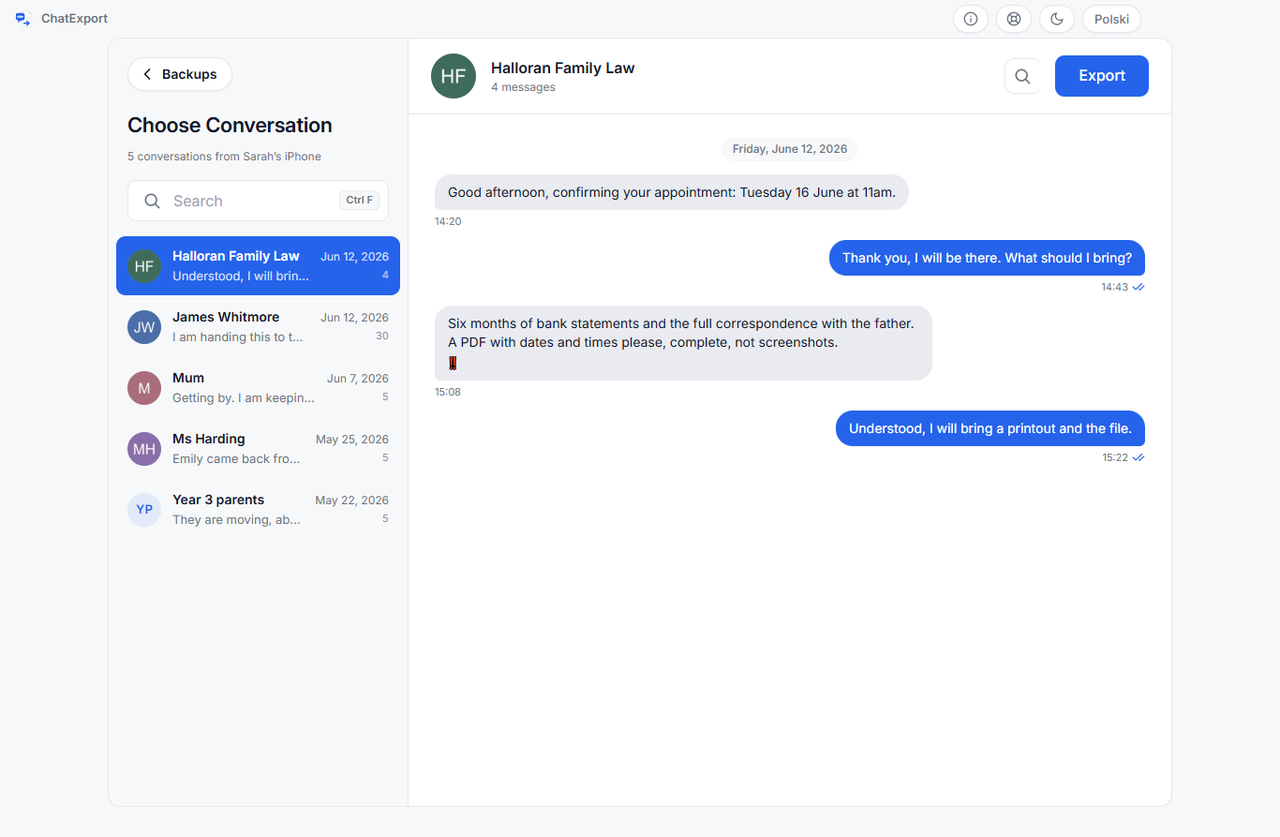
The folder is unreadable on its own, and a program that reads it, such as ChatExport, runs on Windows. It lists the conversations the backup contains by contact name and shows each one whole, with search that covers the entire thread rather than the newest messages it previews; an encrypted backup needs its password, and no program opens one without it. Two things in the backup matter when the missing conversation is the reason you are opening it. Messages deleted within Apple’s 30 to 40 day window before the backup, on iOS 16 and later, are in a Recently Deleted store inside it, and the program can include them, marked with the date of deletion, through a switch that is off by default. And if the phone had Keep Messages on a short horizon or Messages in iCloud on, the program reads the marks those settings leave and says so before you export, so a short thread is explained rather than silently short.
What if it is in none of the five?
Then it is gone, and the honest thing is to say how, which is usually one of three ways. Keep Messages set to 30 Days or 1 Year removed it at the source, and it is in no backup made afterwards. The other person unsent it, and Messages no longer shows it. Or it was deleted more than 30 to 40 days before any backup was made, and Recently Deleted let it go. In all three no program reads what is not in the file.
How do you stop this happening again?
Set Keep Messages to Forever, under Settings, Apps, Messages; make a local backup on a computer; and export the conversations that matter into files you can search. That is the whole of how to archive text messages on an iPhone, with the steps for each.
Frequently asked questions
Does the iPhone have an archived messages folder?
No. Messages offers delete, pin, hide alerts and filters, and a Recently Deleted list that holds deleted conversations for 30 to 40 days on iOS 16 and later. Nothing in Messages files a conversation away for later.
Why did a conversation disappear from my Messages list?
The usual reasons, among others: the sender is not in your contacts and Screen Unknown Senders moved the thread under the Unknown Senders filter; it was deleted, by you or by accident, and sits in Recently Deleted; it was deleted on another device signed in to Messages in iCloud, which deletes everywhere; or Keep Messages on a short horizon removed the old end of it.
Can I find text messages from years ago on my iPhone?
Yes, if Keep Messages has always been Forever and the thread was never deleted: search with the thread narrowed to the person, or scroll, and with Messages in iCloud on give the phone a moment to fetch as you scroll. If a computer backup from those years exists, it holds the conversation as it stood on the day it was made, and a program that reads backups shows it whole.
What does ChatExport cost?
The download is a free trial: it opens the backups in the two folders above, lists every conversation in them, previews any conversation in full and searches the whole thread. Finding a conversation costs nothing. A trial export carries a watermark and stops after the 50 most recent messages, which for an old conversation is the wrong end, so the export of something old needs the one-time licence, on the pricing page. There will never be a subscription.
If the conversation turns out to be in a backup, look at what you can make of it before installing anything. The sample exports are this program’s output over an invented custody dispute, so you can see the layout, the timestamps and the checksum page first.